Archive, Retrieve & Backup
Stratus OCT User Manual PN 2660021134133 A
8-10
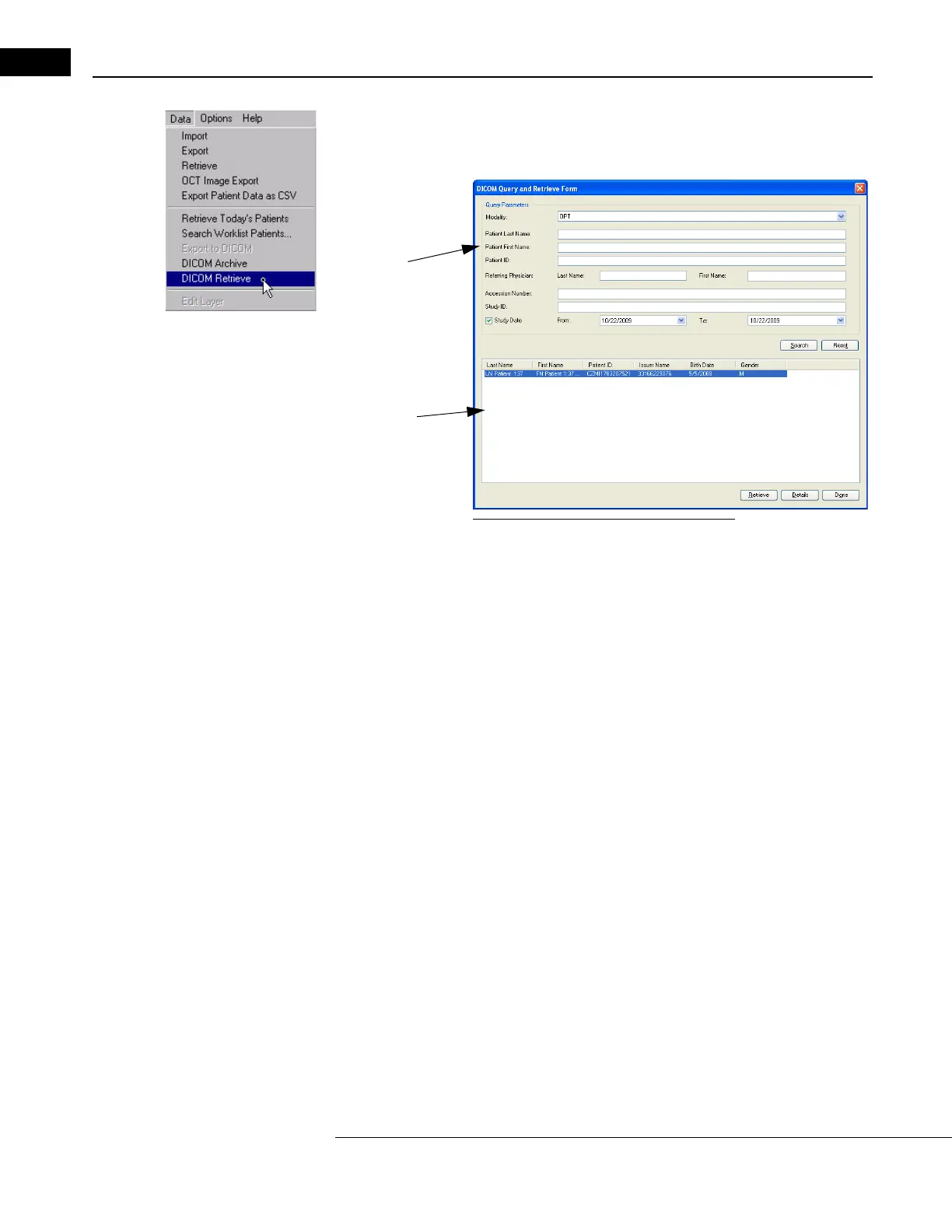
1. Click on DICOM Retrieve in the Data pull down menu on the MAIN WINDOW, as
shown at left. The Q
UERY RETRIEVE FORM dialog is displayed, similar to the one shown
below.
Worklist
query
parameters
Patient list
Figure 8-13 Query Retrieve Form Dialog
2. Set the query parameters, then press the Search button. A list of patient will be
displayed.
You can specify a range of study dates by checking th
e Study Date box in the DICOM
Q
UERY AND RETRIEVE FORM dialog. The default setting for the Study Date box is
unchecked. If left unchecked, all studies for the selected patients will be retrieved. If
the box is checked the default date range is today's date, and only studies performed
on today's date are retrieved. If the box is checked and a date range is specified, just
the studies performed during that date range are retrieved.



 To Next Page