Stratus OCT User Manual PN 2660021134133 A
Export and Import Scan Data
9-11
database has been copied there) or from any location in a network path through a
mapped drive. Click Browse to find and select the desired import path, or type in
the desired import path. When finished, click OK.
• If you are importing from a network location, the instrument must be connected
to the source system.
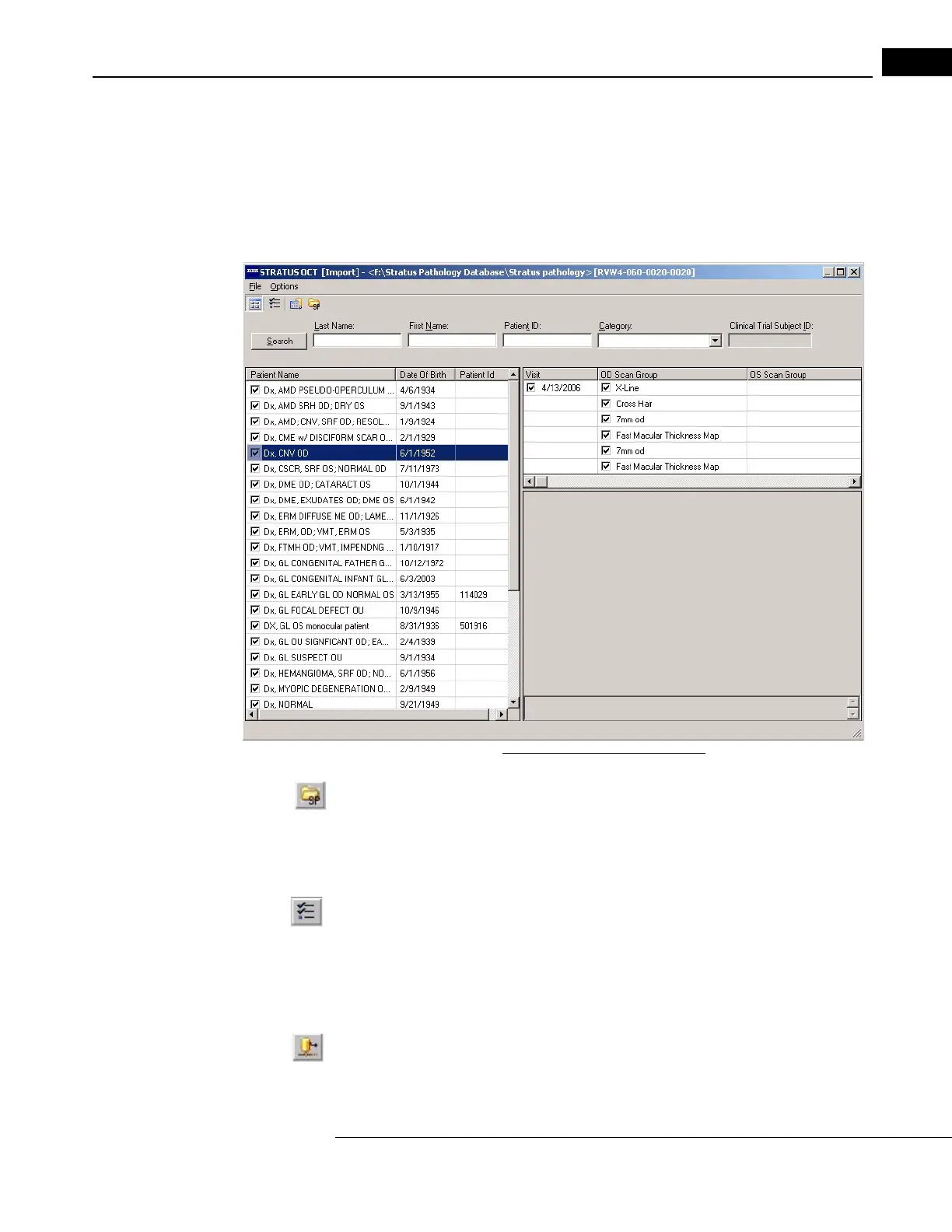
Figure 9-8 The Import Window
• To view the source path or to select a different import source path, click the Select
Source Path button or click Fi
le > Select Source Path and the Import Options dialog
appears. It displays the current import source path. See Figure 9-7 above.
3. The I
MPORT WINDOW displays the list of all patients found in the export database. Click
the checkboxes to select the patients whose exams you wish to import.
Click File >
Select All or the Se
lect All button to select all exams at any time.
• To select specific exams to archive, click on
the selected patient’s visit date(s),
then select the exams.
• To start over making selections after you have begun, click File > Deselect All.
4.
When you have made your selections, click the Import button or click File > Import.
Import begins and a Progress dialog appears.
The Progress dialog box shows import progress.
It can take several seconds to several
minutes for the Stratus OCT to finish importing to the hard drive, depending on the


 To Next Page