Export and Import Scan Data
Stratus OCT User Manual PN 2660021134133 A
9-12
number of exams in the export database. A message notifies you when the operation
is complete.
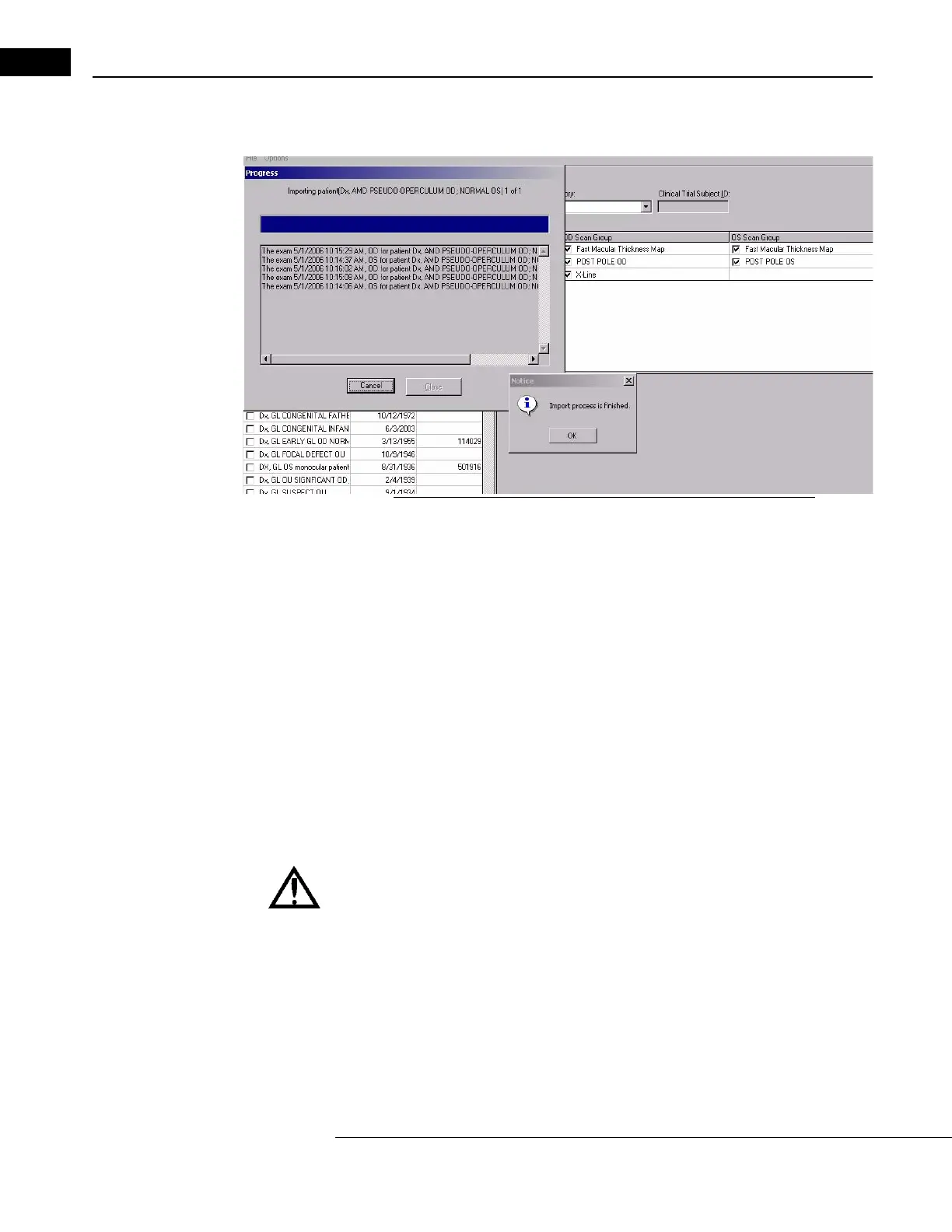
Figure 9-9 Window Showing Import Progress and Finished Notice
• At any time, you can click the Cancel button to abort import. The import process
will stop after the next whole patient record has been imported. Already imported
patient records will not be removed.
• If a record is not transferred due to error or another reason, a message reports it
in the text field of the Progress dialog, and the dialog remains open after the
operation completes, until you click Close. If all data is transferred successfully,
the Progress dialog closes automatically when the operation completes.
•Click Data > Refresh Patient List in the M
AIN WINDOW to check for imported
patient data. Stratus OCT displays anonymous imported records in the patient list
with the originating Site ID as the first name and the encoded Patient Export
ID as the last name.
Note: For patients imported with the date of birth obscured, normative data will not
be presented in the analysis.
WARNING: Imported diagnosis codes do not retain the descriptions created
for them on the exporting instrument. For example, exporting
instrument A
has the description “Retina” for diagnosis code 001, but importing instrument
B has the description “Glaucoma” for diagnosis code 001. When you view on
instrument B a patient record imported from instrument A with diagnosis
code 001 assigned, the description will read “Glaucoma,” as if the record
were created on importing instrument B.


 To Next Page