Configuration Guide
Stratus OCT User Manual PN 2660021134133 A
B-14
and dedicated crossover network cable. While so configured, both the Stratus OCT
and the review station PC will be limited in the ability to communicate via other
network connections.
Note: A direct connection allows patient data to be transferred from the Stratus to
the Review Station utilizing the Stratus software's Export feature. A direct network
connection should not be used to synchronize with archived data.
Direct Connection Procedure
Install the network crossover cable
1. Plug one end of the RJ-45 crossover cable into the ethernet port on the Stratus OCT.
Plug the other end of the cable into the ethernet port on the review station PC.
Configure the Review Station PC
1. Open the Network Connections dialog:
For systems running Windows 2000, select Start >
Settings > Network and Dial-up
Connections.
OR
For systems running Windows XP, select Start > Con
trol Panel > Network Connec-
tions.
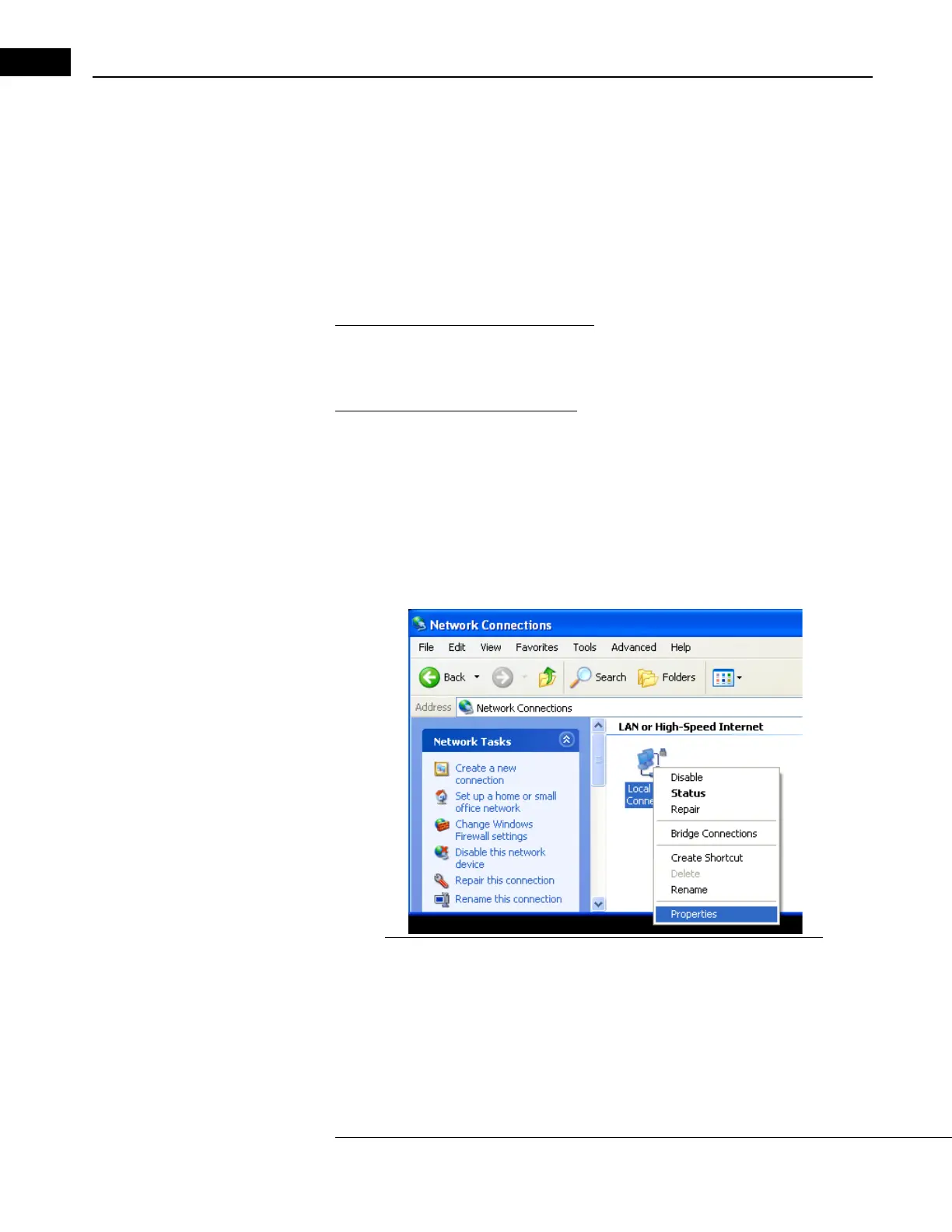
2. The Network (and Dial-up) Connections dialog appears (Figure B-14).
Figure B-14 Local Area Connection: Right-click and select Properties
3. Right-click the Local Area Connection icon, and then select Properties.
Note: Some computers have multiple network connections. It is important to select
the Local Area Connection corresponding to the port where the crossover cable is
connected. These settings will not affect other ports.



 To Next Page