Stratus OCT User Manual PN 2660021134133 A
Introduction
1-19
How to Activate Password Protection
You implement password protection in Windows by disabling auto-logon. You may then
c
reate one or more new user accounts that have a user name and password. When you
create user accounts, you must select Other—Administrator. Only users with administrator
privileges can use all features of the Stratus application.
To activate password protection, follow these steps:
1. Power up the system. Exit the Stratus OCT program (click File > Exit or cl
ick the at
upper right) to enter the Windows environment.
2. Click Windows Sta
rt > Settings > Control Panel. In the Control Panel, double-click
Users and Passwords.
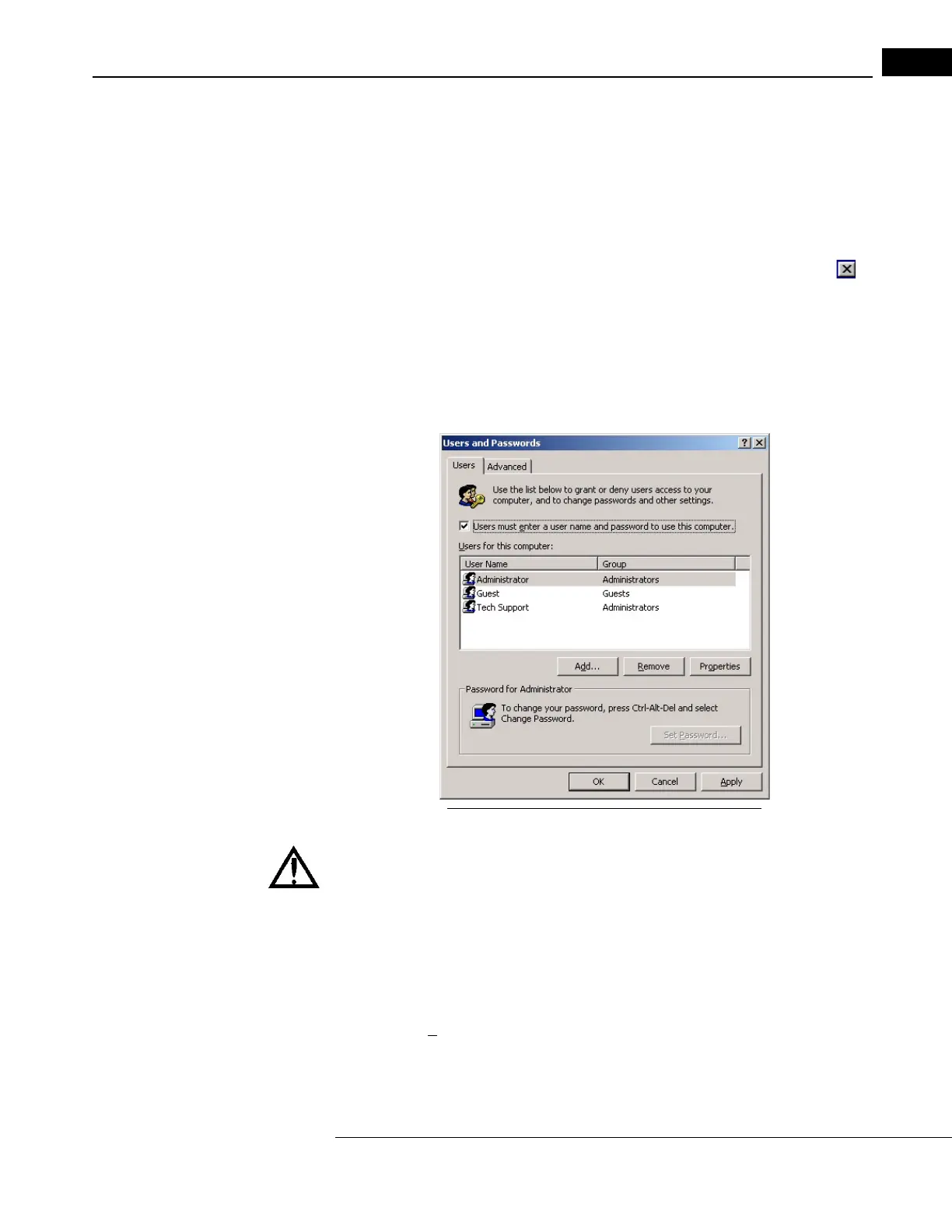
3. In the Users and Passwords dialog box, select the checkbox near the
top that says
“Users must enter a user name and password to use this computer.” This activates the
Add, Remove and Properties buttons.
Figure 1-2 Users and Passwords Dialog Activated
WARNING: Do not attempt to remove, edit the properties or edit the
passwords of the “Administrator” or “Zeiss” or “Tech Support” accounts.
Failure to observe this warning could disable access to the system.
4. Click the Add button. The
Add New User dialog box appears. Enter a user name and
record it. The user name is not case-sensitive. (The other information is optional.)
Click Next.
5. You will be prompted to enter and to con
firm a new password for this user name. The
password
is case-sensitive. Record the password you have entered. When finished,
click Next.



 To Next Page