Stratus OCT User Manual PN 2660021134133 A
Analysis Protocols
6-17
• A key of the map circle diameters appears at upper right. The default diameters are 1,
3 and 6 mm. Click the 3.45 mm radio button above to change to diameters of 1, 2.22
and 3.45 mm.
RNFL Thickness
Application: Select RNFL Thickness to obtain graphs of retinal nerve fiber layer thickness
along circle scans made around the optic disc (peripapillary region). You can apply this
protocol to one scan group of any scan protocol at a time, except (Fast) Optic Disc.
While it functions with line scans,
the output includes circle characteristics like quadrant
and clock hour averages, which are not meaningful for line scans. Anomalous results occur
for scans passing through, rather than around, the optic disc.
Output Display
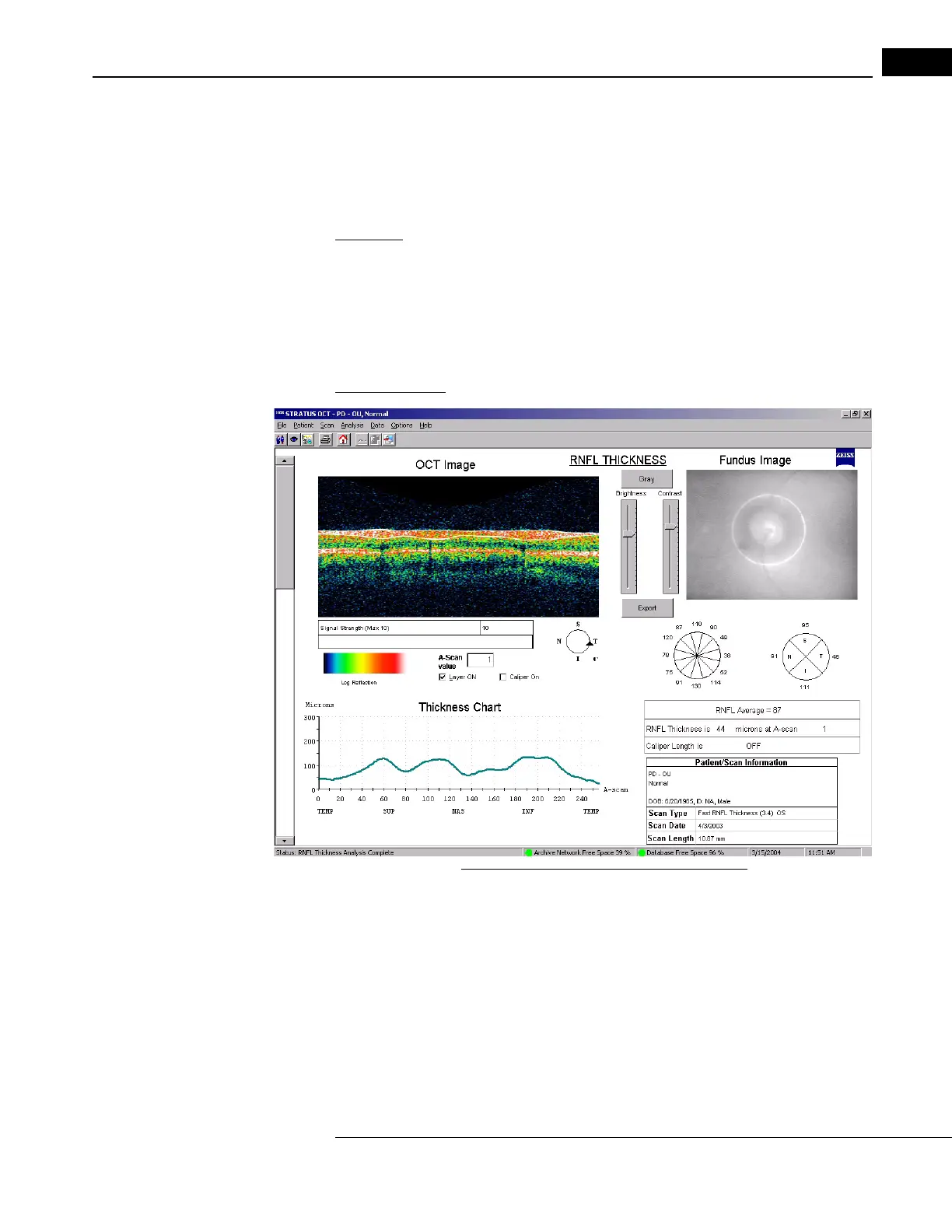
Figure 6-9 RNFL Thickness Analysis Output
• The output graphs show RNFL thickness (green line, in micrometers) on the vertical
axis versus A-scan location on the horizontal axis. The graph indicates the temporal,
superior, nasal and inferior quadrants. If you analyzed more than one scan, use the
scroll bar on the left to see the results for the other scans.
• You can find RNFL thickness at each A-scan
location. Drag the pointer anywhere in
the scan image or type in the A-Scan Value field and a vertical line on the graph
appears corresponding to the pointer location. RNFL Thickness at that A-scan
location appears at bottom right.



 To Next Page