Analysis Protocols
Stratus OCT User Manual PN 2660021134133 A
6-16
Note: Clinicians must exercise judgment in the interpretation of the macula
normative data. For any particular measurement, note that 2 out of 20 normal eyes
(10%) will fall either above or below green.
Note: Subject ethnicity was self-reported by the patients in the population
comprising the normative database but was NOT used as a variable in constructing
the normative database for macular thickness. Normative data will not appear for
patients under 18 years of age. The macula normative data appears only when you
analyze a Fast Macular Thickness Map (Fast Mac) scan.
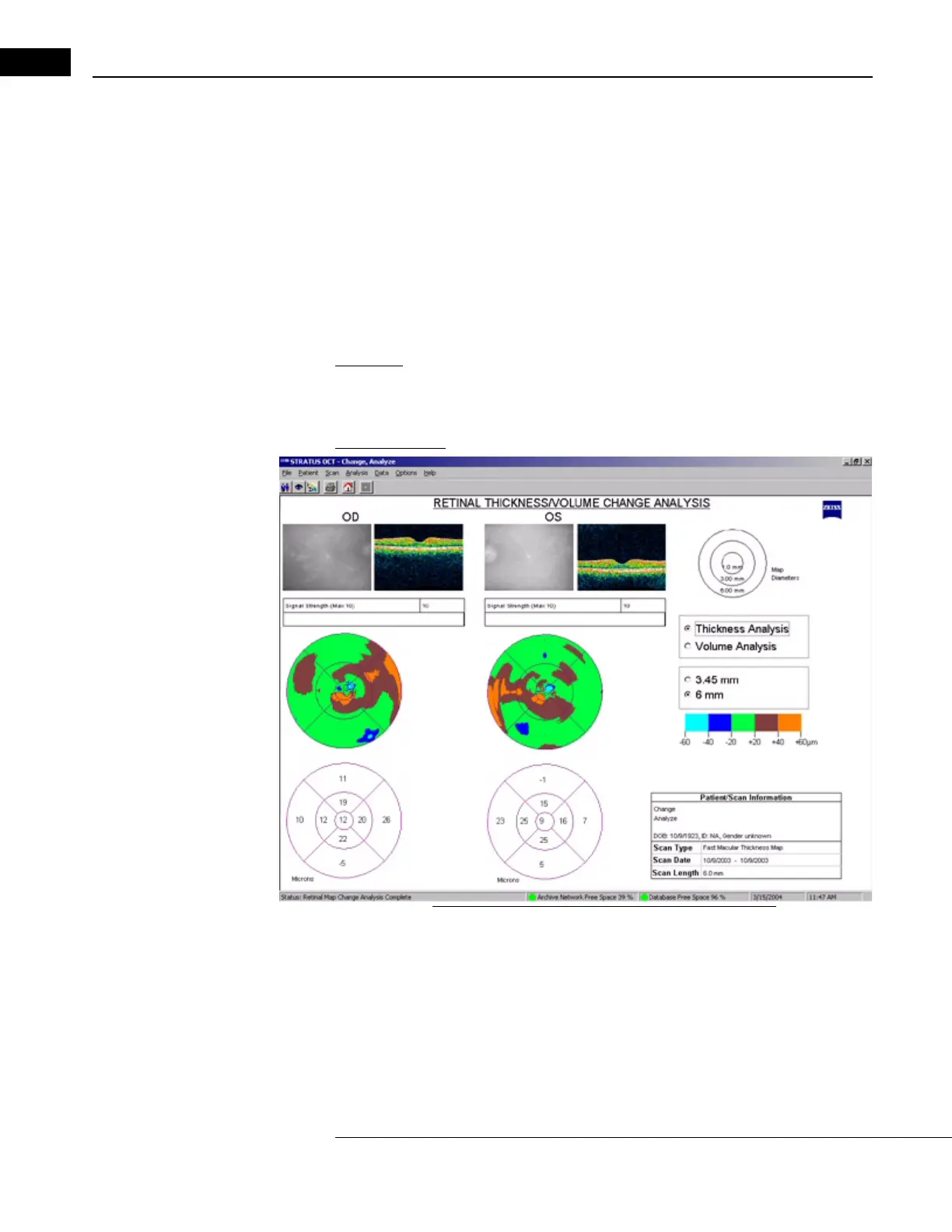
Retinal Thickness/Volume Change
Application: Select Retinal Thickness/Volume Change to assess changes in retinal thickness
or volume between examinations. This analysis protocol operates on 2 OD and/or 2 OS
scan groups made with the Line or (F
AST) Macular Thickness Map protocols.
Output Display
Figure 6-8 Retinal Thickness/Volume Change Output
• The default output displays thickness change between exams. Click the radio button
at upper right to display the volume change analysis. The output has the same layout
for both thickness and volume change analysis. The upper map always presents
retinal thickness change using a color code. The color scale appears to the right. The
lower map shows the change in either average retinal thickness (in micrometers) or
volume (in mm
3
).



 To Next Page