Configuration
LITECOM, Commissioning and maintenance instructions 17.0 | 04.2024 | en 157
Device selection
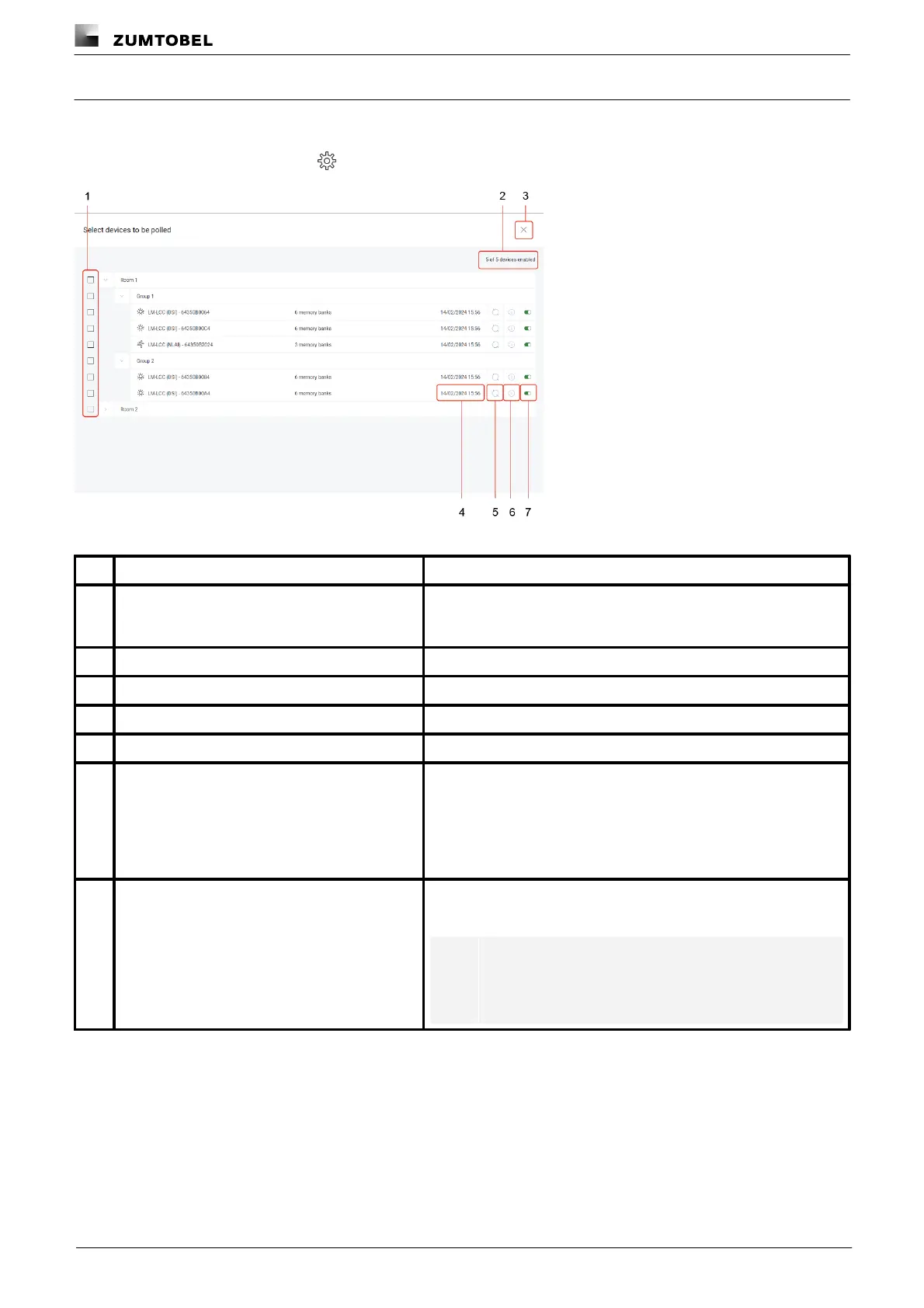
The following contains an overview of the general functions in the Select devices to be polled view.
Path: App overview > DALI data > > Select
Figure 50:“Select devices to be polled” view
Enabling the tick mark next to a room, group or device allows you to
select multiple devices at once and enable or disable DALI data
polling for the selected devices.
Number of enabled devices
The number of enabled devices is displayed here.
Tap this button to save the settings and return to the Settings view.
The timestamp of the last poll is displayed here.
Use this button to manually start DALI data polling for the device.
Use this button to view the following device information:
· Assigned to (room/group): path
· Date of detection: time at which the device is first detected as a
device that delivers DALI data.
· Last poll: time of last poll
· Memory banks: DALI standard memory banks
Enable or disable polling for the device
Use this button to enable or disable DALI data polling for individual
devices.
Note
DALI data polling is enabled by default for all devices
that can deliver DALI data.
Table 77:Functions in the “Select devices to be polled” view



 To Next Page