6253 DC Voltage Current Source/Monitor Operation Manual
4.1.5 Connection with Fixture 12701A
4-8
4.1.5 Connection with Fixture 12701A
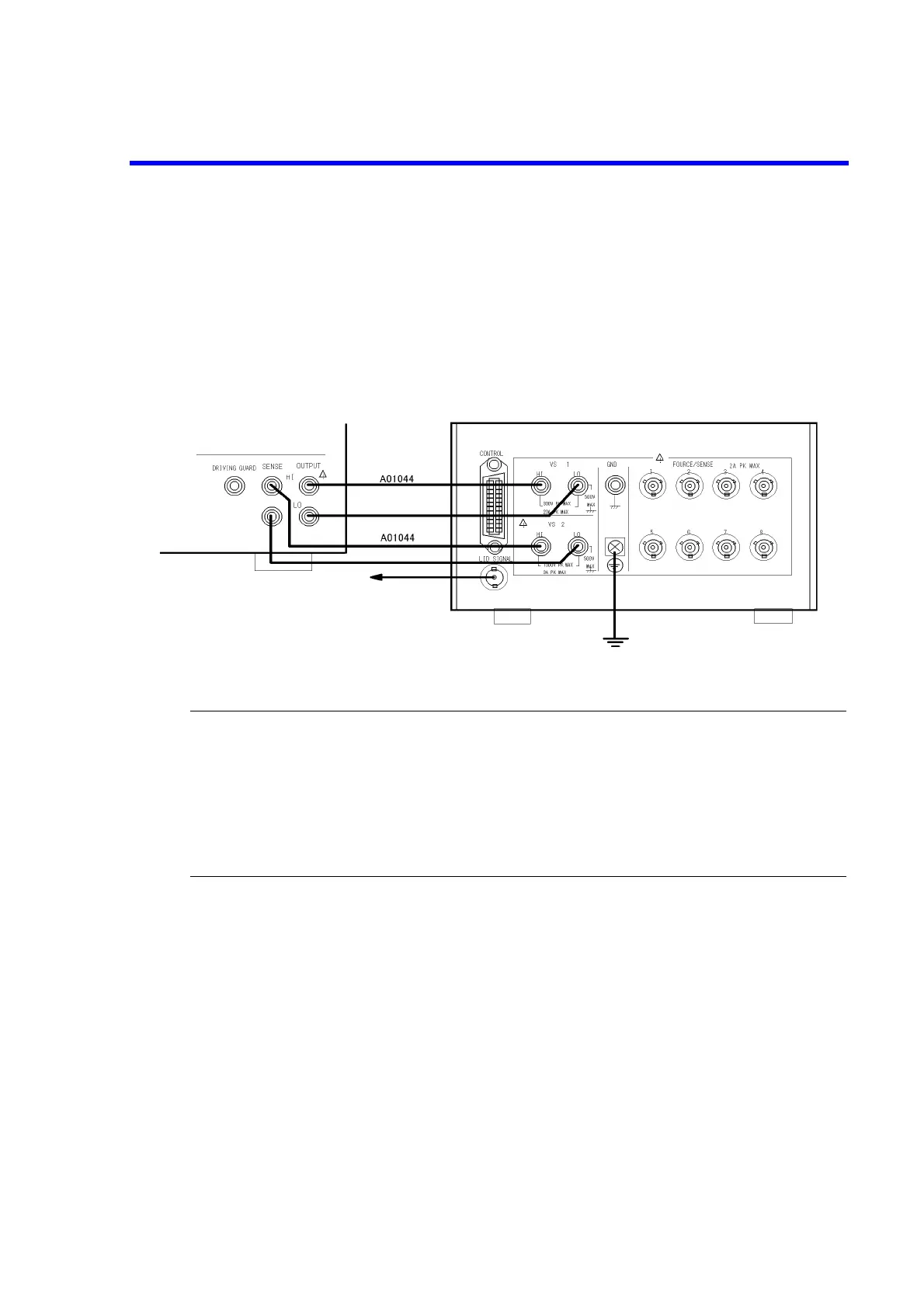
The following figure shows the connection with the 12701A.
This example uses 4-wire connection.
2-wire connection does not require the SENSE connection.
For more information on the device connection inside the 12701A, refer to the 12701A Operation Manual.
Figure 4-7 Connection with 12701A
WARNING:
Follow the procedure below to prevent electric shock.
1. Be sure to ground the 12701A protective grounding terminal.
2. Connect the 12701A LID SIGNAL to the INTERLOCK terminal on the 6253 on the rear
panel, and set the parameter “OPR Signal” to Interlock.
This enables the interlock function. If the 12701A cover opens, the 6253 will be set to
Standby.
To the INTER
LOCK input terminal
on the rear panel
6253 12701A



 To Next Page