Chapter 4 CATALYS® System Procedure
Page 178 of 314 Part Number: 0160-6411, Rev A, 02/2019
Software Release: cOS 5.00
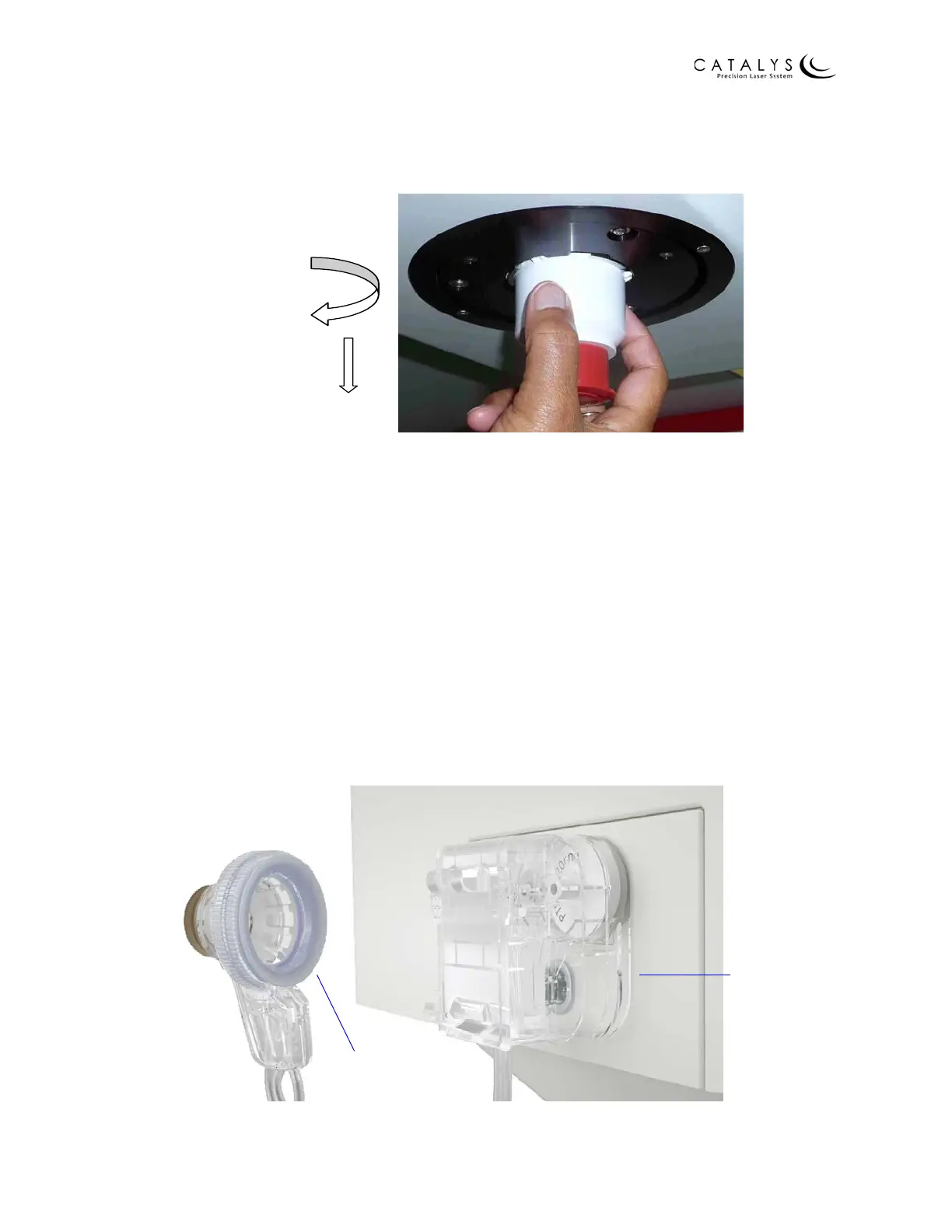
6. Continue past the first stop by turning the disposable lens all the way towards the
touchscreen, until the disposable lens locks into place.
Figure 4.19 Installing the Disposable Lens (steps 5 and 6)
7. Remove the protective cap from the disposable lens (save the protective cap for use
after the treatment, when the disposable lens is removed).
NOTE
Verify that the disposable lens is correctly installed and securely attached to the system before
proceeding.
Installing the Fluid Reservoir
1. Remove the fluid reservoir from the packaging.
2. Install the fluid reservoir into its receptacle on the system. Press the fluid reservoir into
the receptacle until the fluid reservoir back is fully pressed against the system (indicated
by a “click”), securing the fluid reservoir to the system.
3. Leave the suction ring in the packaging until further instruction.
Figure 4.20 Install Fluid Reservoir to System
Fluid reservoir
fully pressed
against system
Leave suction
ring in packaging
prior to use



 To Next Page