Chapter 3 Software Navigation
Part Number: 0160-6411, Rev A, 02/2019 Page 115 of 314
Software Release: cOS 5.00
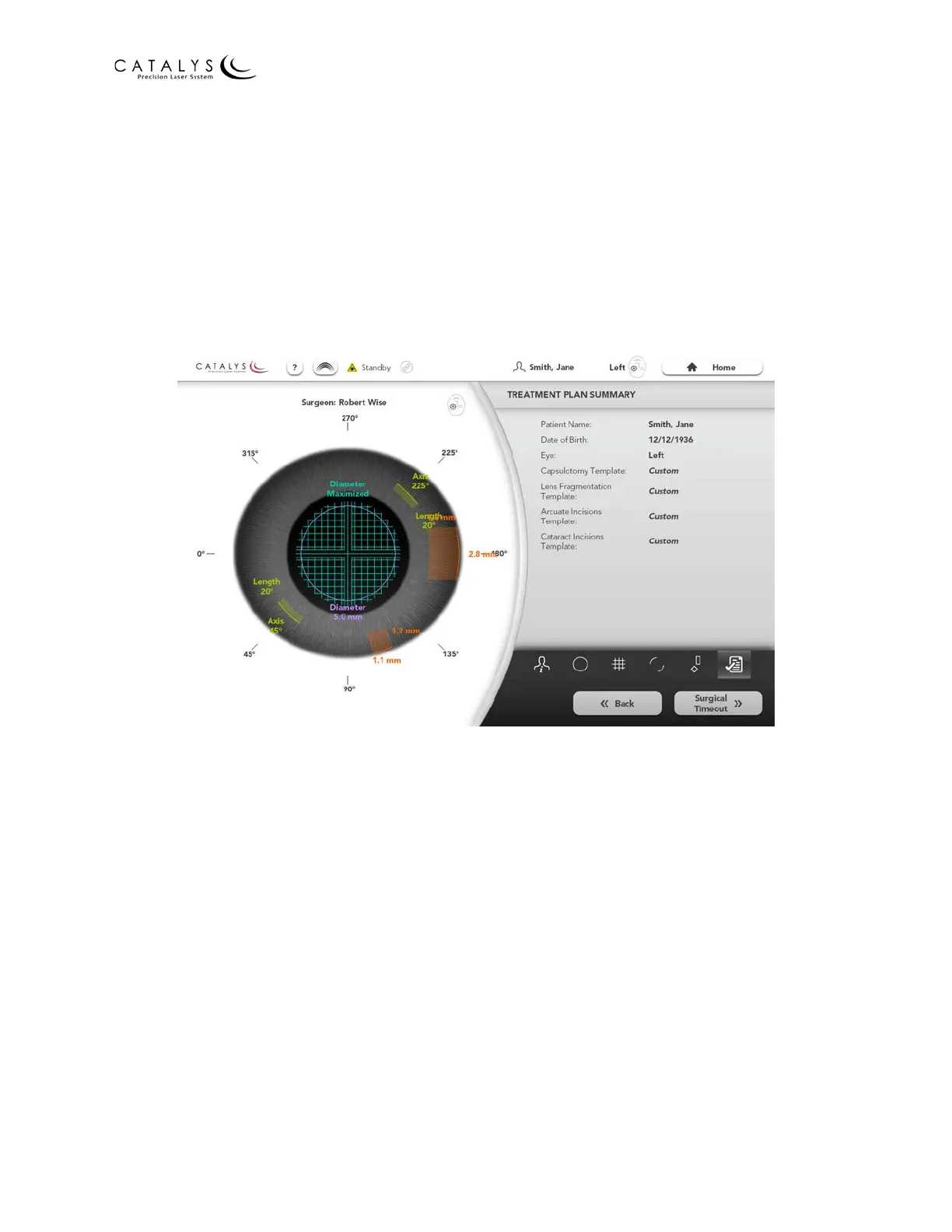
Treatment Plan Summary Screen
After you have selected the desired treatment parameters, press the NEXT button on the (Basic)
or Details Screen for the last treatment in the sequence to proceed to the Treatment Plan
Summary Screen. You can also navigate to the Treatment Plan Summary Screen by pressing the
Quick Navigation Bar Treatment Plan Summary Icon on the Patient Info, Capsulotomy, Lens
Fragmentation, Arcuate Incisions, or Cataract Incisions Screen. The Treatment Plan Summary
Screen provides an overview of the current treatment plan, including a graphical representation
of the selected treatment parameters.
Figure 3.69 Treatment Plan Summary Screen
After verifying the treatment plan summary, press the HOME button to return to the Home
Screen.
Editing the Treatment Plan
To edit the treatment plan, press the BACK button to return to the (Basic) Screen for the last
treatment in the sequence, or select an icon from the Quick Navigation Bar to navigate to the
(Basic) Screen for the corresponding treatment. After making the desired changes, press the
Quick Navigation Bar Treatment Plan Summary Icon to proceed to the Treatment Summary
Screen, and re-check the treatment plan summary.



 To Next Page