Home
AMO
Medical Equipment
Catalys OptiMedica
Page 92
AMO Catalys OptiMedica - Page 92
314 pages
Manual
Save Page as PDF
To Next Page
To Next Page
To Previous Page
To Previous Page
Loading...
Chapter 3 Software Navigation
Page 92 of 31
4
Part Number: 0
160-6411, Rev
A, 02/2019
Software Release:
cOS 5.00
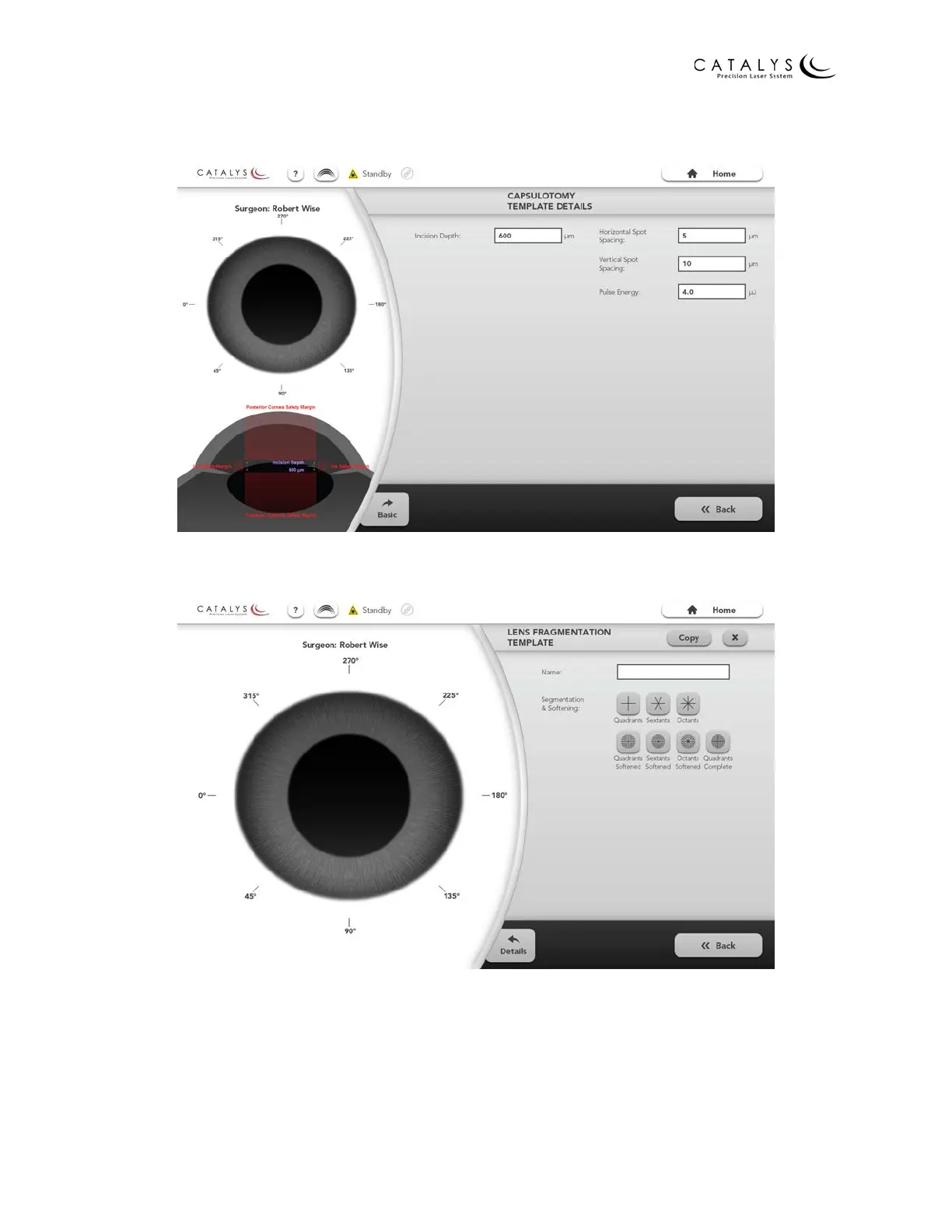
Figure 3.46 Capsulotom
y T
emplate Details Scr
een
Figure 3.47 Lens Fr
agment
ati
on (Basic) T
emplate Scr
een
91
93
Table of Contents
Main Page
Table of Contents
5
Indications for Use, Contraindications, Warnings, and Precautions
11
Indications for Use
11
Contraindications
11
Warnings
11
Precautions
13
Adverse Effects
16
User Training and Certification
17
Target Patient Profile
18
Target Operator Profile
18
Physician
19
Nurse
19
Technician/Operator
19
System Overview
21
Introduction
21
CATALYS® System Components
22
Touchscreen Control Panel-Graphical User Interface (GUI)
24
Docking Keypad
24
LIQUID OPTICS™ Interface
24
LIQUID OPTICS™ Interface Circular Label Reader
25
Mobile Patient Bed or Patient Chair
25
Emergency Laser Stop Button
26
Key Switch
27
Vacuum and Laser Footswitches
27
Door Interlock Connector
28
Treatment Laser
28
Optical Coherence Tomography
28
Video Subsystem
29
Monitoring and Control Systems
29
Bench Testing
30
Animal and Cadaver Testing
30
Clinical Summary
31
System Specifications
33
System Installation and Setup
34
Overview
34
Connecting the System Components
35
Connecting to an Ncast Telepresenter Video Recording System (Optional)
36
Connecting to a Network (Optional)
37
Firewall Configuration
37
WAN Configuration
37
Network Ports
38
Network Cabling
38
Setting up Network Printing and Remote Connectivity (Optional)
38
Moving the System
38
System Basics
39
Starting up the System
39
Logging into the System
40
Enabling the System
41
Verifying System Alignment
42
Disabling the System
51
Shutting down the System
52
Emergency Shutdown
54
Software Navigation
55
Overview
55
Control Screen Conventions
56
Quick Navigation Bar
57
Informational Icons
58
Administrative Screens
58
Home Screen
58
Users Screen
61
All Treatments & Reports Screen
62
Treatment Results Screen
63
Printing the Treatment Report(S)
64
Saving the Treatment Report(S)
66
Sample Report
69
Surgeon Templates Overview Screen
75
Surgeon Template Screens
76
Overlay Settings Screens
78
General Preferences Screen
80
Settings Screen
81
Software Info Window
82
Help Screen
82
Planning Screens
83
Planning Screen Conventions
83
Default Details Screens
86
Treatment Template Screens
91
Treatment Planning Screens
97
Capsulotomy (Basic) Screen
99
Capsulotomy Details Screen
100
Lens Fragmentation (Basic) Screen
101
Lens Fragmentation Details Screen
103
Arcuate Incisions (Basic) Screen
104
Arcuate Incisions Details Screen
106
Cataract Incisions (Basic) Screen
107
Cataract Incisions Primary Geometric Details Screen
109
Cataract Incisions Sideport(S) Geometric Details Screen
110
Cataract Incisions Primary Laser Details Screen
112
Cataract Incisions Sideport(S) Laser Details Screen
113
Treatment Plan Summary Screen
115
Editing the Treatment Plan
115
Surgical Timeout Screen
116
Docking Screen
117
Connection Panel (Mobile Patient Bed Only)
118
Home Panel (Mobile Patient Bed Only)
119
Pivot Lock Panel (Mobile Patient Bed Only)
120
Disposable Lens Panel
121
Vacuum Panel
122
Caster Lock Panel (Mobile Patient Bed Only)
123
Latch Panel (Patient Chair Only)
124
Capture Panel
125
Lock Panel
127
Verify Fluid Panel
129
Treatment Screens
131
Surface Mapping Review Screen
131
Customizing Surface Fits
133
INTEGRAL GUIDANCE System Dimensions
138
Incision Review Screens
139
Incision Adjustment Screens
142
Adjust Capsulotomy Screens
142
Adjust Lens Fragmentation Screens
145
Adjust Arcuate Incisions Screens
147
Adjust Cataract Incisions Screens
148
Final Review Screen
152
Treatment Progress Screen
154
Undocking Screen
155
Vacuum Panel
155
Connection Panel (Mobile Patient Bed Only)
156
Latch Panel (Patient Chair Only)
157
Capture Panel
158
Disposable Lens Panel
159
Treatment Results Screen
160
CATALYS® System Procedure
161
Preoperative Instructions
161
Preparing the Patient for Surgery
161
Selecting Treatment Parameters
161
Capsulotomy Parameters
162
Lens Fragmentation Parameters
164
Arcuate and Cataract Incision Parameters
167
Intraoperative Instructions
175
Installing the LIQUID OPTICS™ Interface Components
175
Scanning the Treatment Activation Label
176
Installing the Disposable Lens
177
Installing the Fluid Reservoir
178
Positioning the Patient
179
Connecting the Mobile Patient Bed to the CATALYS® System
181
Homing the Mobile Patient Bed
182
Placing the Mobile Patient Bed in Pivot Lock Mode
182
Attaching the Suction Ring
182
Capturing the Suction Ring
186
Locking the Suction Ring/Disposable Lens Assembly to the Laser
190
Starting and Verifying INTEGRAL GUIDANCE System Imaging
193
Performing Laser Treatment
198
Instructions for Interrupted Treatments
200
Treatments Interrupted Prior to Initiating Laser Delivery
200
Treatments Interrupted During Laser Delivery
200
Postoperative Instructions
202
Releasing the Patient
202
Disconnecting the Mobile Patient Bed from the CATALYS® System
203
Removing the Suction Ring and Disposable Lens
204
Maintenance
205
System Cleaning
205
System Maintenance
205
Electromagnetic Compatibility
206
Bluetooth Characteristics
212
System Error Codes, Faults, and Messages
214
Error Types
214
Critical Errors
214
Clearable Errors
216
No Treat Errors
216
Warning Errors
217
Error Code Table
217
Calibration Disclaimer
218
Warranty
218
Company Information
218
Copyrights for Integrated Software Libraries
218
Decontamination of Returned Equipment
219
Decontamination Certification
220
Safety and Regulatory
221
General Safety and Regulatory Information
221
Ocular Protection
222
Laser Safety Eyewear
222
Normal System Operation
222
System Alignment Verification
222
Definitions from ANSI Z136.1-2007
223
Electrical Hazards
224
Fire Hazards
224
Protecting Non-Target Tissues
224
Regulatory Compliance Safety Features
225
Key Lock Switch
225
Laser Emission Indicator
225
Door Interlock
225
Emergency Stop
225
Protective Housing
225
Safety Interlocks
225
Safety Shutter
225
Location of Controls
226
System Reset
226
Electrical Fault Detection Circuitry
226
Location and Definition of Regulatory and Other System Labels
226
System Labels
227
Appendix A - Mobile Patient Bed Instructions
233
Mobile Patient Bed System Description/Mobile Patient Bed Operation
235
Mobile Patient Bed System Description
239
Introduction
239
Mobile Patient Bed Components
239
Headrest Assembly
240
Backrest, Seat, and Footrest
241
Cushions
241
Armrests
241
Side Rails
241
Column
241
Base
241
Casters
241
Drape (Optional)
241
Control Pendant and Holster
242
Joystick Control
243
Auxiliary Lock Buttons
243
Lock Foot Pedals
244
Emergency Stop Button
244
Reset Button
244
Battery
244
AC Power Connection
245
Control Electronics and Electrical Components
245
Software
245
Mobile Patient Bed Specifications
246
Mobile Patient Bed Installation and Setup
247
Mobile Patient Bed Operation
249
Enabling, Disabling, and Resetting the Mobile Patient Bed
249
Enabling the Mobile Patient Bed
249
Disabling the Mobile Patient Bed
249
Resetting the Mobile Patient Bed
249
Adjusting the Bed
250
Adjusting the Headrest Assembly
250
Headrest Frame Tilt Adjustment
250
Headrest Frame Length Adjustment
251
Headrest Adjustment
251
Neck Support Adjustment
251
Head Clamp Adjustment
252
Lowering/Raising the Armrests
253
Adjusting the Backrest, Seat, and Footrest
253
Adjusting the Bed Height
254
Adjusting the X-Y Position
255
Returning to the Home Position
255
Locking/Unlocking the Casters
255
Activating/Deactivating Directional Lock Mode
256
Activating/Deactivating Pivot Lock Mode
256
Activating/Deactivating Caster Lock Mode
257
Manually Unlocking the Casters
257
Moving the Bed
257
Positioning the Bed Next to the CATALYS® System
258
Connecting the Bed to the CATALYS® System
258
Disconnecting the Bed from the CATALYS® System
259
Mobile Patient Bed Maintenance
261
Routine User Maintenance
261
Cleaning the Mobile Patient Bed
261
Calibrating the Mobile Patient Bed
261
Replacing the Fuses
262
Annual System Maintenance
262
Electromagnetic Compatibility
263
Bluetooth Characteristics
270
System Error Codes, Faults, and Messages
271
Control Pendant Faults
272
CATALYS® System Error Messages
273
Emergency Stop Error Message
273
Subsystem Error Message
273
Bluetooth Communication Error Messages
274
End of Life Disposal - Environmental Information
275
Warranty
275
Company Information
275
Decontamination of Returned Equipment
275
Decontamination Certification
276
Mobile Patient Bed Safety and Regulatory
277
General Safety and Regulatory Information
277
Electrical Hazards
278
Fire Hazards
279
Additional Safety Considerations
279
Regulatory Compliance Safety Features
281
Emergency Stop
281
Protective Housing
281
Caster Lock Buttons and Lock Foot Pedals
281
Manual Caster Locks
281
Continuous Activation Controls
281
Electrical Fault Detection Circuitry
281
Location and Definition of Regulatory and Other System Labels
281
Appendix B - Patient Chair Instructions
287
Patient Chair Specifications
293
Appendix C - LIQUID OPTICS™ Interface 12 Quick Reference Guide
295
Appendix D - Software Error Code Table
299
Related product manuals
AMO iDesign G300
168 pages



 To Next Page