W-CDMA/HSPA+ Signal Analyzer 3-5 Demodulator
3GPP MG PN: 10580-00234 Rev. T 3-17
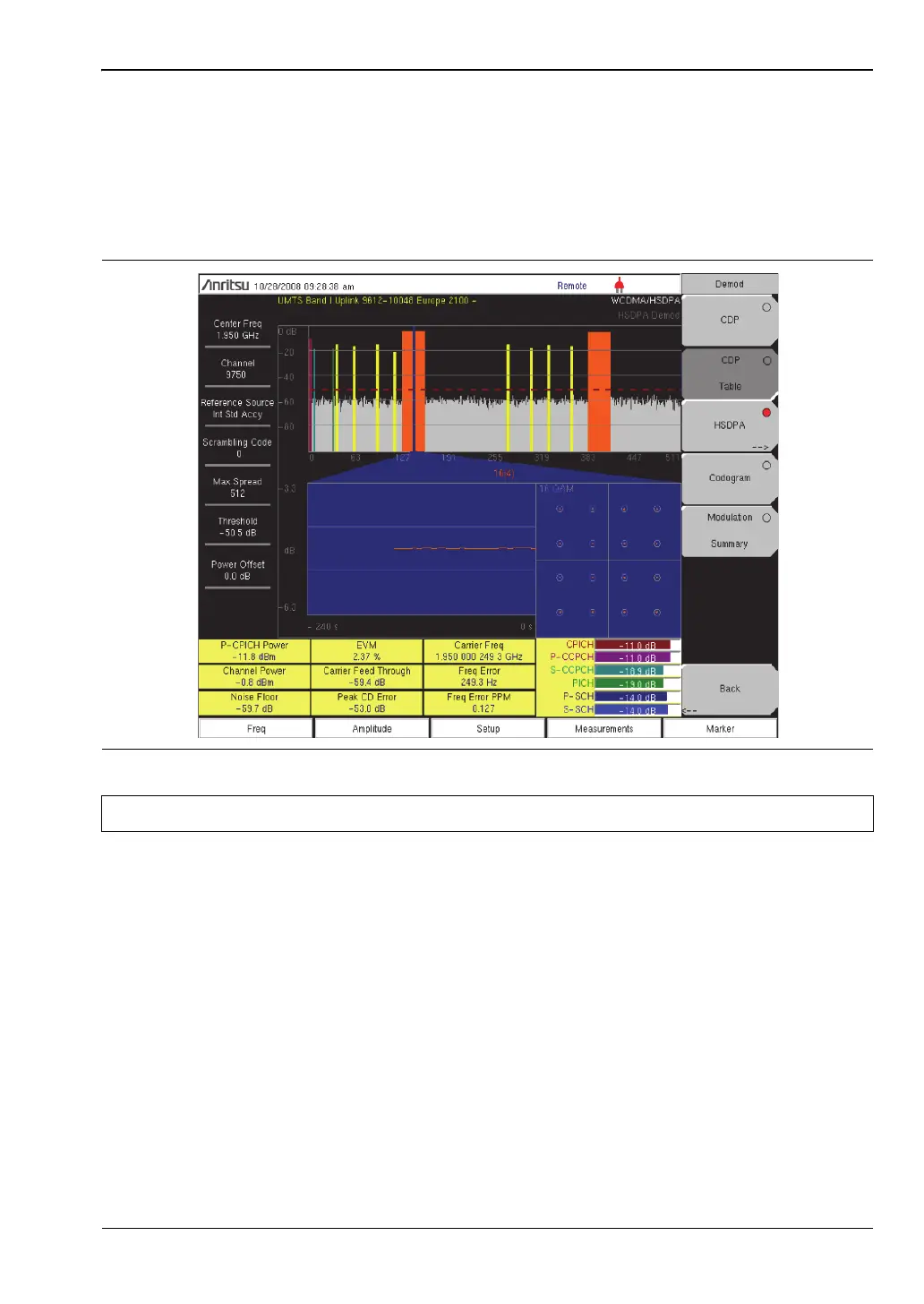
HSPA+ Setup
HSPA+ displays the spreading factor (OVSF codes) 256 or 512 codes and high speed downlink
physical shared channel codes HS-PDSCH. The right or left active codes can be selected using
the cursor. The selected code power versus time and constellation are displayed. The
demodulator also displays CPICH, P-CCPCH, S-CCPCH, PICH, P-SCH and S-SCH power in
the table format.
HSPA+ Procedure
1. Press the Demodulator submenu key to list the Demod menu.
2. Press the HSPA+ submenu key to activate the HSPA+ measurement. The red dot on the
submenu key indicates HSPA+ is selected.
3. Press the HSPA+ submenu key again to display the HSPA+ measurement signal
parameters.
4. Press the To t al Ti m e submenu key to set the time or the Single Sweep Time submenu key
to set the time for the power versus time display. The maximum time is 72 hours.
5. Use the cursor to select the desired code. The code parameters are displayed on the
screen.
Figure 3-9. HSPA+ Measurement Summary
Note This screen is available with the W-CDMA/HSPA+ demod option only.














 To Next Page