File Management 4-2 Managing Files
Cell Master UG PN: 10580-00250 Rev. K 4-3
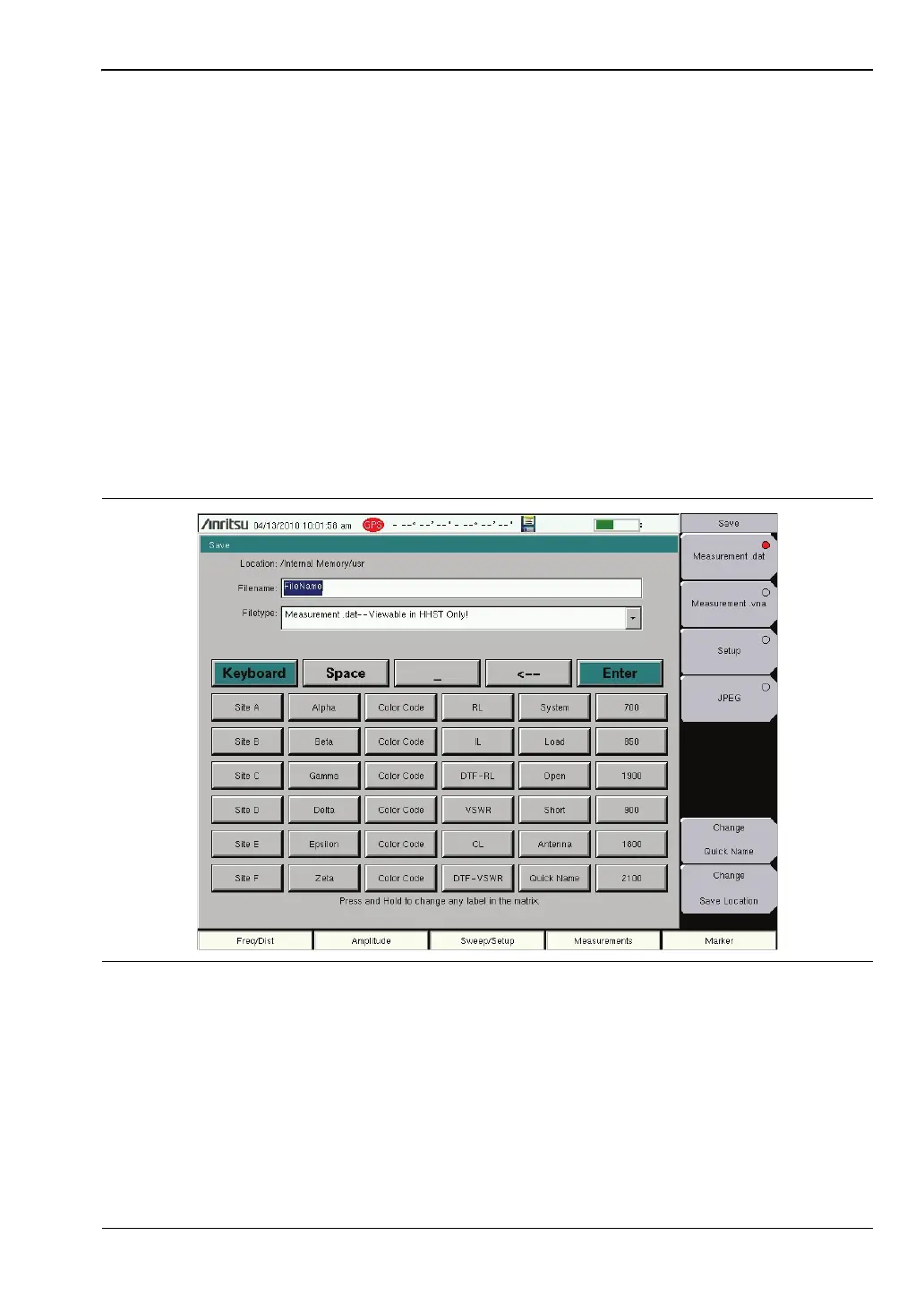
Quick Name Matrix
The Quick Name Matrix button displays in the Cable and Antenna Analyzer measurement
mode. The Quick Name Matrix button allows contractors and field personnel to save time
entering files names when they are making measurements. Using the touchscreen, press the
Quick Name Matrix key shown in Figure 4-1 to open the Quick Name Matrix shown in
Figure 4-2.
Often carriers require file names to be reported in special conventions including site number,
sector information, color coding, measurement type, termination device, and frequency
information. Setup the buttons in this matrix to quickly enter the required file name.
1. Press and hold any Matrix key in the first column to edit the label. Use this column to
enter the first set of variables required in the file naming convention.
2. Continue with additional columns as necessary.
After the keys have been labeled they can be used to quickly create filenames with the
required file naming conventions. Select the type of file and press Enter to save the file.
The Keyboard key returns to the Save Dialog Box (Figure 4-1).
Figure 4-2. Quick Name Matrix














 To Next Page