2-4 Front Panel Overview Instrument Overview
2-2 PN: 10580-00250 Rev. K Cell Master UG
To turn on the Cell Master, press the green On/Off button on the front panel (Figure 2-1)
The Cell Master takes approximately sixty seconds to complete power warm-up and to load
the application software. At the completion of this process, the instrument is ready for use.
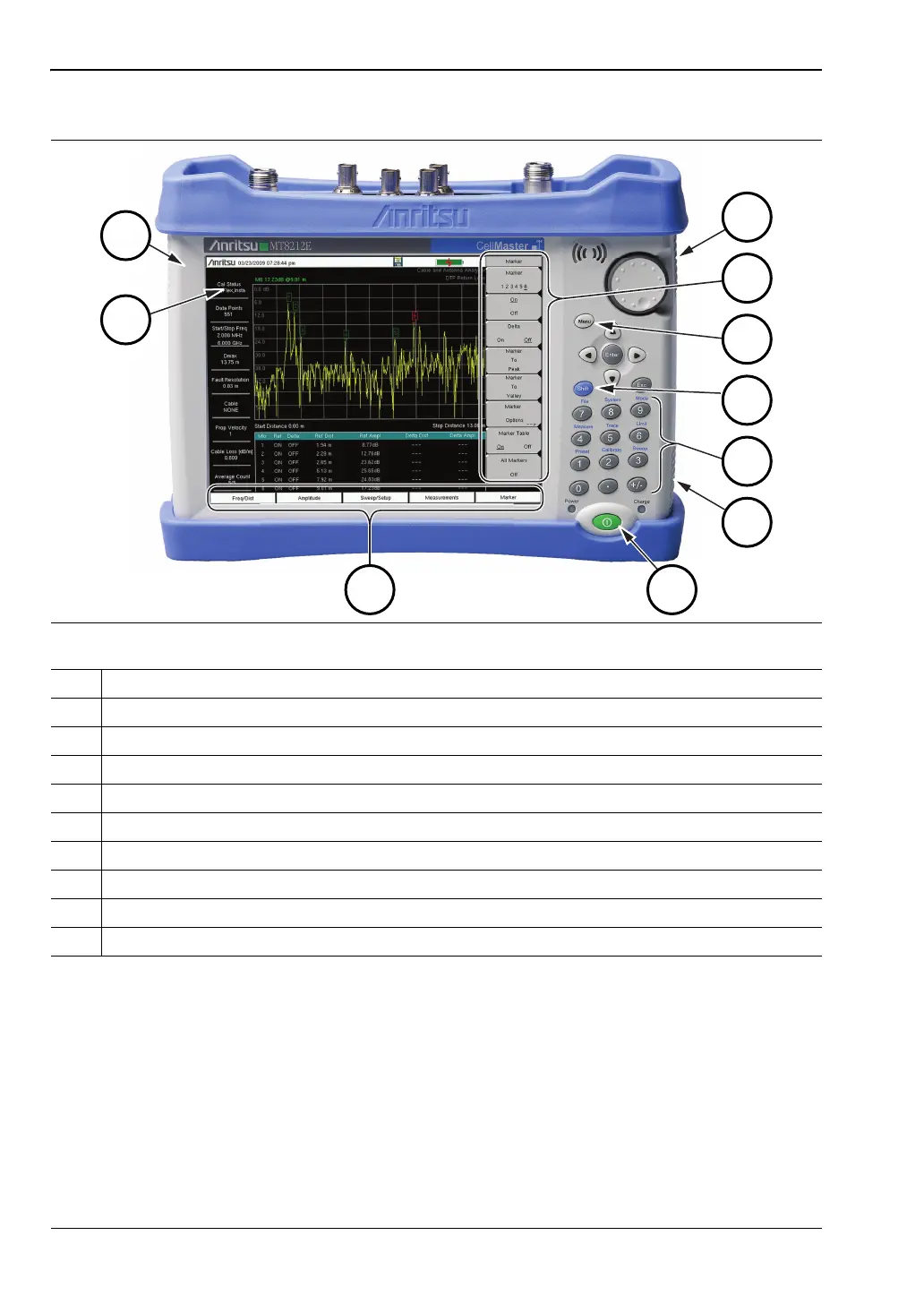
2-4 Front Panel Overview
The Cell Master menu-driven interface is easy to use and requires little training. The
Cell Master uses a touch screen and keypad for data input. The five bottom menu keys and
eight submenu keys on the right side are touch screen keys. The menu and submenu keys will
vary depending upon the selected mode of operation, see “Mode Selector Menu” on page 2-16.
Figure 2-1. Cell Master Overview
1. Fan Inlet Port
2. Touch Screen Submenu Keys
3. Menu Key
4. Shift Key
5. Numeric Keypad and Shift Menu Keys (1 to 9, printed in blue above each key)
6. Fan Inlet Port
7. On/Off Button
8. Touch Screen Main Menu Keys
9. Calibration Status and Type
10. Fan Exhaust Port














 To Next Page