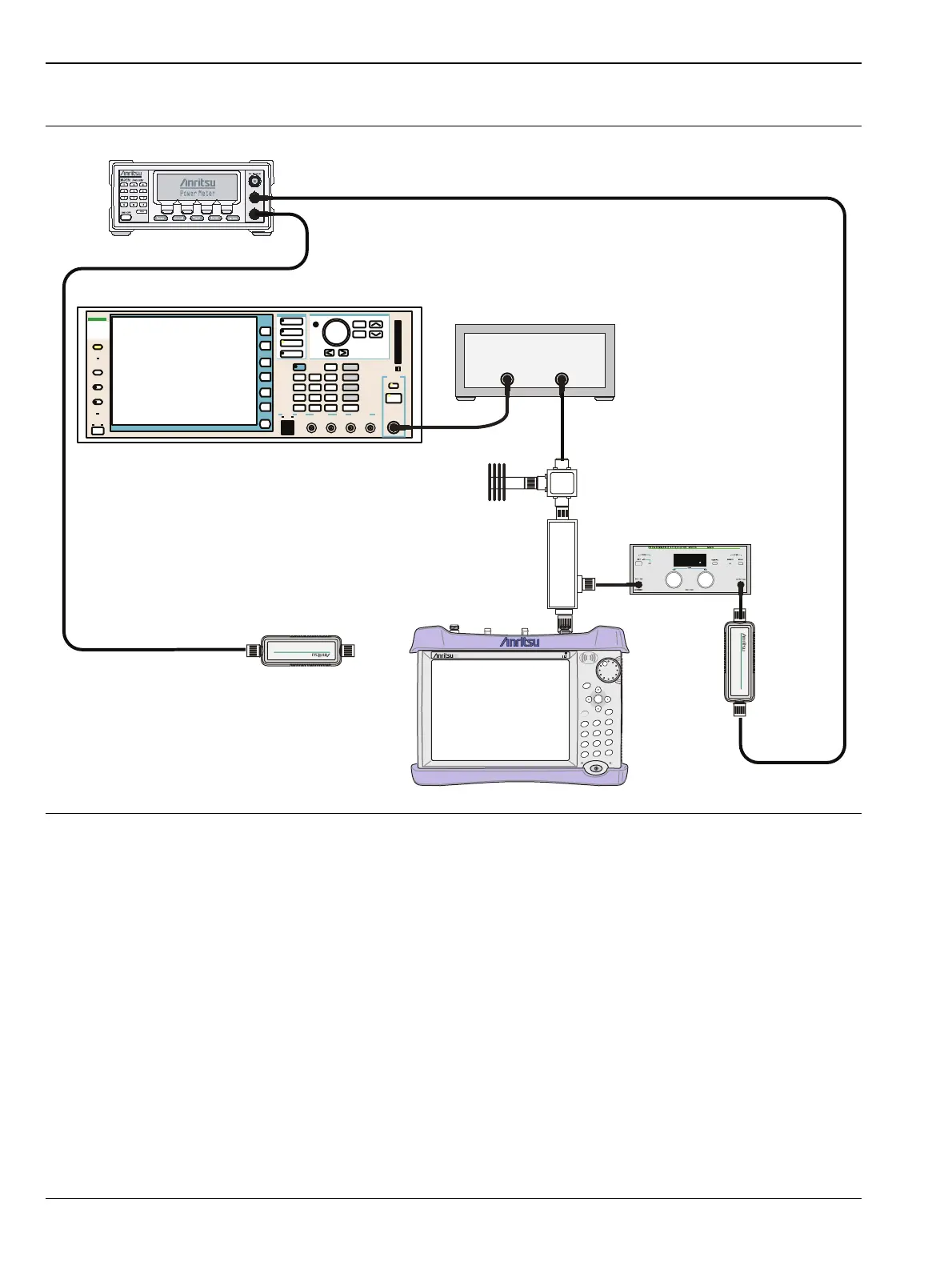
5-9 WCDMA/HSDPA Signal Analyzer Verification, Options 44, 45, 65, Option Verification
5-38 PN: 10580-00255 Rev. J MT8212E and MT8213E MM
34. Set the MN63A attenuator to 0dB.
35. On the MT821xE press the Center Freq submenu key, enter 881.5, and then press the MHz submenu key.
36. Press the Measurements main menu key, then the RF Measurement submenu key, then the Channel
Spectrum submenu key.
37. On the MG3700A, turn On the RF output and use the knob to adjust power level to read the value of
PMA.10C on Sensor A.
38. Record the MG3700A power level setting (MG3700A.10) in Table A-43, “Option 44, Power Level Setting
Components Characterization Table” on page A-34.
39. On the MT821xE, press the Amplitude key and then press the Adjust Range submenu key.
40. Record the channel power reading in the Measured Power column of the +10 dBm row of Table A-44,
“Option 44, WCDMA Absolute Power Accuracy” on page A-34.
41. Use the following formula to calculate the absolute power accuracy of the MT821xE at +10 dBm:
Error = Measured Power –10
Figure 5-9. WCDMA Signal Analyzer Option Verification (Setup 2)
Function
Ethernet
Control Input
Modulation Input
Cursor/Edit
RF Output
3
MG3700
Vector Signal
Generator
250kHz-6GHz
3
MT821xE Cell Master
Power Charge
+/-
.
0
3
Sweep
2
Calibrate
1
Preset
6
Limit
5
Trace
4
Measure
9
Mode
8
System
7
File
Shift
Back
Enter
ESC
CellMaster
MT8212E
MG3700A
RF Power Amplifier
MA2482D
Sensor B
MA2482D
Sensor A
Circulator
MN63A
ML2438A Power Meter
High Power
Load
Coupler














 To Next Page