ANSER CODING INC. 6 A1 User Interface
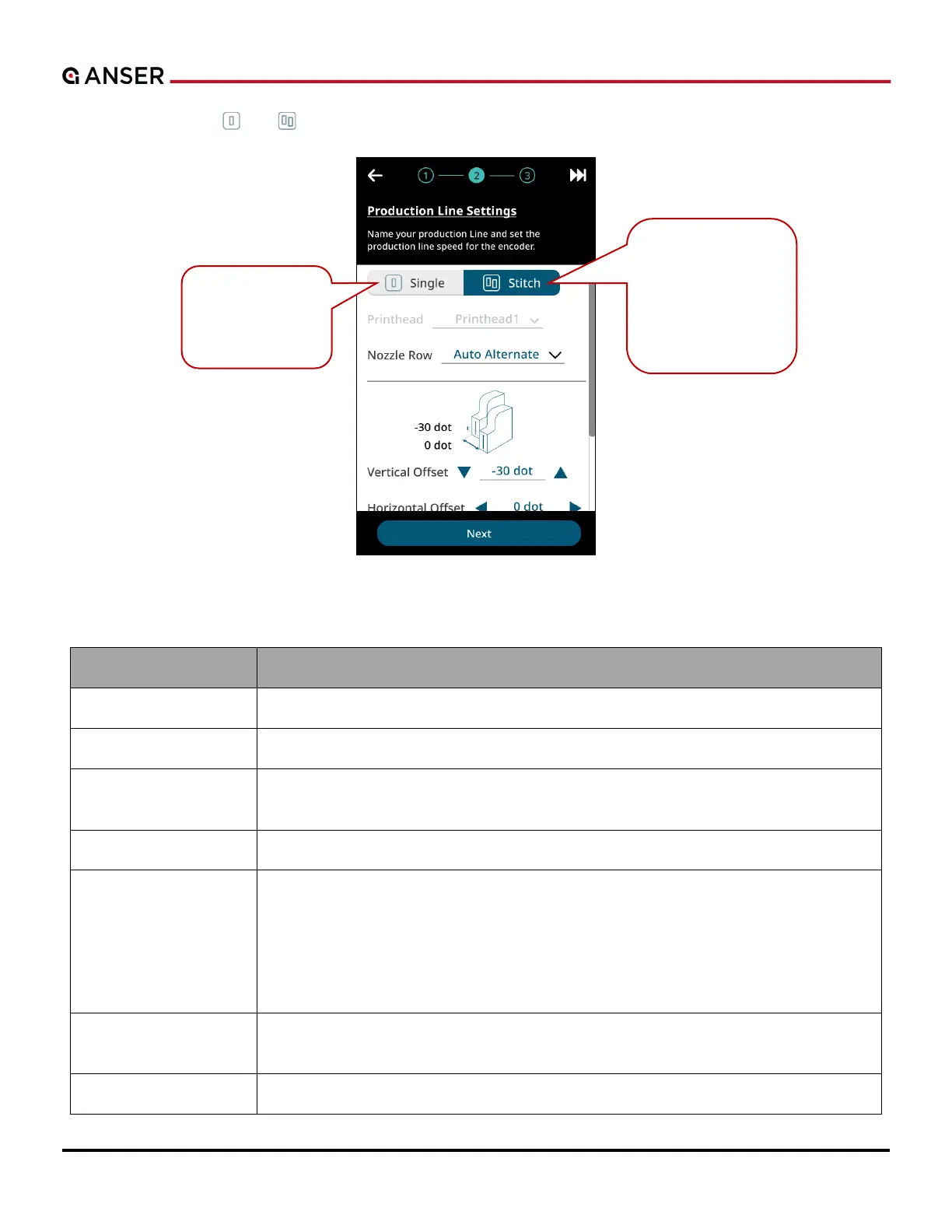
STEP 2: Press buttons “ ” or “ ” to select Single or Stitch printing mode.
Figure 1-6. Initial Setup – Production Line Settings (2)
Table 1-1. Options in Production Line Settings (2)
Option Description
Printhead Select which printhead to be used. Gray out in Stitch mode.
Nozzle Row Select working mode of nozzle row: Auto Alternate, Left, Right, or HD
Vertical / Horizontal
Offset
Fine tune prints when Stitch printheads are already physically aligned (for Stitch mode
only).
Photocell Source Set the sensor signal coming from the Internal or the External device.
Photocell Mode Select Normal or Inverted mode of a photocell.
Normal Mode: Trigger photocell when the sensor detects an object (High-to-Low
signals).
Inverted Mode: Trigger photocell when the sensor detects no object (Low-to-High
signals).
Print Direction Set according to your products’ moving direction when they passing in front of the print
station. View angle is from the back of A1.
Print Upside Down Set all messages to be printed in upside down orientation or not.
A print station
containing one ½"
or 1" printhead.
A print station
composed of two ½"
or 1" printheads
stitched together to
achieve a larger
message print.



 To Next Page