P1 Patient Monitor User’s Manual
1-13
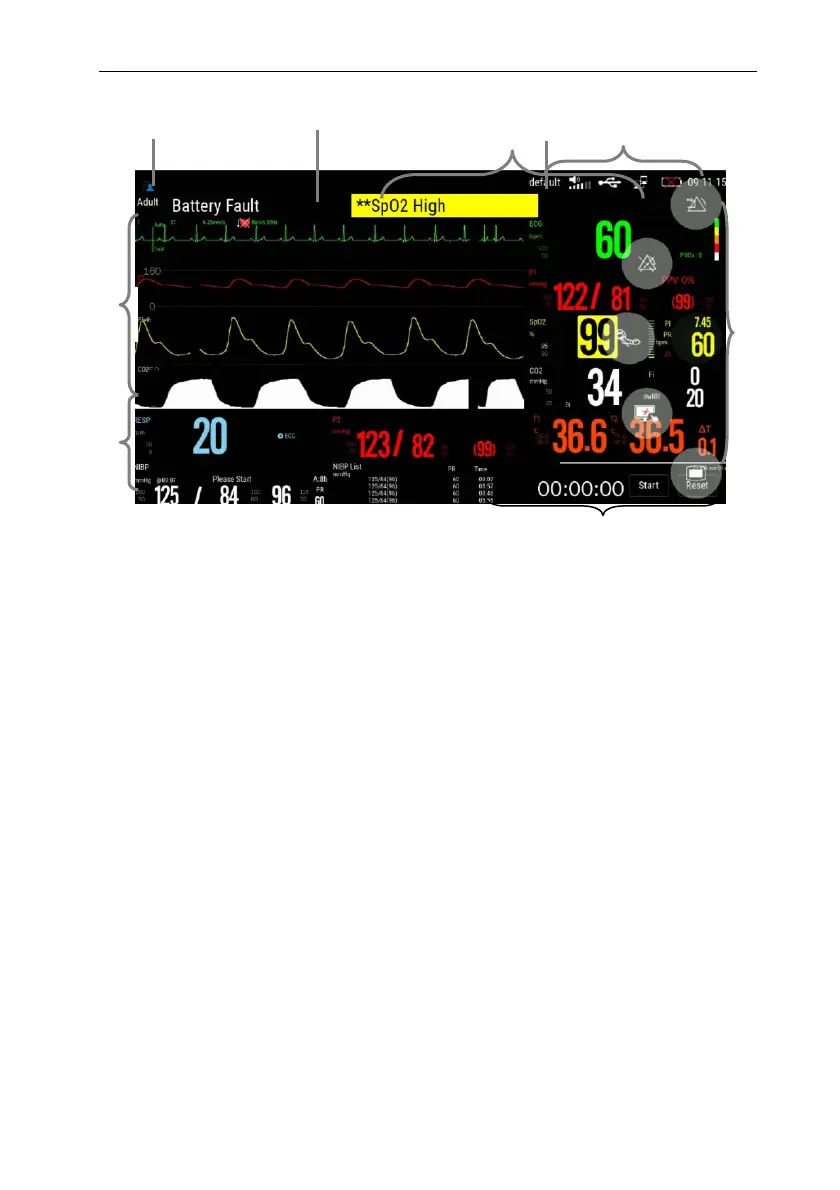
1. Patient info area
Shows the room number, bed number, patient name, patient category and so on.
Select this area to enter the【Patient Management】menu and detailed description please
to refer Chapter 4 Patient Management.
2. Current configuration
3. Technical alarm area
Display technical alarm information and prompt information. Cyclic displaying when
there are multiple messages. Select this area to open the 【Alarm Informations】menu to
view the current technical alarm.
4. Physiological alarm area
Shows the physiological alarm messages, medium-level and low-level alarm
messages display on the left, while the high-level alarm messages display on the right.
Cyclic displaying when there are multiple messages. Select this area to open the 【Alarm
Informations】menu to view the current physiological alarm.
5. System status information area
Display alarm volume, network and storage devices connection status, battery and
system time. For the battery status icon,
please to refer chapter 18 Battery.
6
3
1
2
5
4
8
7
7



 To Next Page