P1 Patient Monitor User’s Manual
1-14
6. Waveform area
Show the waveforms of physiological parameter. Label displays on the top left
corner of each waveform area. Select the waveform area of a parameter and enter the
corresponding parameter setting menu.
7. Parameter area
It consists of various parameter areas, and shows
parameter value, unit, alarm limit
and alarm status, etc. Label displays on the top left corner of each parameter area. Select
the parameter area of a parameter to enter the corresponding parameter setting menu.
8. Area of touch quick keys
Shows quick keys, these quick keys are used to conduct some common operations.
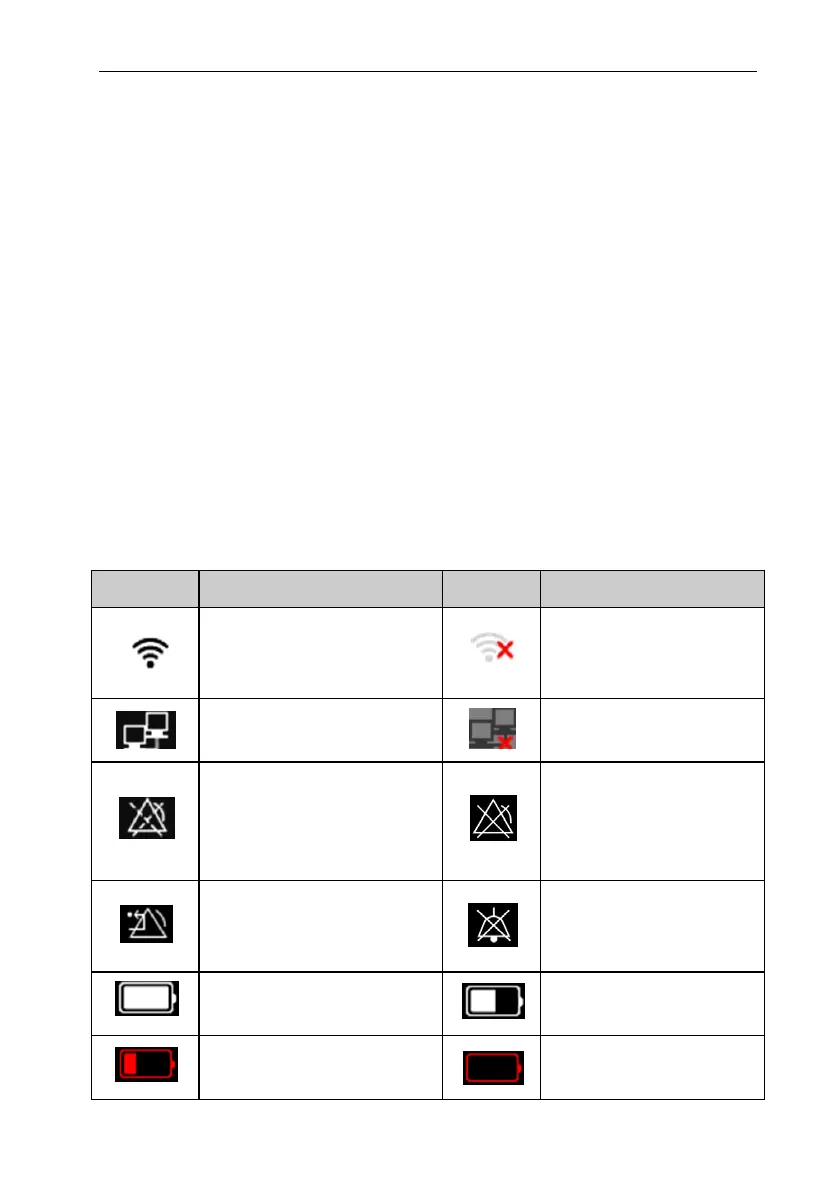
1.11.1. Screen Symbols
The following table shows the symbols and meanings displayed in the system
information area:
Symbol
Note
Symbol
Note
Wireless network connected.
The physical part represents the
network signal strength.
Wireless network not
connected.
Wired network connected
Wired network not
connected.
All the alarms are paused.
The parameter alarm is
turned off or the alarm
system of the monitor is
turned off.
The alarm has been confirmed
and the alarm system has been
reset.
Audible alarm tones are
turned off
Indicates that the battery is fully
charged.
Indicates that the battery is
half charged.
Indicates that the battery is
empty and needs to be charged.
Indicates that the battery is
almost depleted and need to



 To Next Page