P1 Patient Monitor User’s Manual
1-15
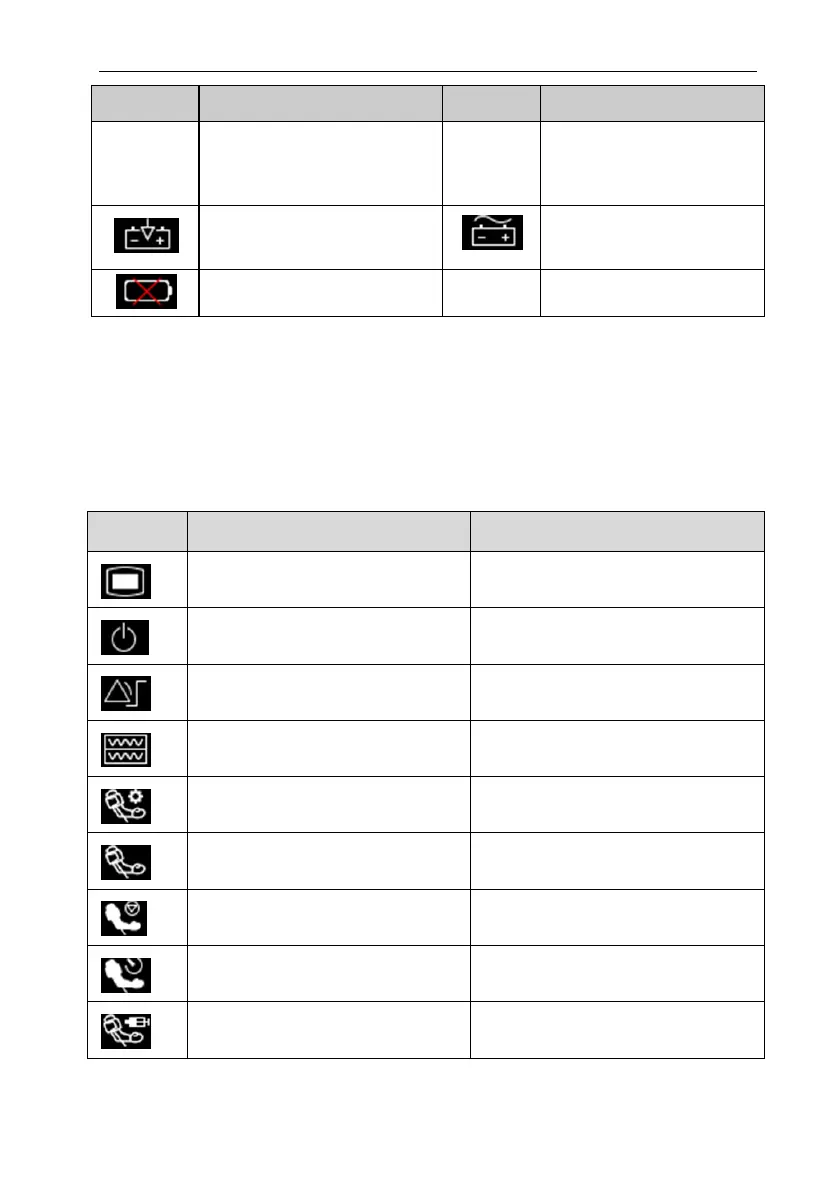
Symbol
Note
Symbol
Note
be charged immediately,
otherwise the monitor will
automatically turn off.
Indicates that the battery is
being charged.
Indicates that the monitor is
being powered by AC power.
No battery is installed.
1.11.2. Quick keys
In Standard Mode, quick keys are displayed at the monitor's main screen. The quick
key area can display 5 quick keys simultaneously. Through the quick keys, you can easily
and quickly access some functions or perform operations. The symbols on the quick keys
are shown as follows:
Symbol Quick key Note Function
Main Menu Enter the main menu
Standby Enter the Standby mode
Alarm Setup
Enter the【Alarm Setup】menu
Review Enter the【Review】interface
NIBP Measure Enter the【NIBP Measure】menu
NIBP Start/ Stop Start/Stop NIBP measurement
NIBP Stop All Stop all NIBP measurement
NIBP STAT NIBP STAT measurement mode
Venipuncture Start/Stop Auxiliary venipuncture



 To Next Page