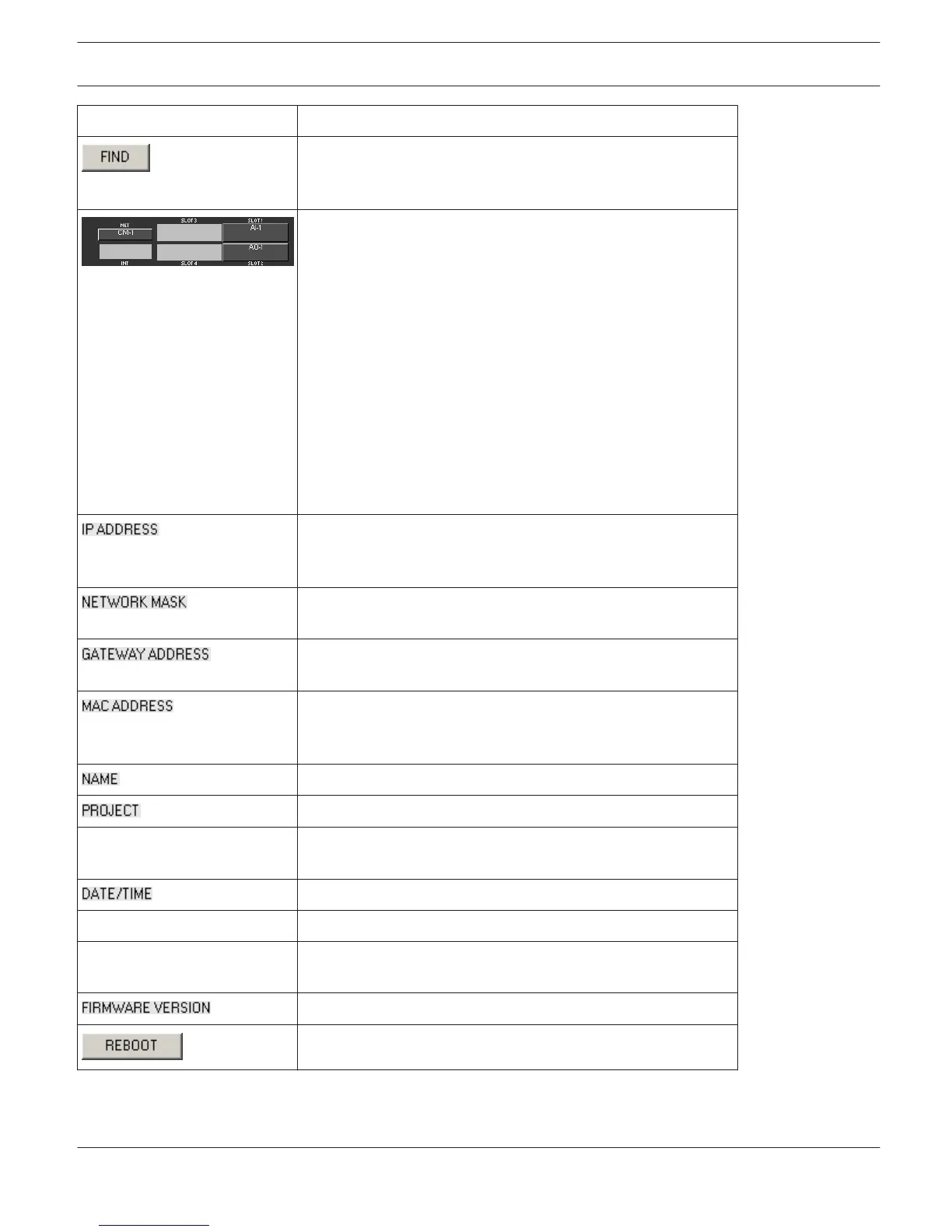
Element Description
A click on the FIND button lets the LEDs on the front panel of
the P 64 blink. When on-line, this allows for easy identification
of the P 64 the user communicates with at the moment.
This view represents the rear panel of a P 64 with module slots
and extension cards. In off-line mode, clicking onto the slots
with the right mouse button and by exchanging, adding or
deleting extension cards, allows defining the unit’s
configuration. When on-line, the display shows the actually
installed extension cards. Differences from the off-line
configuration are recognized and marked in yellow or red.
HINT: A yellow indicator signals that the hardware equipment
differs from the software configuration. However, this
difference does not cause any problems during on-line
operation. A red indicator signals an existing conflict between
hardware and software configurations, which needs to be
remedied, either by customizing the P 64’s hardware
equipment or through modifying the software configuration.
Indicates the IP address of the P 64’s Ethernet port (factory
setting: 192.168.1.100). Enter the address of the P 64 with
which you want to establish on-line communication.
Indicates the Ethernet port’s network mask (factory setting:
255.255.255.0).
Indicates the standard gateway of the Ethernet port (factory
setting: 192.168.1.1).
Indicates the MAC address of the connected P 64 when on-line.
The MAC address of the P 64 is also shown on a label on the
unit’s rear panel.
IRIS-Net internal device name of the P 64.
IRIS-Net project filename.
INFO This button displays information concerning the IRIS-Net
project file.
Date and time of the P 64 system clock.
SET This button opens the system clock settings dialog box.
SYNC This button syncs the P 64 system clock to the PC system
clock.
Indicates the firmware version of the P 64 when on-line.
Reboots the P 64.
IRIS-Net DIGITAL MATRIX | en 341
Bosch Security Systems B.V. User Manual 2017.05 | 3.20 | F.01U.119.956












 To Next Page