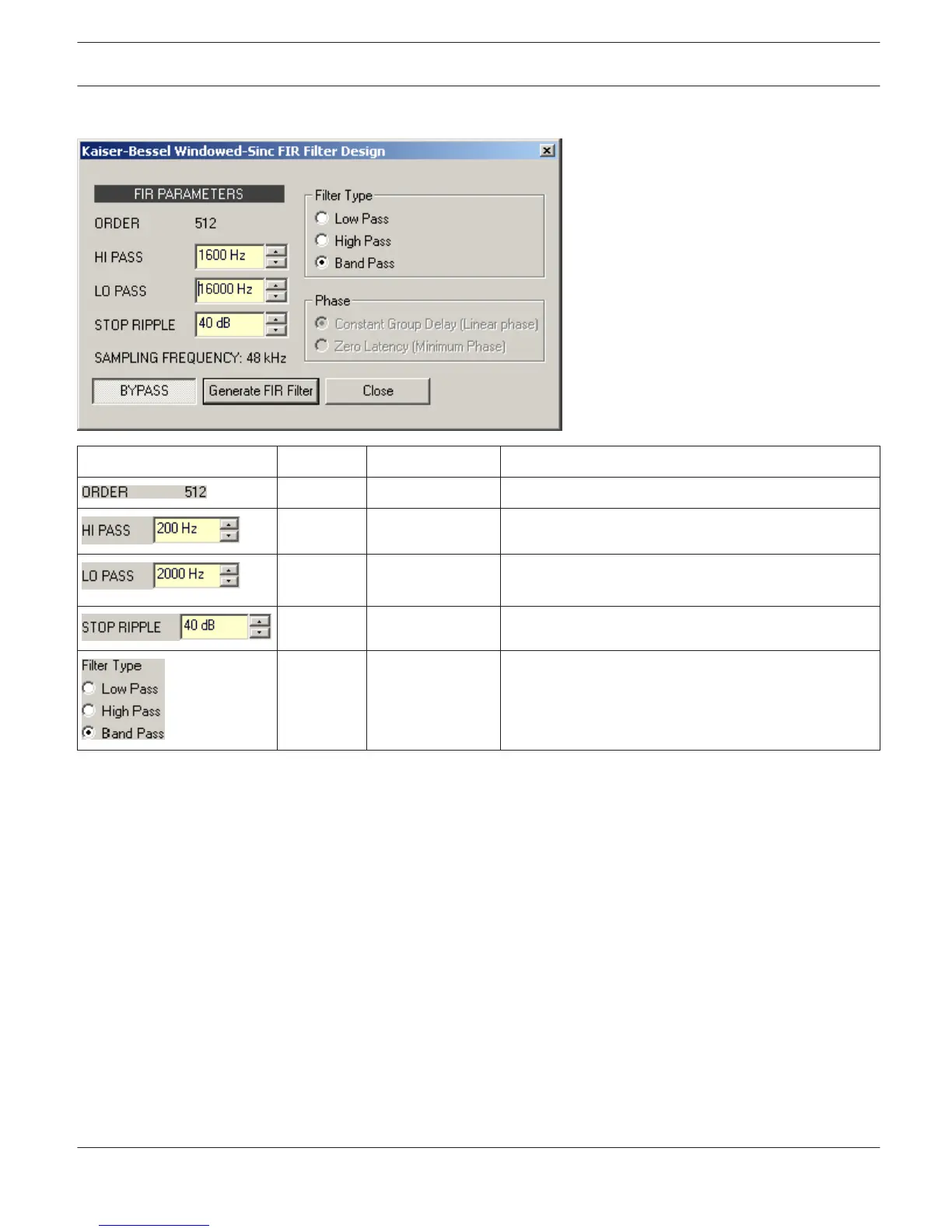
FIR Filter Design
Element Default Range Description
ORDER of the FIR filter.
200 Hz 20...20000 ms HI PASS sets the cut-off frequency of the Hi pass filter.
2000 Hz 20...20000 ms LO PASS sets the cut-off frequency of the Lo pass
filter.
40 dB 21...100 dB STOP RIPPLE sets the slope of the FIR filter.
Selects the FIR filter type of the DSP block.
Filter Editing via ”Mouse Movement” in the Graphics Display
A white dot in the frequency response display represents an active filter (BYPASS not engaged). Clicking with the left
mouse button on this dot and keeping the mouse button pressed down allows changing the selected filter’s frequency
by moving the mouse to the left or to the right.
Dynamics (FIR Controller original)
The Dynamics window provides access to a compressor and a Peak Anticipation limiter. This allows setting the
corresponding parameters in a band pass, so that connected loudspeaker systems are protected against dangerous
level peaks and overload.
Click on the fifth block in the Flow Diagram Selector or double click on the DYNAMICS block in the large Flow Diagram
to select the Dynamics window.
IRIS-Net
DIGITAL MATRIX | en 411
Bosch Security Systems B.V. User Manual 2017.05 | 3.20 | F.01U.119.956












 To Next Page