9-6
¡
Saving Labels as Files
existing label you want to keep. If you respond Yes when the
system asks you if you really want to replace the old file, the
system discards the old saved label and puts the new saved label
in its place. You cannot recover the discarded file.
5. Choose OK when you have named your file. The system saves the
new file and filename.
• If you choose Cancel, no file is created and you’ll see the unsaved
file on the Editor window.
• If you choose Back, you’ll see the Save in Group screen again,
where you can change the Group name or choose a different
group.
To save a file to a memory card
If your system has a compact flash memory card installed, you can save
the file and its file group to the memory card. (See Installing a
compact flash memory card on page 2-12 for information about
memory cards.)
1. With the unsaved label displayed in the Editor window, press <File
Options>. You’ll see the File Options screen (Figure 9-1).
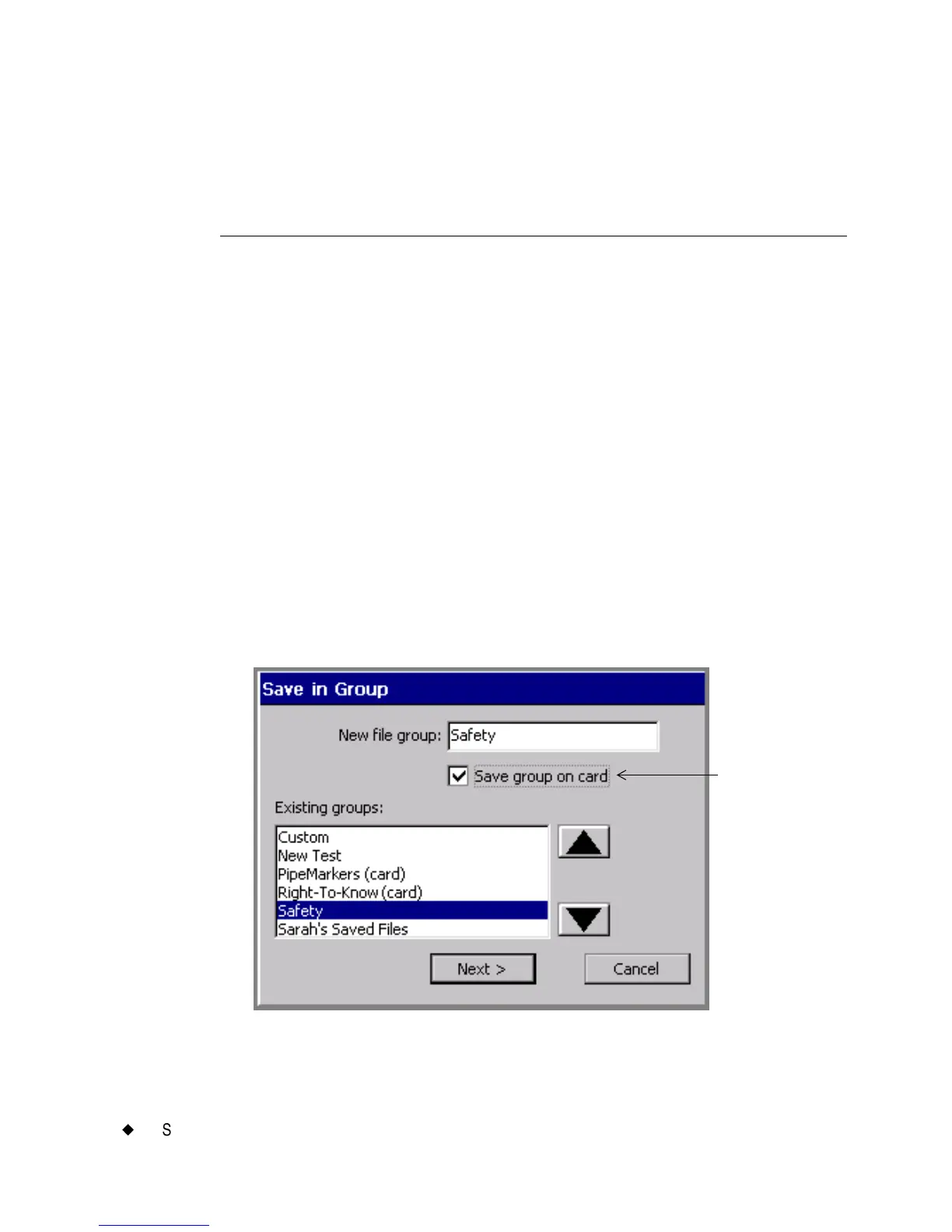
2. Choose Save File. You’ll see the Save in Group screen:
Figure 9-4. The Save in Group screen with memory card.
Enabled when
memory card is
attached to your
system.



 To Next Page