53-1002177-19 Hardware Installation Guide
Brocade DCX 8510-4 Backbone Hardware Installation Guide
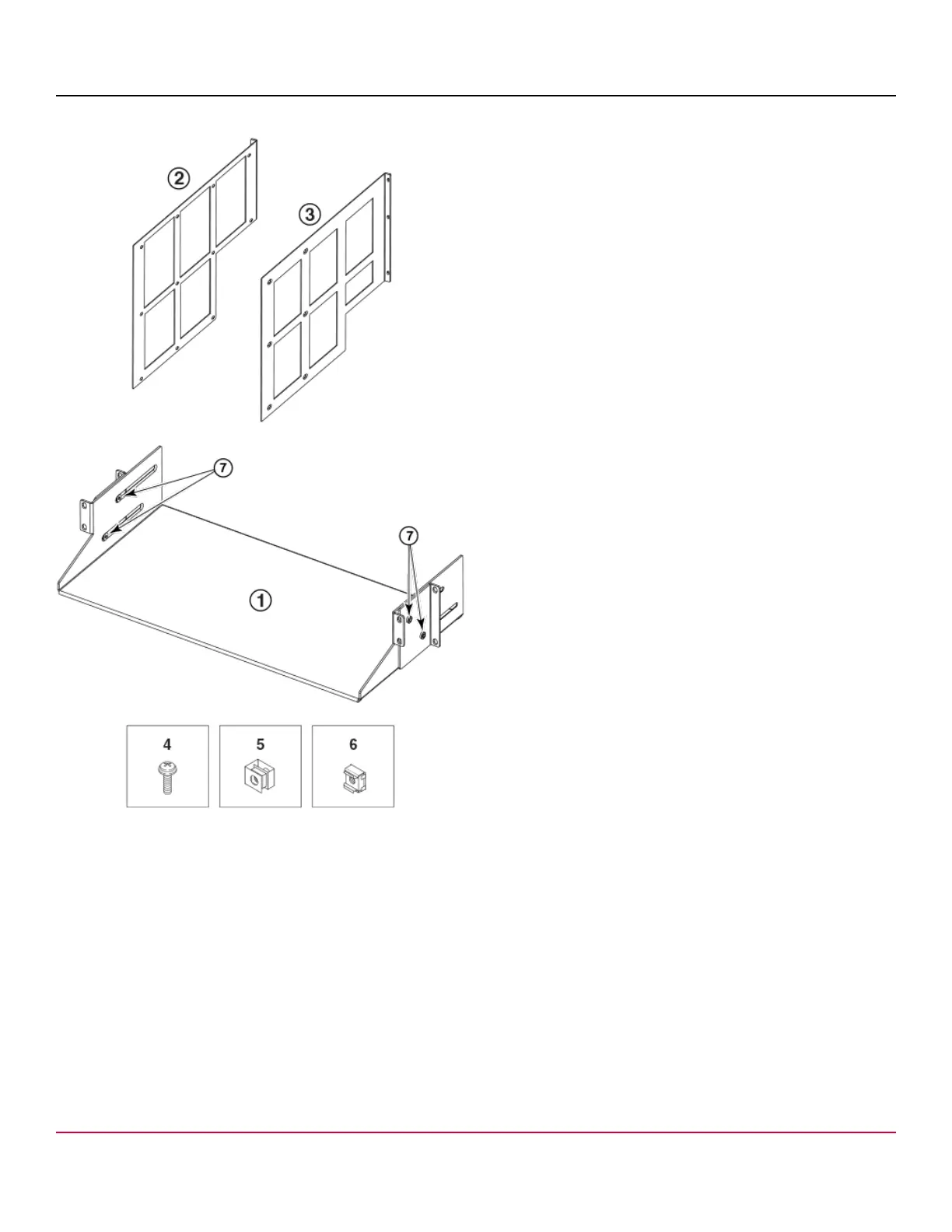
Figure 4: Rack Kit Parts (XBR-DCX4S-0126)
1. Saddle
2. Telco Mid-Mount Mounting Bracket (left)
3. Telco Mid-Mount Mounting Bracket (right)
4. 10-32 x .63 in.(1.60 cm) Phillips Screws with Square Cone Washer (for racks that have rails with round holes)
5. 10-32 Clip Nuts (for racks that have rails with round holes)
6. 10-32 Retainer Nuts (for racks that have rails with square holes)
7. Bracket Adjusting Screws
Use parts in the following XBR-X64-0126 rack mount kit to install the Brocade X6-4 Director in a two-post rack.
Use parts in the following XBR-X64-0126 rack mount kit to install the Brocade Director in a two-post rack.
53-1002177-19
28


 To Next Page