EasyManua.ls Logo

Buffalo LS720D0802 - Page 163

Buffalo LS720D0802
204 pages
Print Icon
To Next Page IconTo Next Page
To Previous Page IconTo Previous Page
Loading...
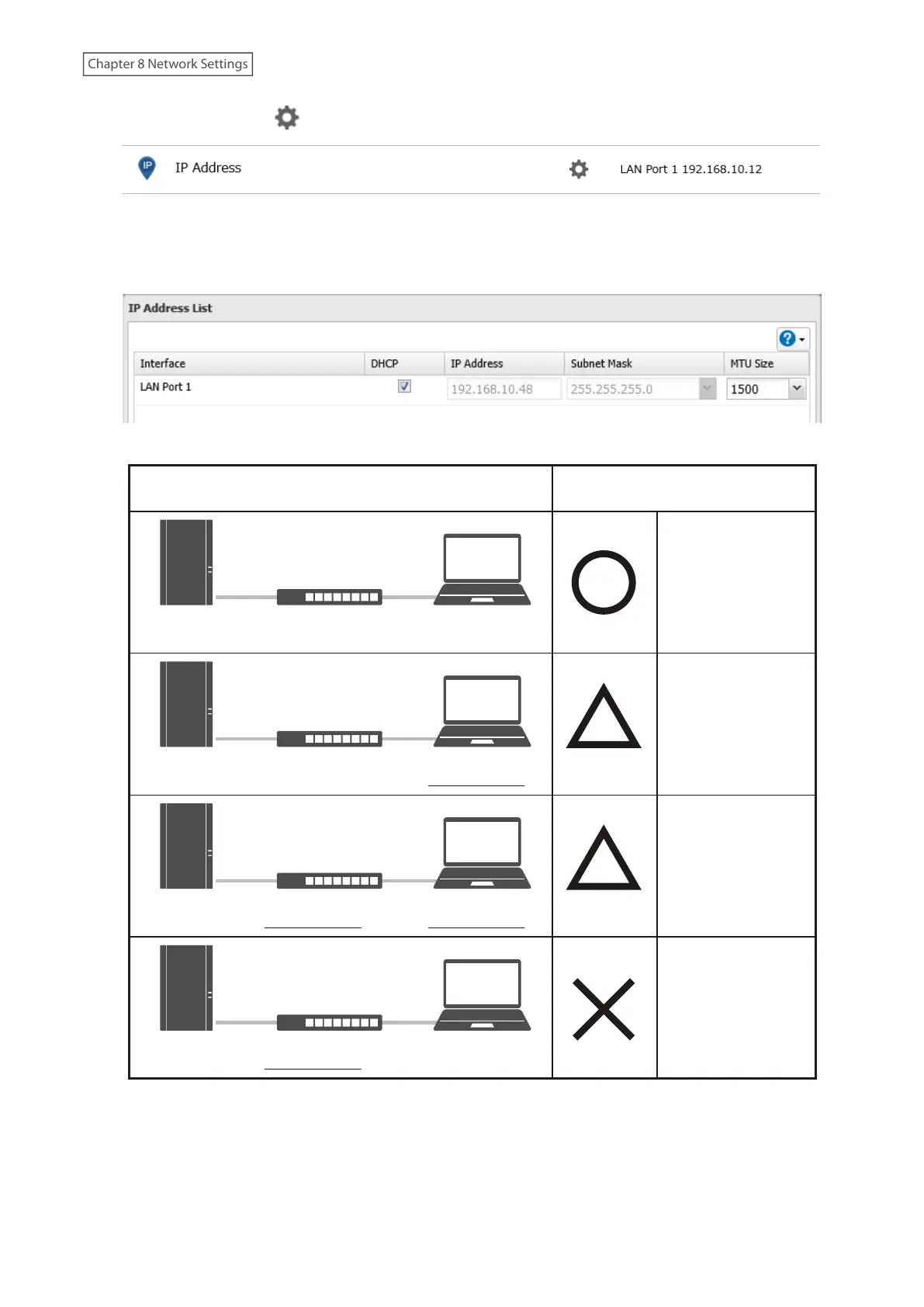
2 Click the settings icon ( ) to the right of “IP Address.
3 Click Edit.
4 Select or enter the desired MTU size and click OK.
Jumbo Frame
Jumbo Frame
Incompatible Switch
Jumbo Frame
Compatible PC
No data can be
transferred.
Transfer data
without using
jumbo frames.
Transfer data
without using
jumbo frames.
Transfer data using
jumbo frames.
TransmissionConnection
Jumbo Frame
Compatible Switch
Jumbo Frame
Compatible PC
Jumbo Frame
Jumbo Frame
Compatible Switch
Jumbo Frame
Incompatible PC
Jumbo Frame
Jumbo Frame
Incompatible Switch
Jumbo Frame
Incompatible PC
Jumbo Frame
Note: Make sure the LinkStations MTU size is smaller than the hub or routers. Larger MTU sizes may not transfer the
data to the LinkStation correctly.
162
Chapter 8 Network Settings

Table of Contents

Related product manuals