Amber (Notices)
If a non-critical error occurs, the power LED will glow amber. You can also confirm the current status from the
Dashboard in Settings or by using NAS Navigator2. If NAS Navigator2 displays the error as an unknown error, check
the Dashboard in Settings for the error details.
You can click the “Clear” button to delete messages from the Dashboard.
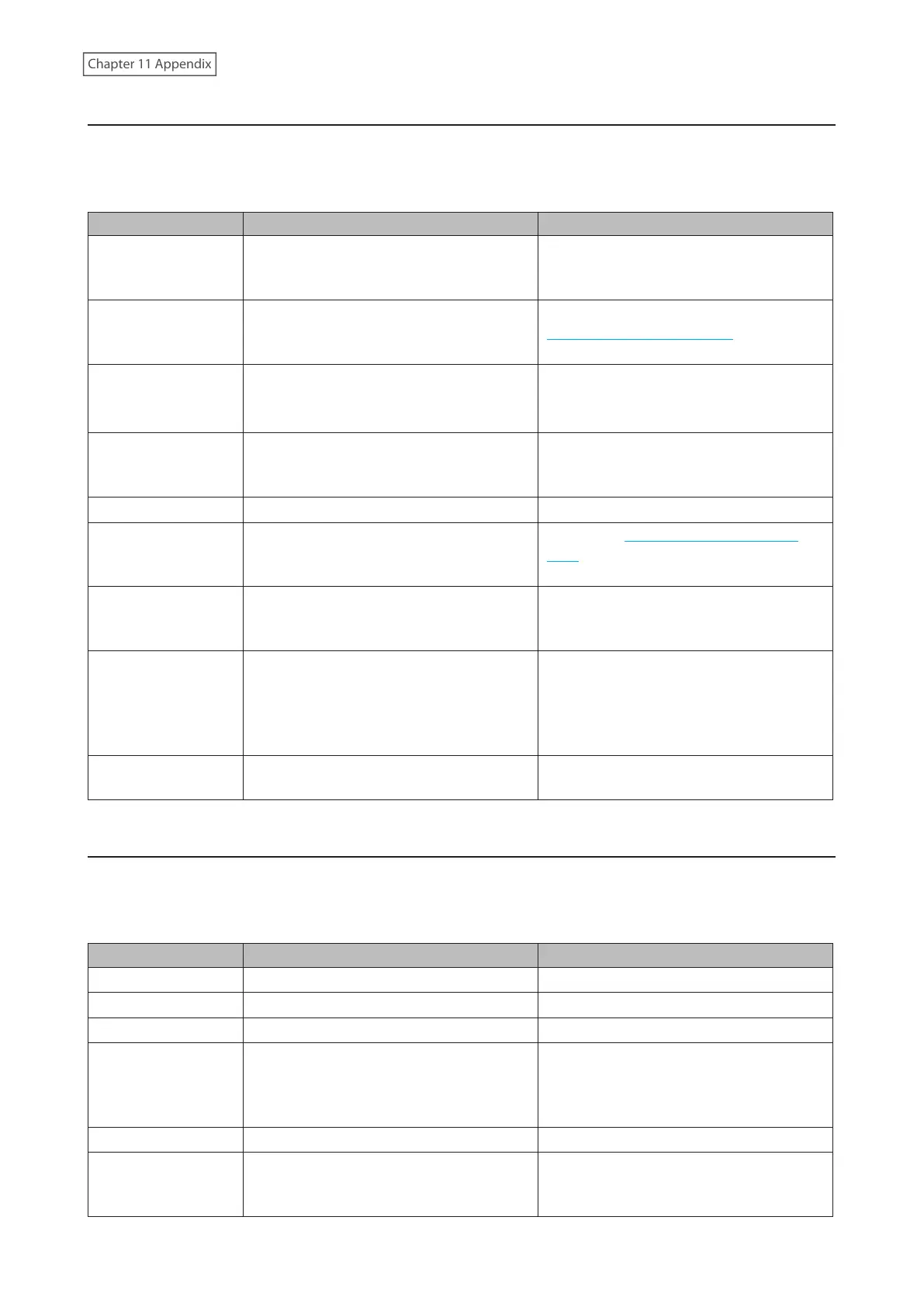
Code Description Corrective Action
I10
A rise in the system temperature may have
exceeded the allowable safety value.
Move the LinkStation to a cool location. Do
not place objects in the area around the
LinkStation.
I11
The drive has too many bad sectors.
Replace the drive by referring to the
“Replacing a Defective Drive” section in
chapter 10.
I12
Operating in degraded mode.
Check if the E30 error is also displayed. If
it is, refer to the corrective action for the
E30 error.
I44
Initialization from the USB initialization
drive was initiated, but the drive in slot 1
was not detected.
Make sure that the drive in slot 1 is present
and fully inserted into its slot.
I45
Initialization failed. -
I54
The backup job failed.
Refer to the “Backup Logs for If Backup
Fails” section in chapter 4 and try the
respective corrective actions.
I55
Authentication during initialization of
settings failed.
Settings can only be restored for the
LinkStation whose settings were originally
saved.
I64
Connecting to the cloud storage service
failed.
Open Settings and check the status of
the job that failed for the cloud service.
Refer to the error log on the job list of the
specific cloud storage service and check
the cause of the error.
I70
There is not enough space to save file
access logs.
Delete file access logs to free up space.
Amber (Information Events)
After you change any settings, the power LED will glow amber. You can also confirm the current status from the
Dashboard in Settings or by using NAS Navigator2. If NAS Navigator2 displays the status as an unknown error, check
the Dashboard in Settings for the status details.
You can click the “Clear” button to delete messages from the Dashboard.
Code Description Corrective Action
I01
Checking the system area. -
I13
Formatting the RAID array. -
I14
Checking the RAID array. -
I15
Examining the error status of the RAID
array.
Note: Transfer speeds are slower during
the examination process.
-
I16
Creating the RAID array. -
I17
Resynchronizing the RAID array.
Note: Transfer speeds are slower during
resynchronization.
-
200











 To Next Page