101
büS/CAN open-Design
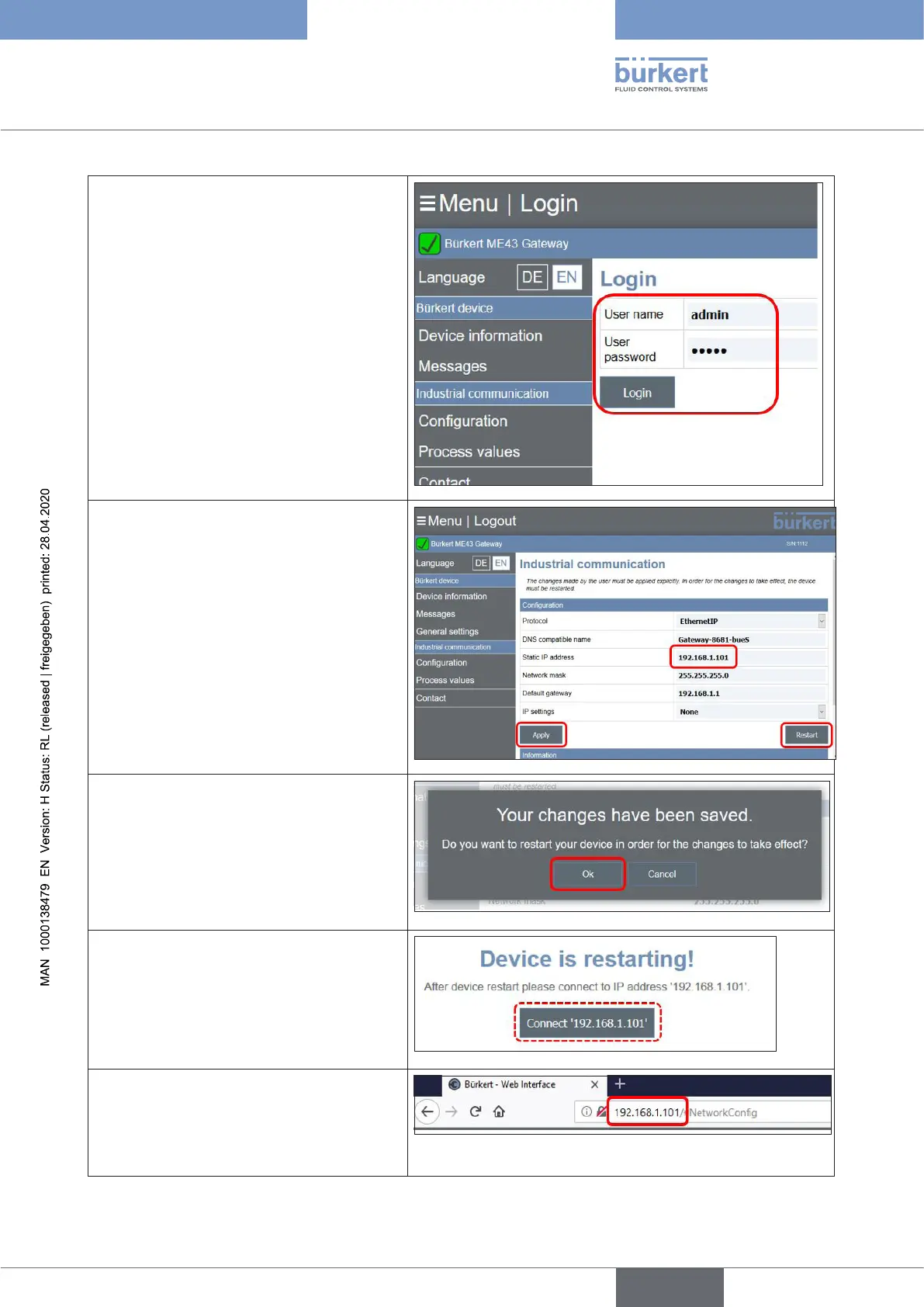
→ Completethe“Username”and“User
password”
(factorysettingforboth:“admin”)
→ Clickthe“Login”button
→ Change/overwrite the “Static IP
address”,e.g.with“192.168.1.101”
or another address, to distinguish the
gateways from each other
→ Conrmbyclickingthe“Apply”button
(Ifthebutton“Restart”isclicked,the
new“StaticIPaddress”isnotsaved,
onlythedevicewillberestarted.)
→ Clickthe“OK”buttontotakeoverthe
new“StaticIPaddress”byrestartingthe
device
(if“Cancel”isselected,theold“Static
IPaddress”remainsactiveandisonly
takenoveratthenextrestart)
→ The following message appears
→ To connect the gateway to its new IP
address:
enter the newIPaddress(showninthe
gureabove)intothebrowseraddress
barandpress“Enter”
english
Control Head Type 8681



 To Next Page