102
büS/CAN open-Design
15.15.2 Changing the gateway IP address using “Bürkert
Communicator”
→ ConnectthePC(withBürkertCommunicatorType8920)via“büSstick”tothebüS/CANopendataline
(e.g.toafreeconnectionofaCANjunctionboxinthenetwork-asshownin“Fig.38:Networkprinciple”
on page 85)
→ StarttheBürkertCommunicatorType8920
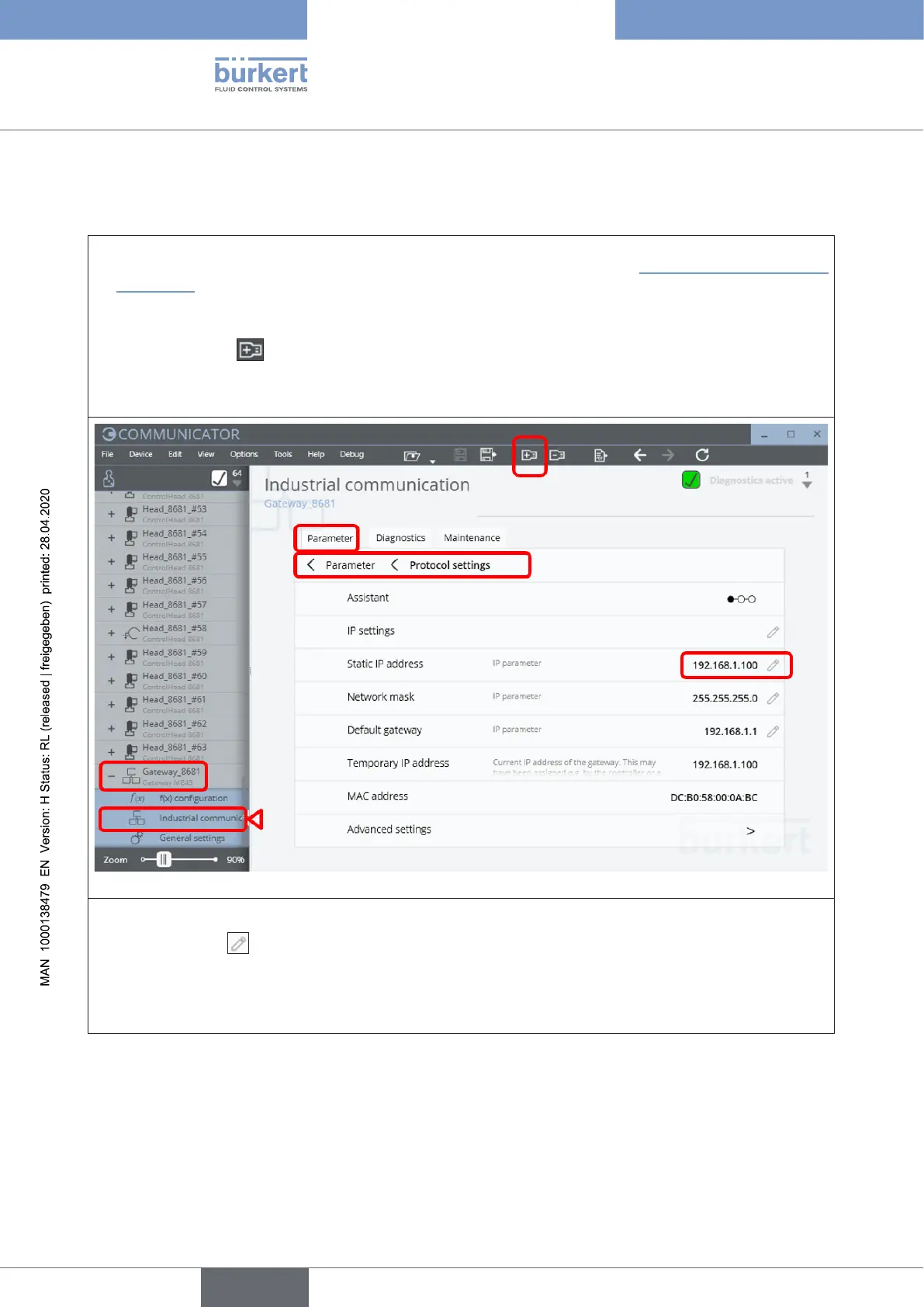
→ Click on the icon toadda“büSconnection”(e.g.“büSCOM8”)
→ Openthedesiredgateway(e.g.“Gateway_8681”)andselect“Industrial communication” and then the
“Parameter” tab, then select “Protocol settings”
→ Thestandardaddress“StaticIPaddress”isdisplayed(“192.168.1.100”)
→ Click the pencil to change the IP address
→ Conrmthenew“StaticIPaddress”byclickingonthe“Apply”button
→ Restartthedevice/gateway:Rightclickon“Gateway_8681”,thenselectthe“Restart”option
english
Control Head Type 8681



 To Next Page