136
LED Colour Assignments
21 LED COLOUR ASSIGNMENTS
The switching statuses of the process valves as well as the device statuses are signalled to the outside via
thecentralmulti-colourstatusdisplay(devicestatusLED/TopLED),sothatquickvisualcontrolispossible
also for large systems.
Coloursandashingpatternshavebeenassignedtothesignalsoftheprocessvalvepositionsanddevice
statuses – see chapter “21.1.1DevicespecicLEDmode“8681ClassicMode”” and “21.2 Flashing pattern &
faultsignalling”.Whenseveralsignalsareoverlapped,aprioritylistapplies(“21.3Signalpriorities”).
In order to be able to react to various process valve designs or customer signalling philosophies in the systems,
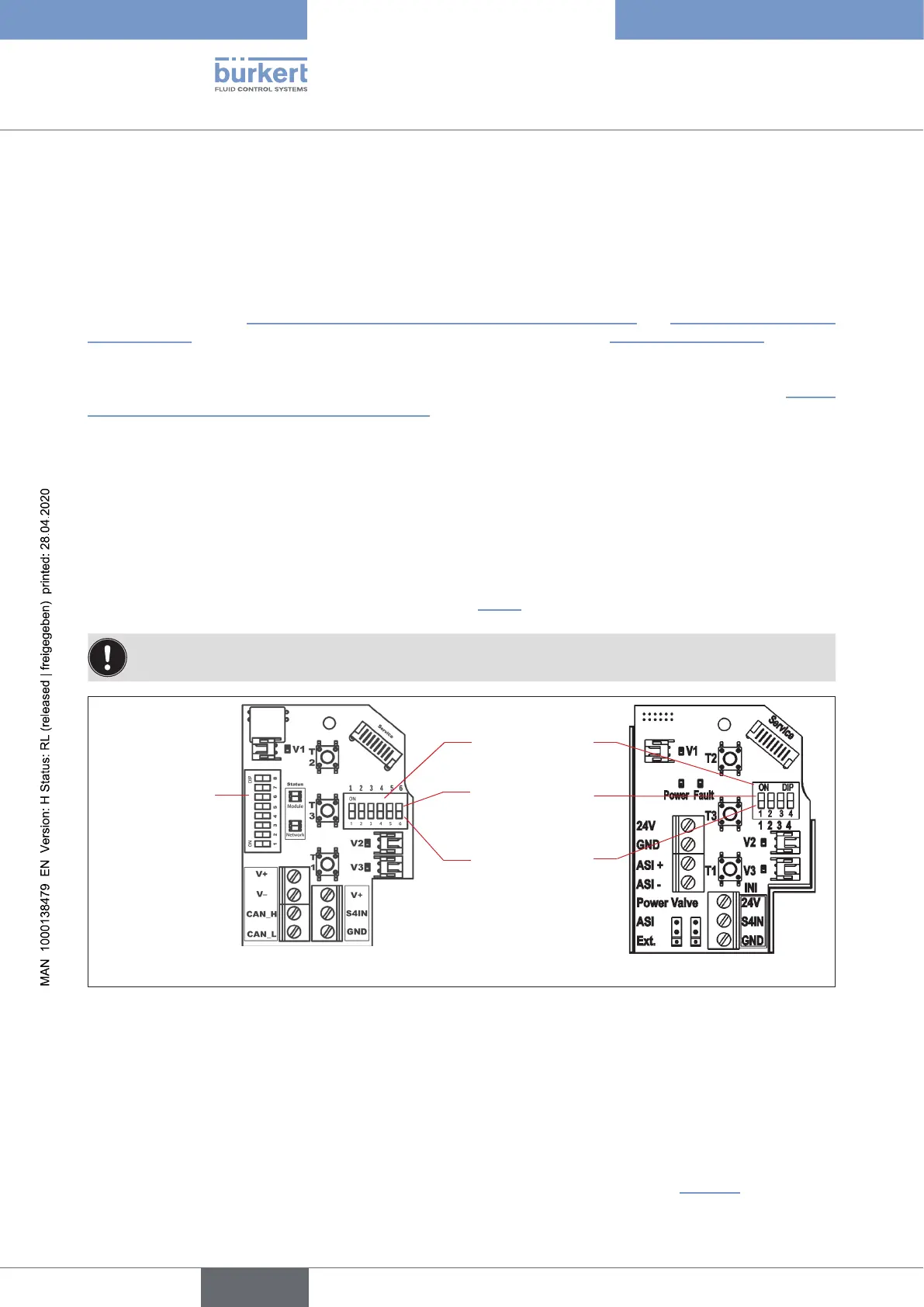
the colour assignments can be changed on site using the DIP switches for colour coding
(see chapter “21.1.1
DevicespecicLEDmode“8681ClassicMode”” – except for the IO-Link version, which does not have DIP
switches).
For the büS/CANopen and IO-Link variants,thecolourscanalternativelybeassignedusingtheBürkert
Communicator. With the DeviceNet, büS/CANopen and IO-Link variants, changes to settings can also be
carriedoutviatheactualbus-speciccommunicationinterface;inthiscase,nosettingsontheelectronic
modulearerequiredand,assuch,thecovercanremainclosed.
Factory setting DIP 1 - 4: 0000 – i.e. DIP1to4inposition0=OFF
(relatestovariants24VDC,120VAC,AS-i,DeviceNet)
Factory setting DIP 1 - 5: 111110 – i.e. DIP1 to 5 in position 1 = ON, DIP 6 = Pos. 0 = OFF
(relatestovariantbüS/CANopen-see following chapter “21.1”)
When using the control head in a potentially explosive atmosphere, the housing may only be
opened in a not energised state.
8 DIP switches
for setting the
baudrate
and address
(forDeviceNet
and büS/
CANopenonly)
4 DIP switches
for colour coding
PositionON=1
PositionOFF=0
Electronic module büS/CANopen Electronic module ASI
Fig. 48: DIP switches for setting the colour coding (in the example of the electronic modules büS/CANopen and AS-i)
21.1 Display modi – overview
Theswitchingstatusandpositionfeedback(S1,S2,S3,S4IN)oftheprocessvalvedescribedaboveaswell
aserrorandwarningmessagesaredisplayeddierentlyinthevariousvariantsduetothevaryingdesignof
the top LED.
With Type 8681 büS/CANopen and IO-Link, further display modes and colour combinations can be selected,
whichmaydierfromtheclassicvariants(24VDC,120VAC,AS-i,DeviceNet) - see “Table6”.
english
Control Head Type 8681



 To Next Page