111
büS/CAN open-Design
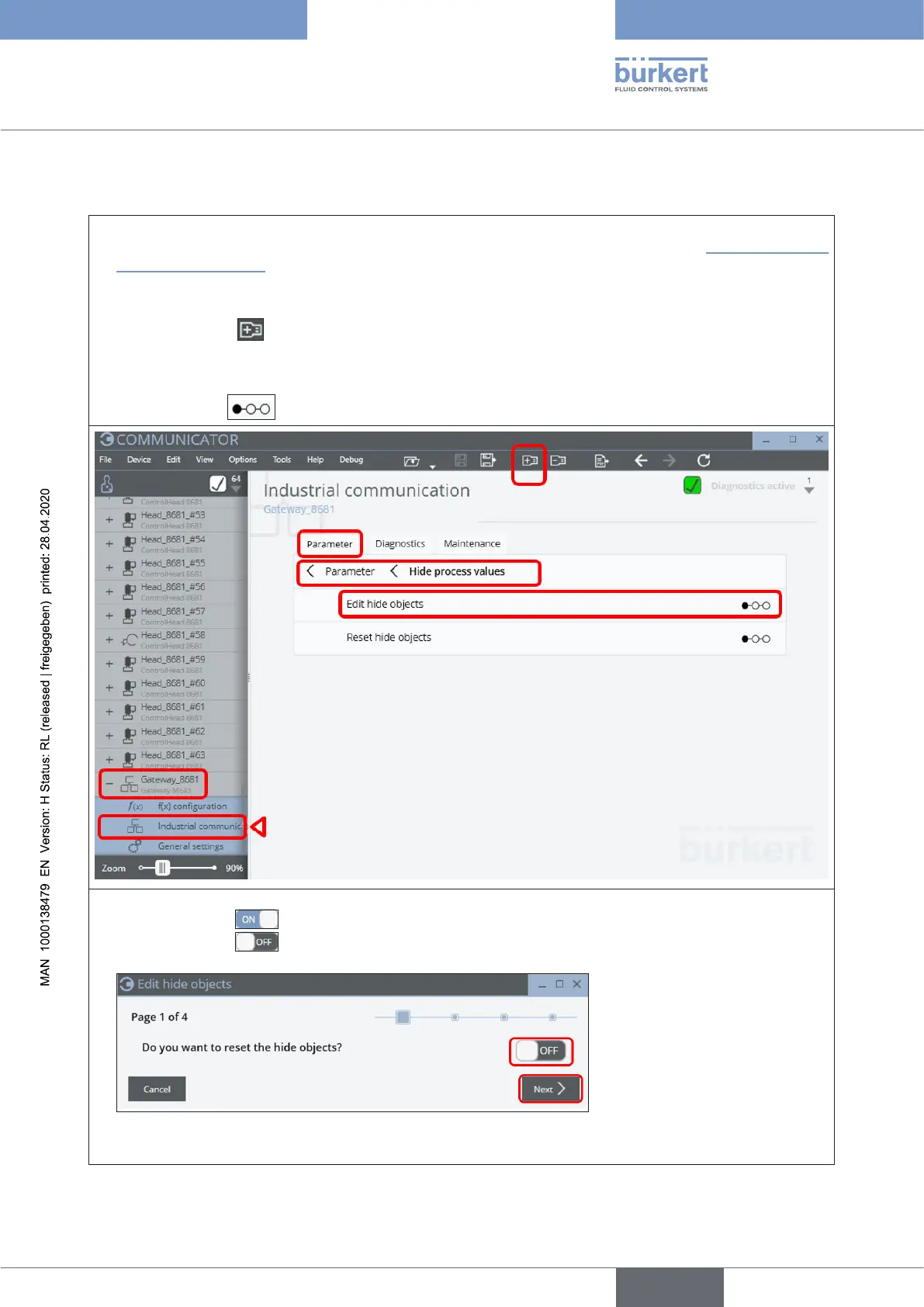
15.18.2 “Hide function” via “Bürkert Communicator”
→ ConnectthePC(withBürkertCommunicatorType8920)via“büSstick”tothebüS/CANopendataline
(e.g.toafreeconnectionofaCANjunctionboxinthesamenetwork-asshownin“Fig. 38: Network
principle”onpage85)
→ StarttheBürkertCommunicatorType8920
→ Click on the icon toaddaninterface(e.g.“büSCOM8”)
→ Openthedesiredgateway(e.g.“Gateway_8681”)andselect“Industrial communication” and then
the “Parameter” tab, search for “Hide process values”, then select “Edit hide objects” and start the
stepsequence with a click
→ “Page 1”:Startthe“hidingfunction”:
set the switch to
(ON)inordertoresetalreadyhiddenvalues–or
set the switch to
(OFF)inordertoNOTresetalreadyhiddenvalues.
→ Click on “Next”(orcancelthe“hidingprocess”viabutton“Cancel”).
english
Control Head Type 8681



 To Next Page