107
büS/CAN open-Design
15.16 Registration of a gateway via Logix Designer
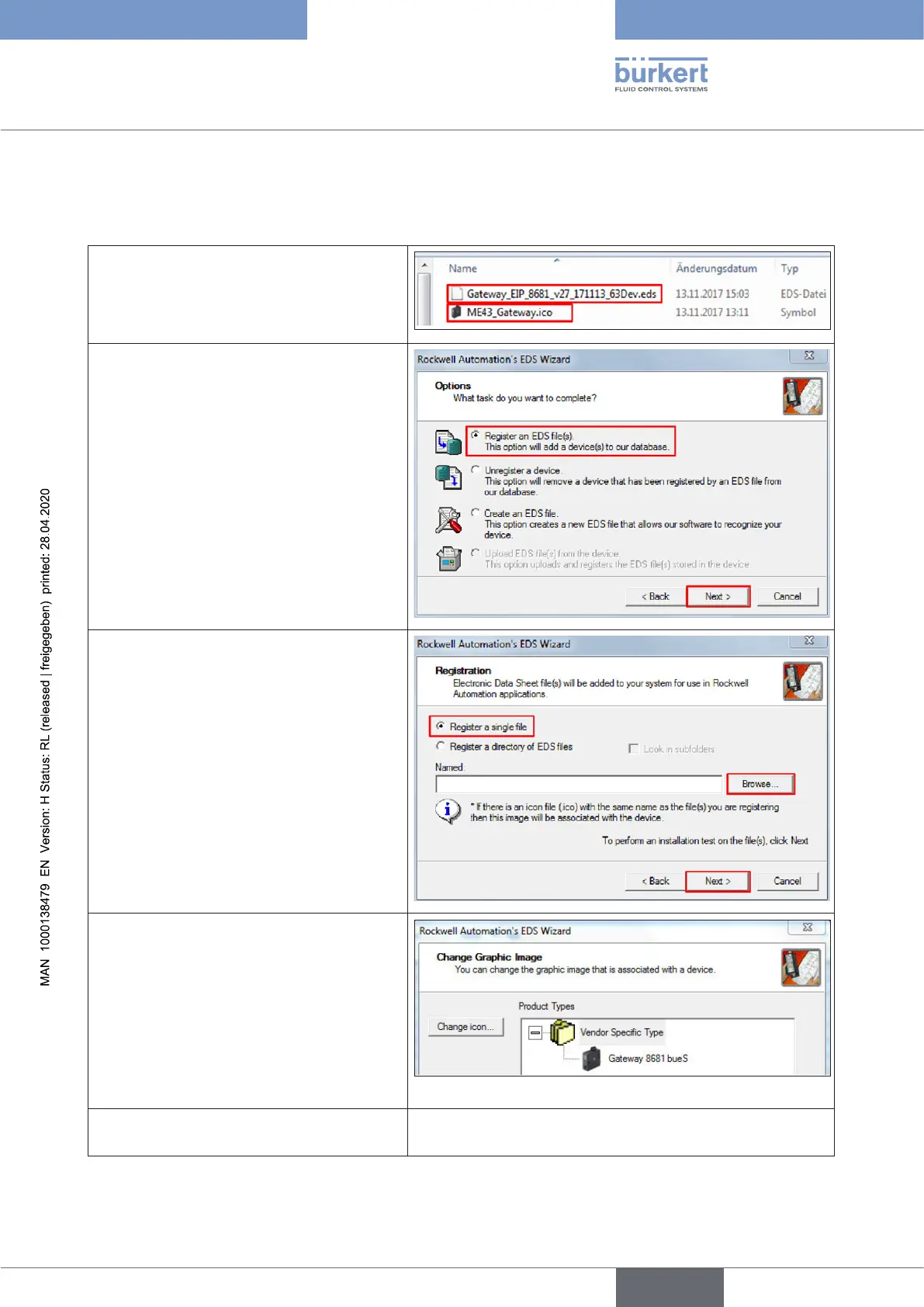
The gateway ME43 must be registered in the Logix Designer database:
→ EnsurethattheEDSleandtheICOle
are in the same folder
(Do not change the name of the ICO
le asitisreferencedintheEDSlewith
thisname!)
→ Startthe“LogixDesigner”
→ Gotothe“Tools”tab
→ Select“EDSHardwareInstallationTool”
→ A new window opens as shown in the
gureontheright
→ Select“RegisteranEDSle(s)”optionand
clickthe“Next”button
→ A new window opens as shown in the
gureontheright
→ Select“Registerasinglele”option
→ Browseyourcomputerfortheappro-
priateEDSle:
“Gateway_EIP_8681_vXX_
YYMMDD_63Dev.eds”
→ Clickthe“Next”button(twice)
→ A new window opens: “Change Graphic
Image”
→ If you want to change the icon graphic, click
the “Change icon ...” buttonand select
a graphic
→ Clickthe“Next”button(twice)
→ Thenclickthe“Finish”button
The gateway ME43 is now registered in the
Logix Designer database.
english
Control Head Type 8681



 To Next Page