100
büS/CAN open-Design
15.14.4 Central conguration management (Conguration client)
AsofrmwareB.01.00.00thecentralcongurationmanagement(e.g.withgatewayME43,asofrmware
A.03.02)issupported.ThismeansthatdefectiveBürkertdevicescanbeexchangedeasily,almostwithout
congurationeort.Todothis,thecongurationmanagementforthecongurationprovider(gateway)in the
BürkertCommunicatormustbesetto“Active”and the “Conguration client”parameterfortheconguration
device(controlhead)mustbesettomode“Automaticallyswitchon”(=factorysetting)or“Active”(Bürkert
Communicator: ControlHead/Generalsettings/Parameters/Congurationclient/Mode).
ViaamemorycardintheME43gateway,thelaststoreddeviceparametersandcongurationsareretained
andcanbetransferredtothenewBürkertdevice.
When replacing a defective control head, however, the hardware settings (all DIP switches) must be set on
the new device before connecting to the network, as they have been set on the device which is to be replaced.
Inthisway,allrelevantsoftwareparameters(duringthecommunicationprocesslastingseveralminutesto
integratethenewcontrolheadintothenetwork)canbetransferredautomatically.Thenewdevicemustthen
be“taught”.
Detailsandoperatingconditionsaredescribedinthesoftwaremanual“Centralcongurationmanagement
ofBürkertdevices”(seechapter“4.3”onpage14).
ForthiscongurationtheBürkertCommunicatorversion4.xorhigherisrequired.
(Duringadevicereset/factoryresetofthecongurationdevice(controlhead,asofrmwareB.01.00.00),the
“conguration client” parametermodeisresettothefactorysetting“Automaticallyswitchon”.)
15.15 Changing the gateway IP address
EachgatewayrequiresauniqueIPaddresstodistinguishseveralgatewaysfromeachother.
Ifrequired,thegatewayIPaddresscanbechangeddirectlyatthegatewayitselfusingitsmenuandarrow
keys or in four other ways:
using web server(“15.15.1”)orBürkert Communicator (“15.15.2”) or Logix Designer(“15.15.3”),please
usetheLogixDesignermanualforthis)orRS Linx (“15.15.4”).
AfterchangingthegatewayIPaddress,register(“15.16”)andinstallthegatewayusingLogixDesigner(see
“15.17”).
The gateway must always be connected to the same network as the PC!
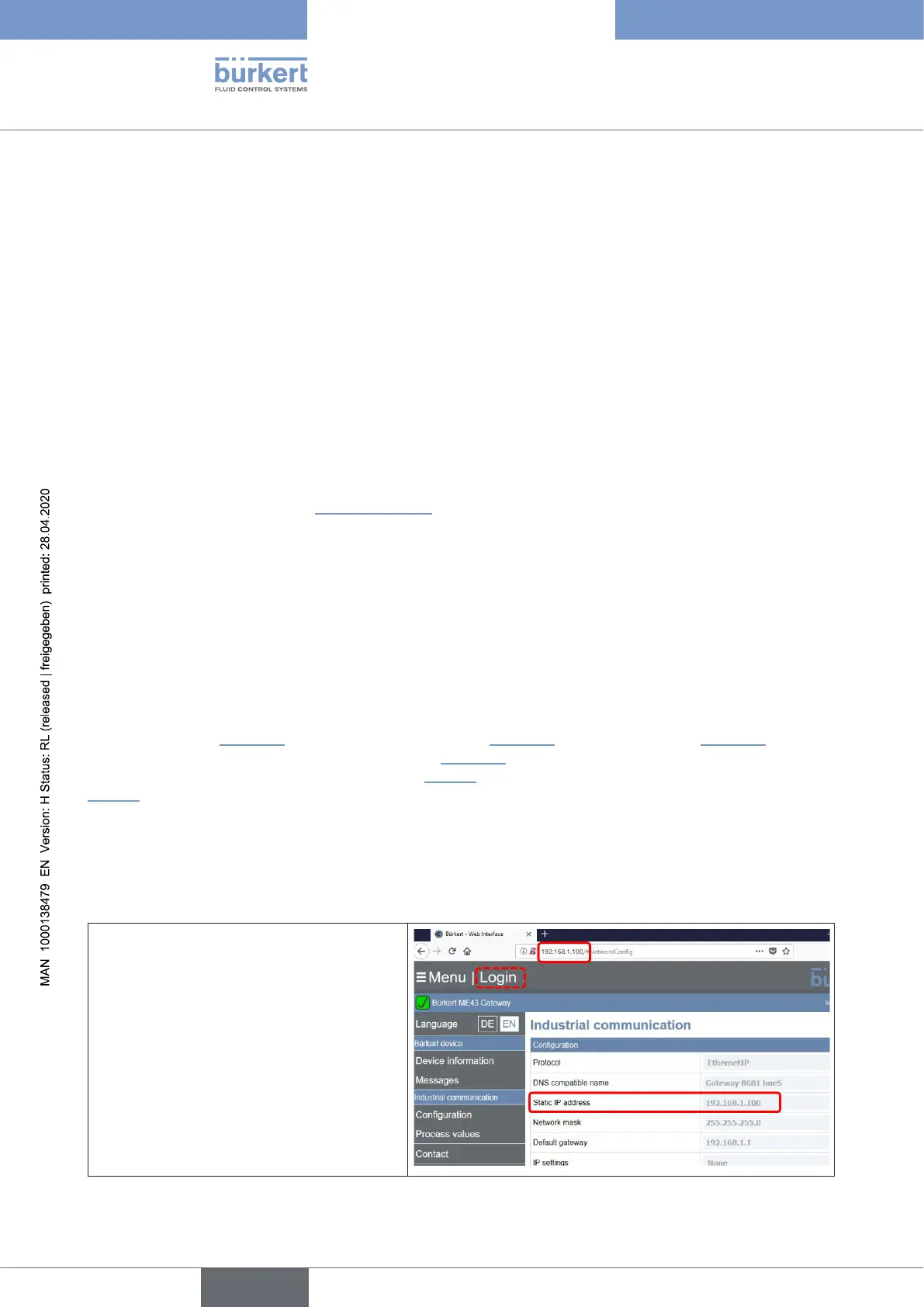
15.15.1 Changing the gateway IP address using web server
→ Call the gateway’s web server with
abrowser(enteronlythecurrentIP
address number:
“http://192.168.1.100”)
(thewindowwhichopensforthisIP
address shows the default
“StaticIPaddress”ofallgatewaysME43
(factorysetting):192.168.1.100)
→ Thenclick“Login”
english
Control Head Type 8681



 To Next Page