321
3 Menu Settings
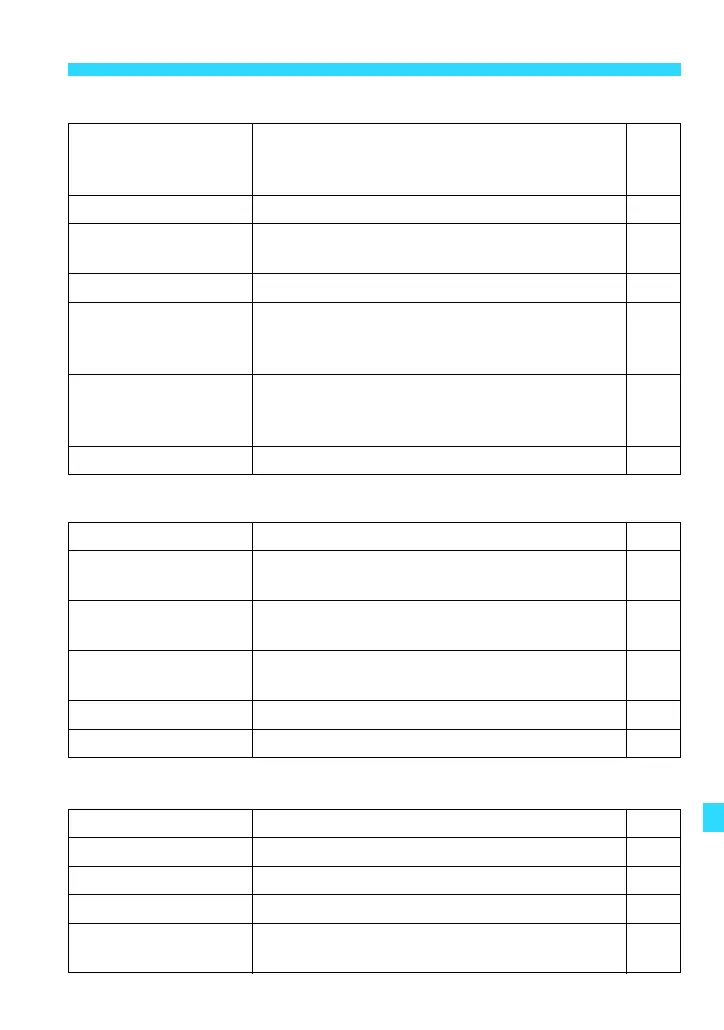
T Playback 1 (Blue) Page
a Playback 2 (Blue)
m Set-up 1 (Yellow)
Protect images
Select images / All images in folder /
Unprotect all images in folder / All images on
card / Unprotect all images on card
252
Rotate image
Rotate vertical images 233
Erase images
Select and erase images / All images in folder
/ All images on card
254
Print order Specify images to be printed (DPOF) 278
Photobook Set-up
Select images / All images in folder / Clear all
in folder / All images on card / Clear all on
card
282
Creative filters
Grainy B/W / Soft focus / Fish-eye effect / Art
bold effect / Water painting effect / Toy
camera effect / Miniature effect
260
Resize
Downsize the image’s pixel count 262
Cropping Crop part of the image 265
xHistogram
display
Brightness / RGB 258
Image jump with 5
1 image / 10 images / 100 images / Date /
Folder / Movies / Stills / Rating
232
Slide show
Images (content) to play back / Display time /
Repeat / Transition effect / Background music
243
Rating
[OFF] / l / m / n / o / p 234
Control over HDMI Disable / Enable 249
Select folder Create and select a folder 212
File numbering Continuous / Auto reset / Manual reset 214
Auto rotate
OnzD / OnD / Off 218
Format card
Initialize and erase data on the card 57
Eye-Fi settings
Displayed when a commercially-available
Eye-Fi card is used.
305















 To Next Page