3 Menu Settings
322
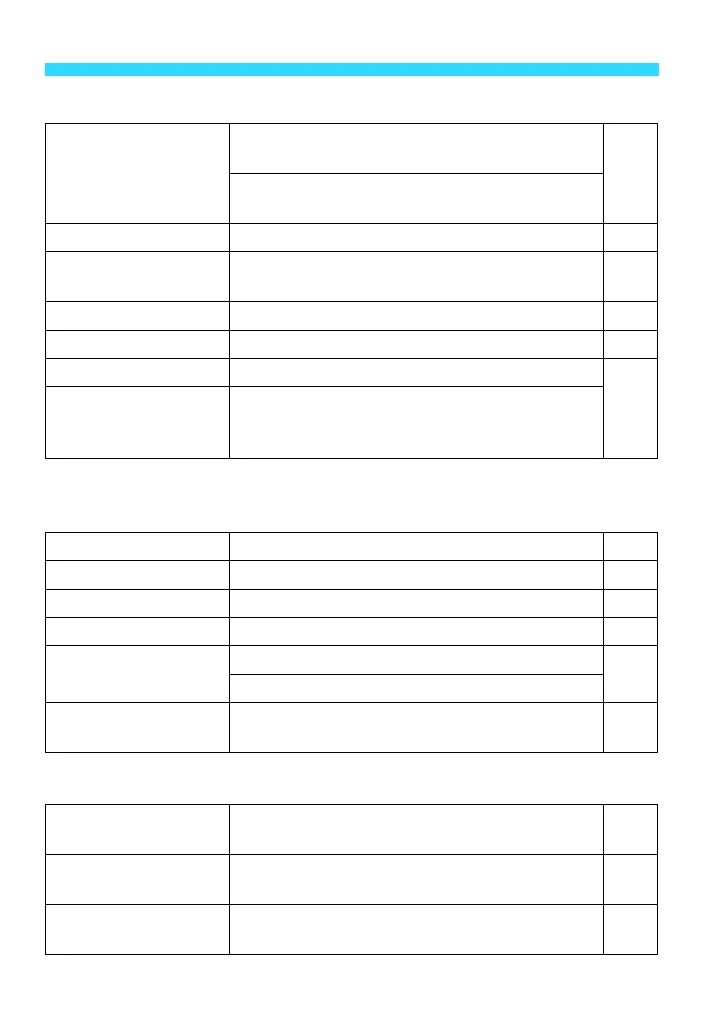
n Set-up 2 (Yellow) Page
* For details, refer to the Wi-Fi Function Instruction Manual (PDF).
o Set-up 3 (Yellow)
p Set-up 4 (Yellow)
Power saving
LCD auto off: 15 sec. / 30 sec. / 1 min. /
3 min. / 5 min. / 10 min. / 30 min.
210
Camera auto off: 0 sec. / 30 sec. / 1 min. /
3 min. / 5 min. / 10 min. / Disable
LCD brightness
Seven brightness levels provided 211
Date/Time/Zone
Date (year, month, day) / Time (hour, min.,
sec.) / Daylight saving time / Time zone
41
LanguageK
Select the interface language 43
Video system
NTSC / PAL 251
Wi-Fi
Disable / Enable
-
*
Wi-Fi function
Transfer images between cameras / Connect to
smartphone / Print from Wi-Fi printer / Upload to
Web service / View images on DLNA devices
Beep
Enable / Touch to h / Disable 208
Screen color
Select the shooting settings screen color 223
Feature guide
Enable / Disable 62
Touch control
Standard / Sensitive 61
Sensor cleaning
Auto cleaning: Enable / Disable
224
Clean now
GPS device settings
Settings available when the GPS Receiver
GP-E2 (sold separately) is attached
-
Displays camera
settings
Display major camera settings 219
Custom Functions
(C.Fn)
Customize camera functions as desired 286
Clear settings
Clear all camera settings / Clear all Custom
Func. (C.Fn)
220















 To Next Page