Removing the Front Cover
■ Preparation
1. Remove the Cartridge Tray.(Refer to “Removing the
Cartridge Tray” on page 127)
2. Remove the Right Cover.(Refer to “Removing the
Right Cover” on page 120)
3. Remove the Left Cover.(Refer to “Removing the Left
Cover” on page 118)
4. Remove the Right Front Cover.(Refer to “Removing
the Right Front Cover” on page 121)
■ Procerdure
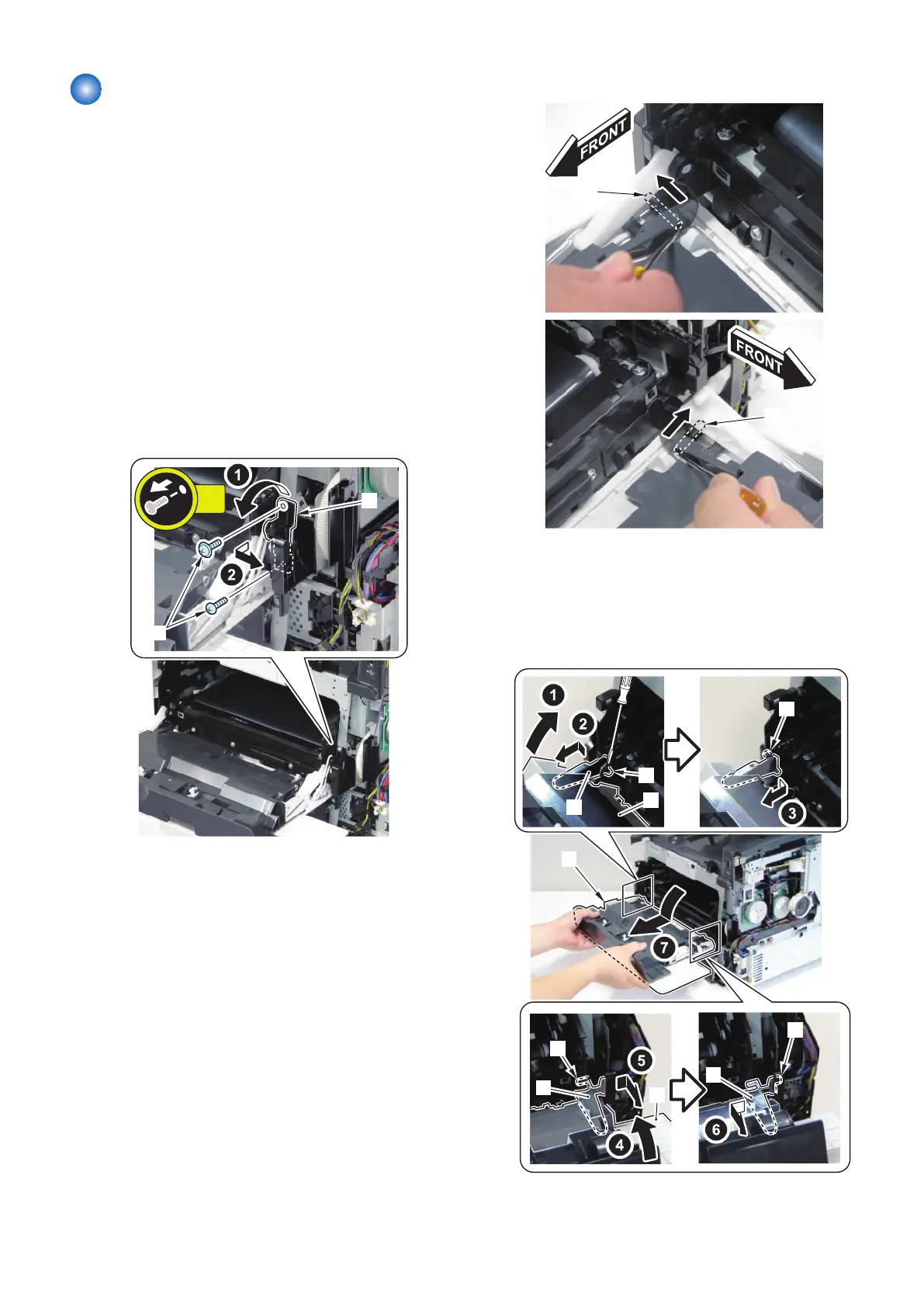
1. Remove the bushing support [1].
• 2 screws [2]
2. Remove the 2 pins [1] using a screwdriver.
3. While closing the Front Cover [1], release the shaft
[3] of the Left Link [2] and the protrusion [4].
4. While closing the Front Cover [1], release the shaft
[6] of the Right Link [5] and the protrusion [7], and
remove the Front Cover [1].
[1]
[1]
[2]
[5]
[5]
[3]
[4]
[1]
[6]
[7]
4. Disassembly/Assembly
122



 To Next Page