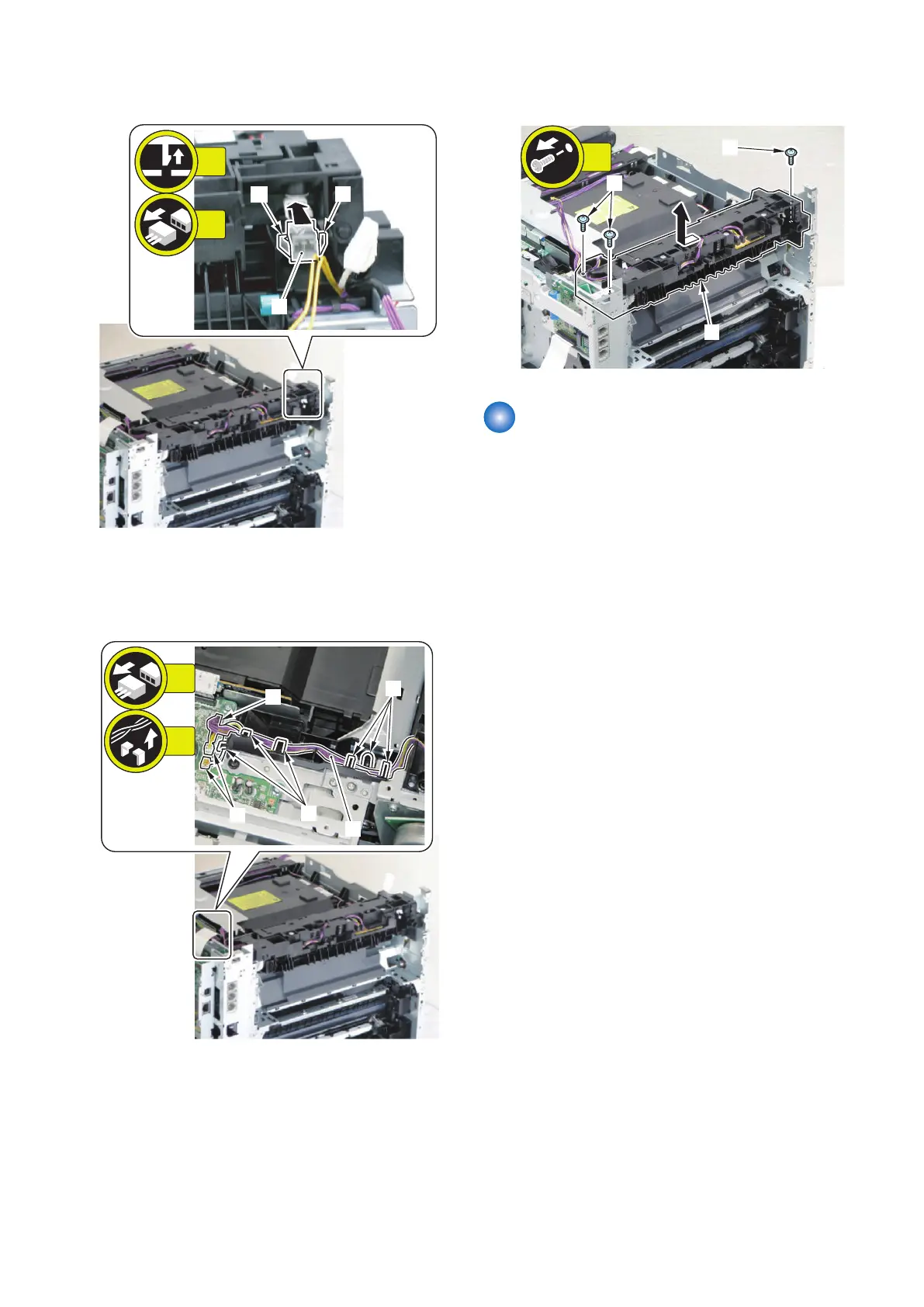
2. Release the 2 claws [1], and disconnect the
connector [2].
3. Remove the wire harness [1] from the wire harness
guide.
• 3 connectors [2]
• 6 fixing guides [3]
4. Remove the Delivery Unit [1].
• 3 screws [2]
Removing the Duplex Feed
Unit
■ Preparation
1. Removing the Right Cover.(Refer to “Removing the
Right Cover” on page 120)
2. Removing the Left Cover.(Refer to “Removing the
Left Cover” on page 118)
3. Removing the Secondary Transfer Feed Unit.(Refer
to “Removing the Secondary Transfer Feed Unit” on
page 219)
4. Removing the Rear Upper Cover.(Refer to
“Removing the Rear Upper Cover” on page 123)
5. Removing the Rear Cover.(Refer to “Removing the
Rear Cover” on page 123)
6. Removing the Rear Lower Cover.(Refer to
“Removing the Rear Lower Cover” on page 123)
4. Disassembly/Assembly
221



 To Next Page