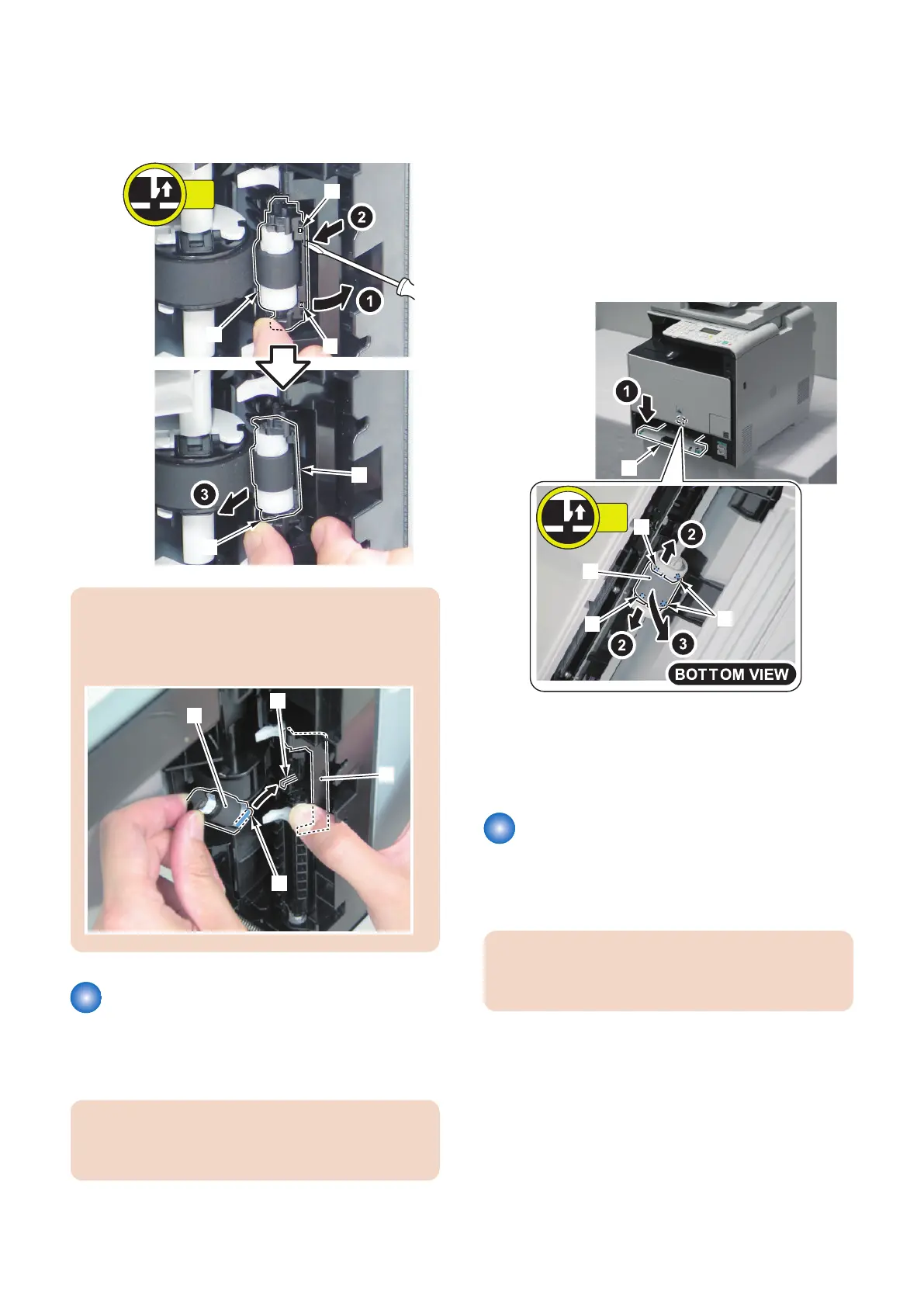
4. Open the Holder [1] remove the Cassette Separation
Roller [2].
• 2 Claws [3]
• 1 projection [4]
CAUTION:
At installation, be sure to align the protrusion [A] of the
Cassette Separation Roller [2] with the groove [B] of
the holder while opening the holder [1].
Removing the MP Tray Pickup
Roller
■ Procedure
CAUTION:
Do not touch the surface of the Multi-purpose Tray
Pickup Roller.
1. Turn ON the power switch.
2. Execute the following items in Service mode.
COPIER > FUNCTION > VIFFNC > FD-R-CHG
3. The Multi-purpose Tray Pickup Roller rotates to the
replacement position.
4. Remove the cassette.
5. Lower the Multi-purpose Tray [1].
6. Remove the Multi-purpose Tray Pickup Roller [2].
• 2 Claws [3]
• 2 Shafts [4]
7. After replacing the Multi-purpose Tray Pickup
Roller, turn OFF and then ON the power, and then
return it to its original position from the replacement
position.
Removing the MP Tray
Separation Pad
■ Procedure
CAUTION:
Do not touch the surface of the Multi-purpose Tray
Separation Pad.
4. Disassembly/Assembly
211



 To Next Page