Image Formation System
Disassembly/Assembly
Procedure
Removing the ITB Unit
■ Preparation
1. Removing the Cartridge Tray.(Refer to “Removing
the Cartridge Tray” on page 127)
■ Procedure
CAUTION:
Be sure not to touch the surface of the ITB and the
Secondary Transfer Roller when disassembling/
assembling.
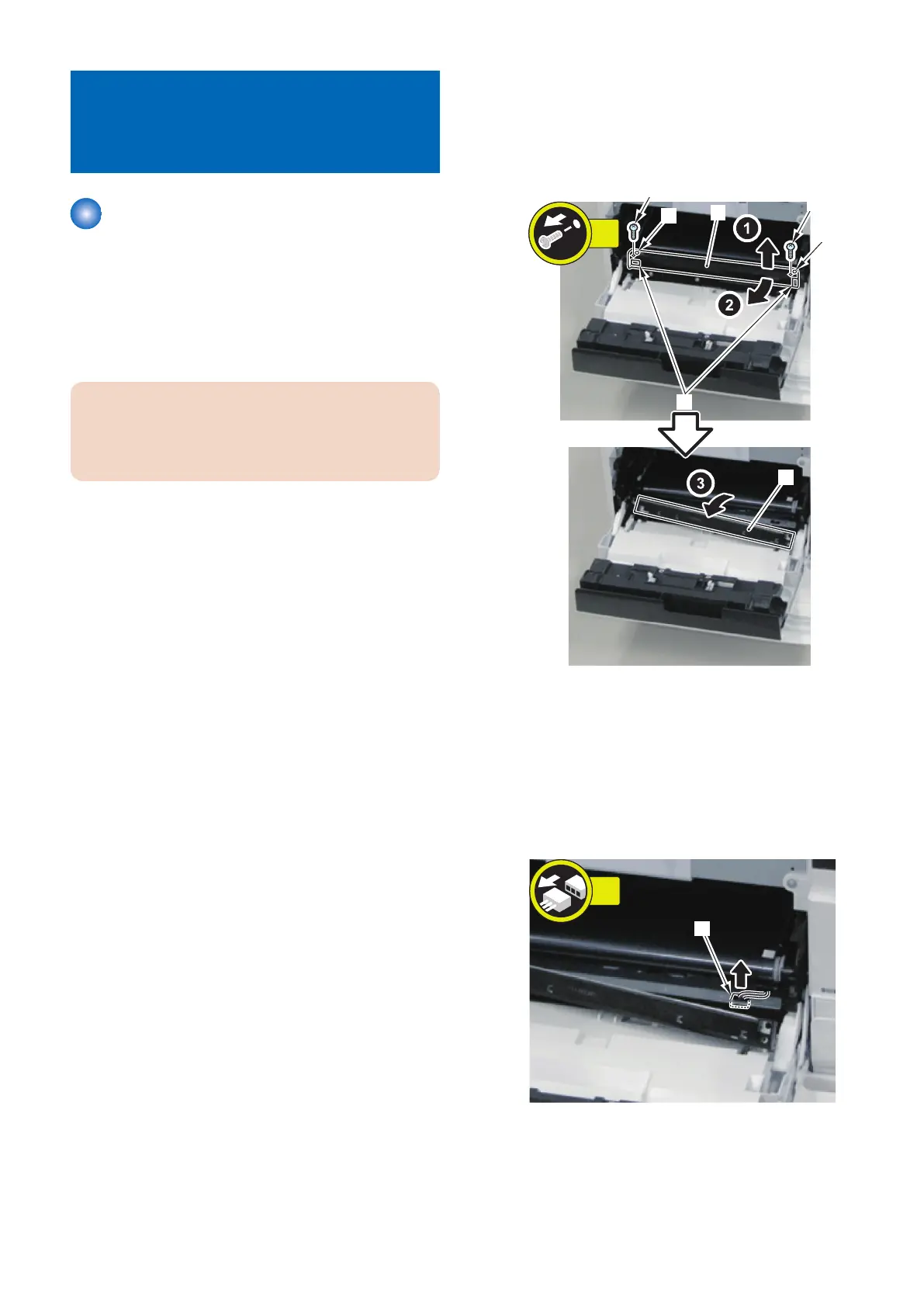
1. Pull out the Patch Density/Registration Sensor Unit
[1] toward the front.
• 2 Screws [2]
• 2 Bosses [3]
• 2 Protrusions [4]
When it is difficult to pull out the Patch Density/
Registration Sensor Unit toward the front and there is a
risk of contact with the ITB, refer to "Removing the Patch
Density and Registration Sensor Unit" so that the Patch
Density/Registration Sensor Unit [1] can be further
pulled out. (Refer to “Removing the Patch Density and
Registration Sensor unit” on page 193)
2. Disconnect the connector [1].
4. Disassembly/Assembly
191



 To Next Page