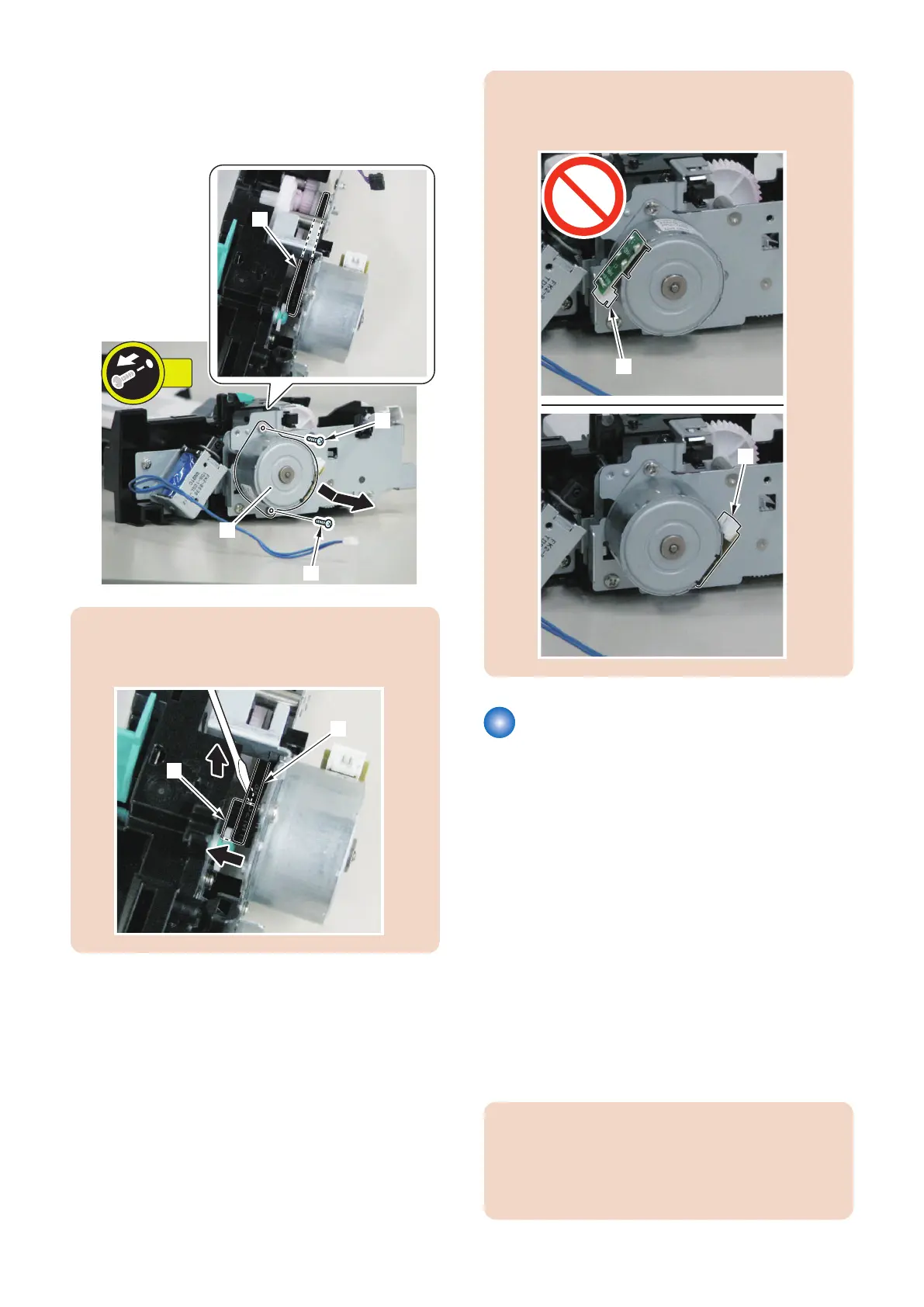
1. Remove the ADF Motor [1] in the direction of the
arrow.
• 2 screws [2]
• 1 belt [3]
CAUTION:
When installing the ADF Pickup Motor, be sure to hook
the gear [1] of the motor on the belt [2].
CAUTION:
When installing the ADF Pickup Motor, be sure to install
with the connector [1] on the right side.
Removing the Scoopup sheet
holder
■ Preparation
1. Remove the Right Cover.(Refer to “Removing the
Right Cover” on page 120)
2. Remove the Left Cover.(Refer to “Removing the Left
Cover” on page 118)
3. Remove the ADF Unit + Reader Unit.(Refer to
“Removing the ADF Unit + Reader Unit” on page
130)
4. Seaparare the ADF Unit from the Reader Unit.(Refer
to “Separating the ADF Unit + Reader Unit” on page
131)
■ Procedure
CAUTION:
Be sure to perform "After Replacing the Scoopup sheet
holder (Refer to “After Replacing the Scoopup Sheet
Holder” on page 143)" when replacing the Scoopup
sheet holder, respectively.
4. Disassembly/Assembly
142



 To Next Page