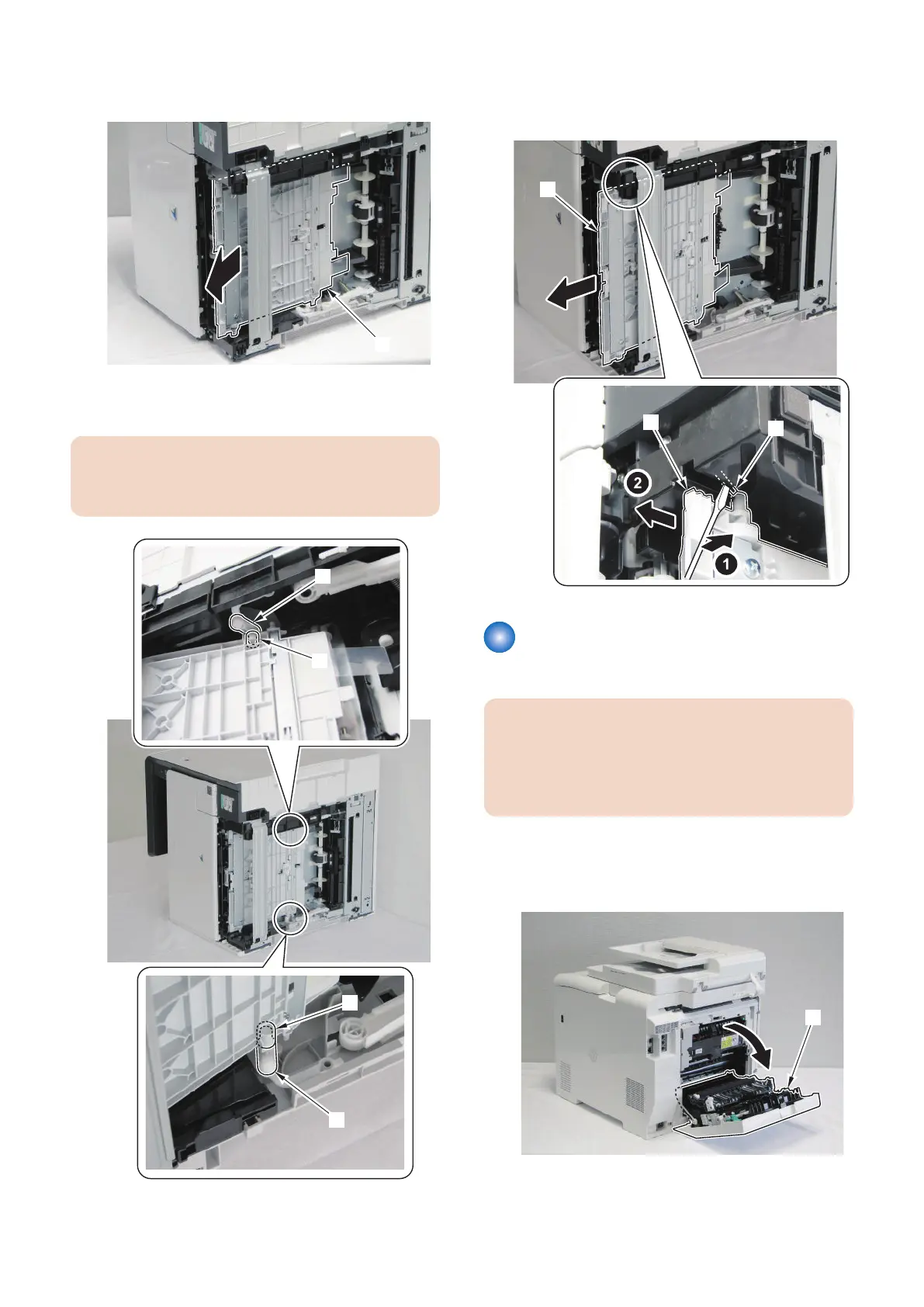
3. Move the MP Tray Pickup Unit [1] in the direction of
the arrow.
4. Remove the 2 Links [1] (left and right) from the
bushings [2] of the MP Tray Pickup Unit.
CAUTION:
When removing the MP Tray Pickup Unit, be careful
not to lose the link.
5. Push a flat-blade screwdriver to the stopper [1] and
remove the MP Tray Pickup Unit [2] in the direction
of the arrow.
Removing the Secondary
Transfer Feed Unit
CAUTION:
Secondary Transfer Outer Roller is included in
Secondary Transfer Feed Unit so when replacing the
Secondary Transfer Outer Roller, be sure to replace
the Secondary Transfer Feed Unit itself.
■ Procedure
1. Open the Rear Cover [1].
4. Disassembly/Assembly
219



 To Next Page