COPIER>IO>R-CON
Ad-
dress
BIT Description Remarks
P001
2
While the screen is open, the values are updated periodically (with an
interval of 1 second).
Display sensor status (HPS)
P002 - No sensor allocated; 0 is always shown While the screen is open, the values are updated periodically (with an
interval of 1 second).
ADJUST
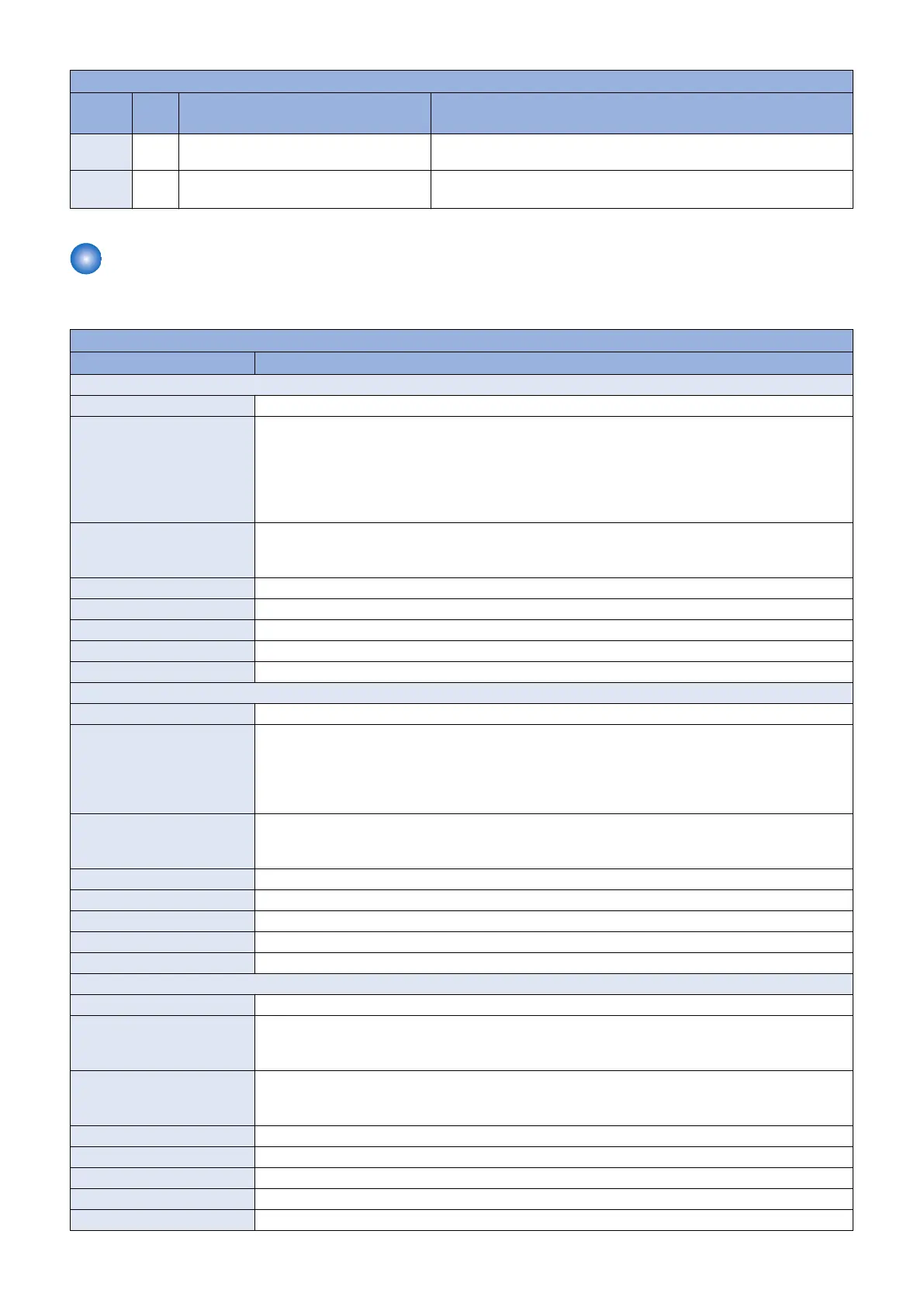
■ ADJ-XY
COPIER > ADJUST > ADJ-XY
Item Description
ADJ-X
Title Adj of img pstn in book mode: vert scan
Details To adjust the image reading start position (image leading edge position) in the vertical scanning direction
at copyboard reading.
When replacing the Main Controller PCB, enter the value of service label.
When the non-image width is larger than the standard value, set the smaller value.
When out of original area is copied, set the larger value.
As the value is incremented by 1, the image position moves to the trailing edge side by 0.1mm.
Use case • When replacing the Reader Unit
• When replacing the CIS Unit (Scanner Unit)
• When replacing the Main Controller PCB
Adj/set/operate method Enter the setting value (switch negative / positive by * key) and press Apply key.
Caution After the setting value is changed, write the changed value in the service label.
Display/adj/set range -30 to 30
Unit 0.1 mm
Default value 0
ADJ-Y
Title Adjustment of image position at copyboard reading (horizontal scanning direction)
Details To adjust the image reading start position in the horizontal scanning direction at copyboard reading.
When replacing the Main Controller PCB, enter the value of service label.
When the non-image width is larger than the standard value, set the smaller value.
When out of original area is copied, set the larger value.
As the value is incremented by 1, the image position moves to the front by 0.1mm.
Use case • When replacing the Reader Unit
• When replacing the CIS Unit (Scanner Unit)
• When replacing the Main Controller PCB
Adj/set/operate method Enter the setting value (switch negative / positive by * key) and press Apply key.
Caution After the setting value is changed, write the changed value in the service label.
Display/adj/set range -10 to 10
Unit 0.1 mm
Default value 0
ADJ-Y-DF
Title Adj img pstn in ADF mode:horz scan
Details To adjust the image reading start position in the horizontal scanning direction at ADF reading.
When replacing the Main Controller PCB, enter the value of service label.
As the value is incremented by 1, the image position moves to the front by 0.1mm.
Use case • When replacing the ADF
• When replacing the CIS Unit (Scanner Unit)
• When replacing the Main Controller PCB
Adj/set/operate method Enter the setting value (switch negative / positive by * key) and press Apply key.
Caution After the setting value is changed, write the changed value in the service label.
Display/adj/set range -10 to 10
Unit 0.1 mm
Default value 0
8. Service Mode
266



 To Next Page