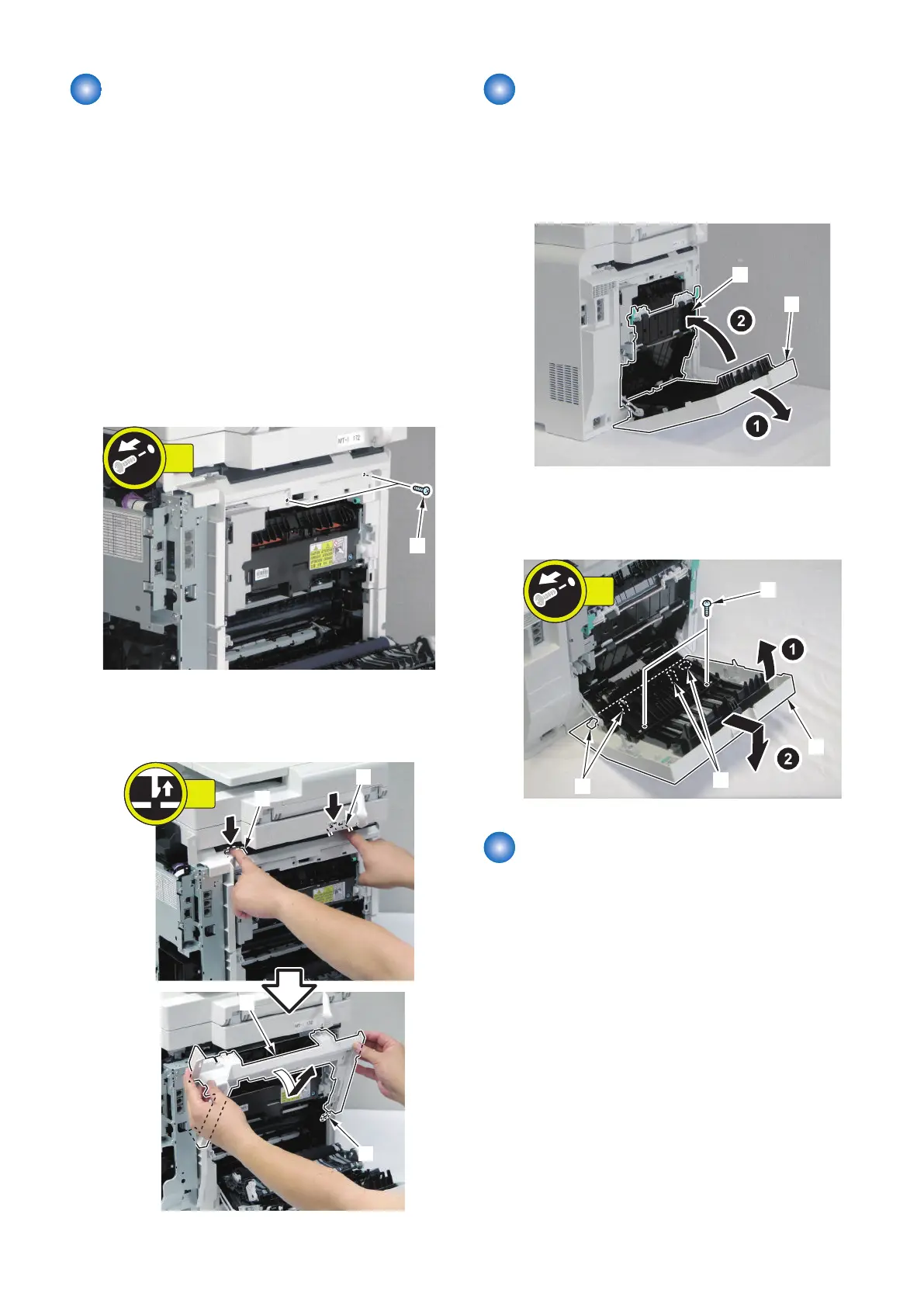
Removing the Rear Upper
Cover
■ Preparation
1. Remove the Right Cover.(Refer to “Removing the
Right Cover” on page 120)
2. Remove the Left Cover.(Refer to “Removing the Left
Cover” on page 118)
■ Procedure
1. Close the ADF Unit/Copyboard + Reader Unit.
2. Open the Rear Cover.
3. Remove the 2 screws [1].
4. Push the 2 claws [1] to remove the Rear Upper Cover
[2].
• 1 Hook [3]
Removing the Rear Cover
■ Procedure
1. Open the Rear Cover [1].
2. Close the Duplex Feed Unit [2].
3. Remove the Rear Cover [1].
• 2 screws [2]
• 4 hooks [3]
Removing the Rear Lower
Cover
■ Preparation
1. Remove the Right Cover.(Refer to “Removing the
Right Cover” on page 120)
2. Remove the Left Cover.(Refer to “Removing the Left
Cover” on page 118)
3. Remove the Rear Upper Cover.(Refer to “Removing
the Rear Upper Cover” on page 123)
4. Remove the Rear Cover.(Refer to “Removing the
Rear Cover” on page 123)
4. Disassembly/Assembly
123



 To Next Page