Laser Exposure System
Disassembly/Assembly
Procedure
Removing the Laser Scanner
Unit
■ Preparation
1. Removing the Right Cover.(Refer to “Removing the
Right Cover” on page 120 )
2. Removing the Left Cover.(Refer to “Removing the
Left Cover” on page 118 )
3. Removing the Right Front Cover.(Refer to
“Removing the Right Front Cover” on page 121 )
4. Removing the ADF Unit + Reader Unit.(Refer to
“Removing the ADF Unit + Reader Unit” on page
130 )
5. Removing the Rear Upper Cover.(Refer to
“Removing the Rear Upper Cover” on page 123 )
6. Removing the Upper Cover.(Refer to “Removing the
Upper Cover” on page 125 )
7. Removing the Rear Cover.(Refer to “Removing the
Rear Cover” on page 123 )
8. Removing the Rear Lower Cover.(Refer to
“Removing the Rear Lower Cover” on page 123 )
9. Removing the Rear Cover Rib Unit.(Refer to
“Removing the Rear Cover Rib Unit” on page 125)
10. Removing the Duplex Printing Reverse Drive Unit.
(Refer to “Removing the Duplex Reverse Drive Unit”
on page 179 )
11. Removing the Fixing Assembly.(Refer to “Removing
the Fixing Assembly” on page 200)
12. Removing the Delivery Unit.(Refer to “Removing the
Delivery Unit” on page 220 )
■ Procedure
CAUTION:
When replacing the Laser Scanner Unit, be sure to
perform the following procedure.(Refer to “After
Replacing the Laser Scanner Unit” on page 188)
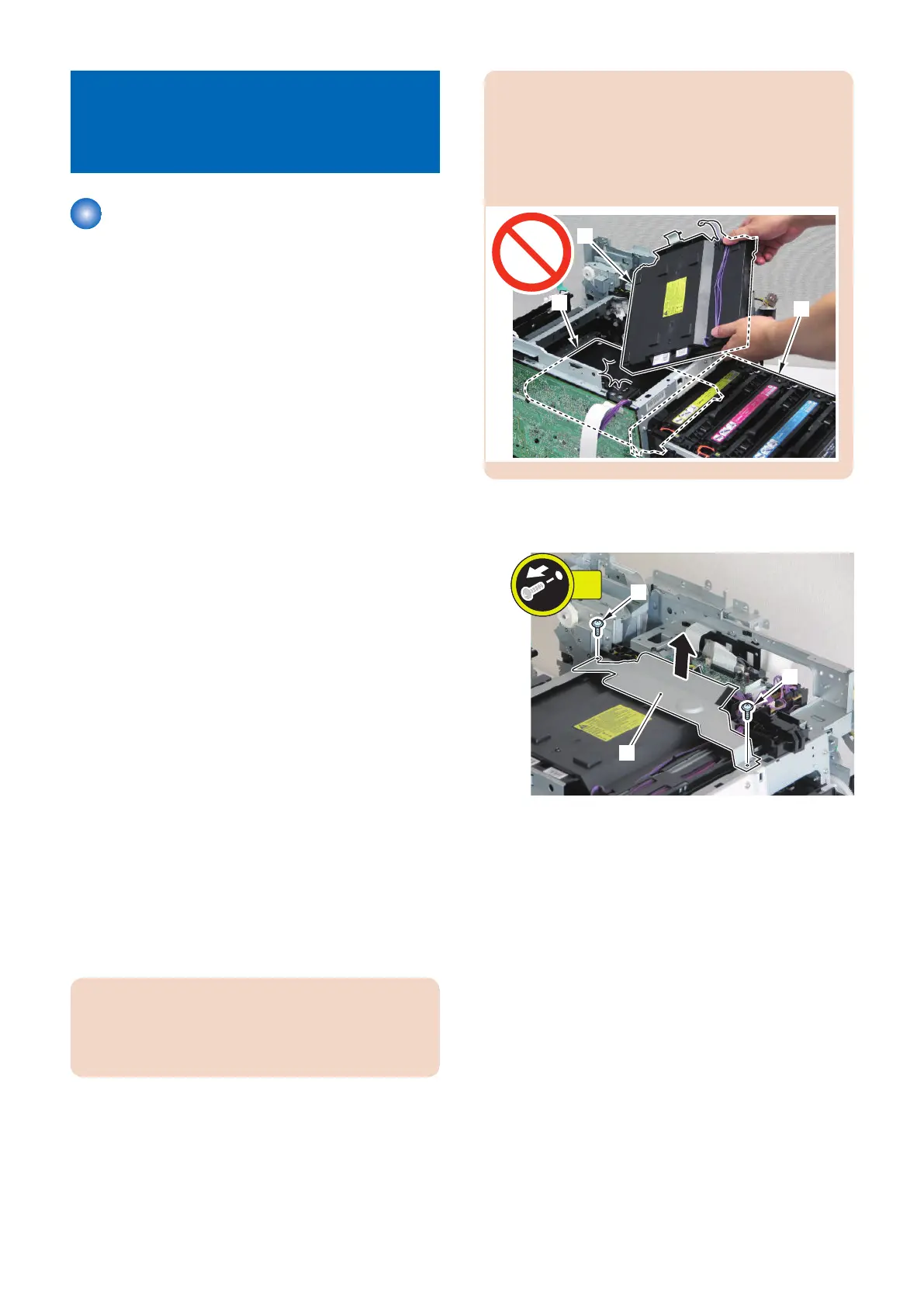
CAUTION:
The ITB Unit is under the Laser Scanner Unit. Ensure
to close a Cartridge Tray when performing this
procedure, because there is a possibility that the ITB
Unit might be damaged when the Laser Scanner Unit
is mistakenly dropped during installation/removal.
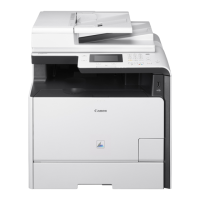
1. Remove the wire harness cover plate [1].
• 2 screws [2]
4. Disassembly/Assembly
185



 To Next Page