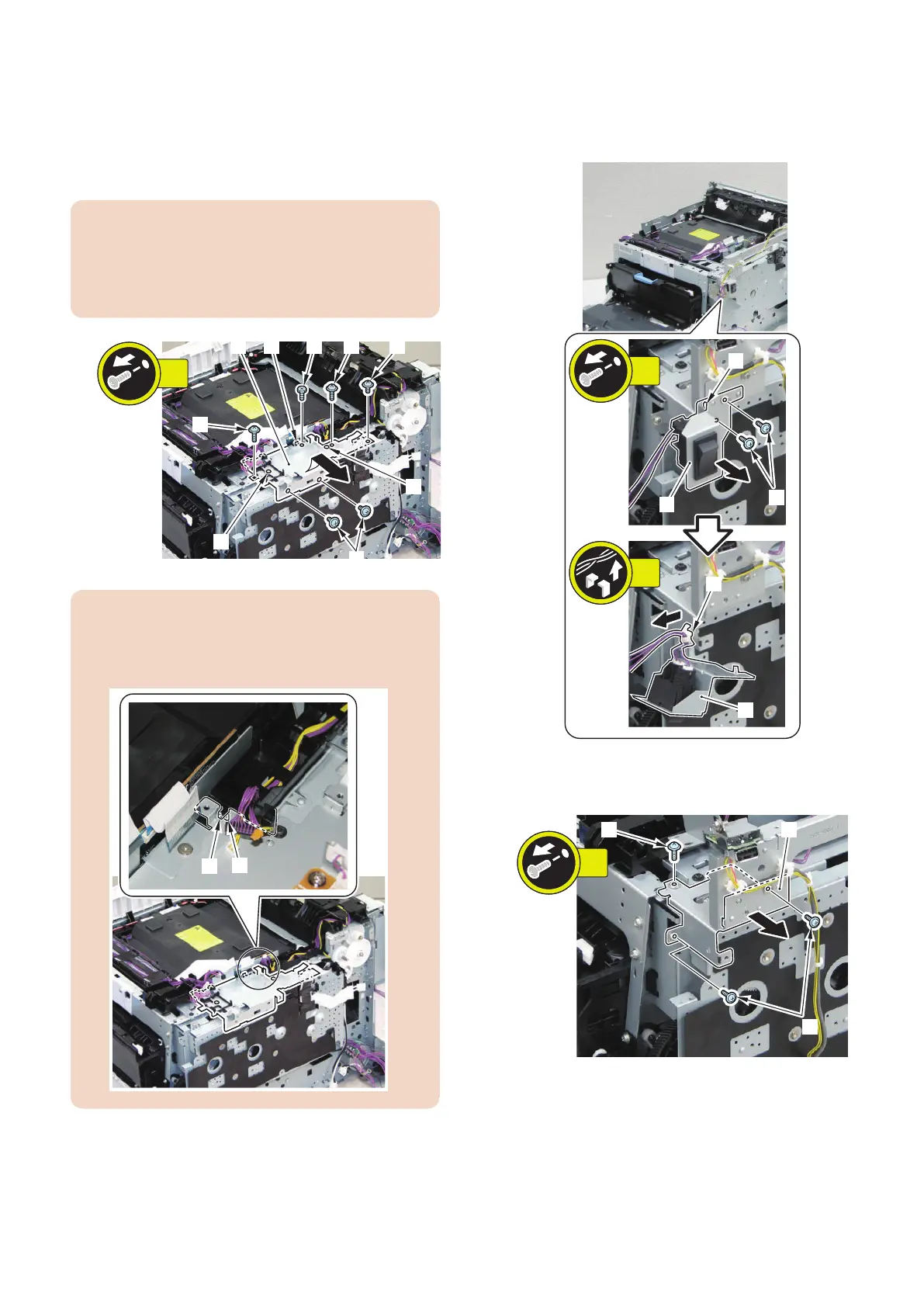
7. Remove the DC Controller Support Plate [1].
• 1 Special Flat-head Screw [2]
• 2 Black Screws [3]
• 3 Screws [4]
• 2 Bosses [5]
• 1 Protrusion [6]
CAUTION:
Since the Special Flat-head Screw [2] adjusts the
interval between the plate [1] and parts in the vicinity,
be sure to install the Special Flat-head Screw [2] in the
location it was in before removal.
[2]
[4]
[3]
[1]
[5]
[5]
[6]
[3] [4]
6x
CAUTION:
When installing, be sure to place the [A] part of DC
Controller Support Plate under the [B] part of the
Harness Guide.
8. Remove the Main Switch Unit [1].
• 2 Screws [2]
• 1 Hook [3]
• 1 Reuse Band [4]
9. Remove the Main Switch Unit Connecting Plate [1].
• 3 Screws [2]
4. Disassembly/Assembly
175



 To Next Page