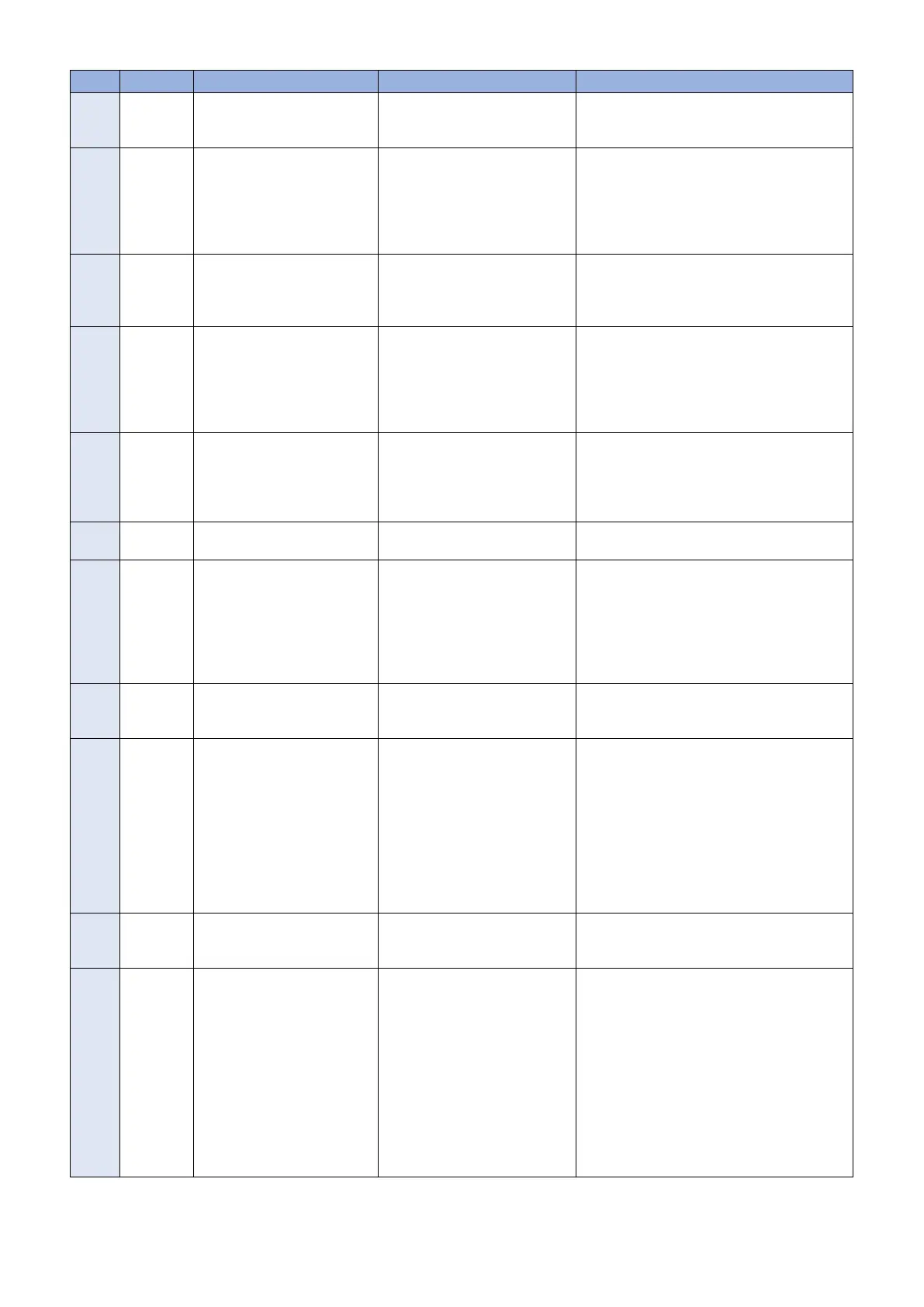
No. Code Character strings Cause Remedy
19 8xxx 2002 URL server specified is illegal A URL different to that specified
by the UGW has been set.
Check that the value of URL of UGW (RGW-
ADR) is https://a01.ugwdevice.net/ugw/agen-
tif010.
20 8xxx 2003 Network is not ready, try later Communication attempted with-
out confirming network connec-
tion, just after turning OFF and
then ON the main power of this
machine in which the network
preparations are not ready.
Check the network connection, as per the initial
procedures described in the troubleshooting.
Perform a communication test (COM-TEST)
about 60 seconds later, after turn on the device.
21 8xxx 2004 Server response error ([Hexa-
decimal]) [Error detailed in
UGW]*1
Communication with UGW has
been successful, but an error of
some sort has prevented UGW
from responding.
Try again after a period of time.
Check detailed error code (Hexadecimal) and
[Error details in UGW] from UGW displayed af-
ter the message.
22 8xxx 200A Server connection error • TCP/IP communication fault
• The IP address of device is
not set.
• Check the network connection, as per the
initial procedures described in the trouble-
shooting.
• When proxy is used, make the settings for
proxy, and check the status of the proxy
server.
23 8xxx 200B Server address resolution er-
ror
Server address name resolution
has failed.
• Check that the value of URL of UGW
(RGW-ADR) is https://a01.ugwdevice.net/
ugw/agentif010.
• Check that Internet connection is available
in the environment.
24 8xxx 2014 Proxy connection error Could not connect to proxy serv-
er due to improper address.
Check proxy server address / port and re-enter
as needed.
25 8xxx 2015 Proxy address resolution error Could not connect to proxy serv-
er due to name resolution error of
proxy address.
• Check that the proxy server name is cor-
rect.
If the proxy server name is correct, check
the DNS connection, as per the initial pro-
cedures described in the troubleshooting.
• Specify the IP address as the proxy server
name.
26 8xxx 201E Proxy authentication error Proxy authentication is failed. Check the user name and password required in
order to login to the proxy, and re-enter as nee-
ded.
27 8xxx 2028 Server certificate error • No route certificate installed
in device.
• Certificate other than that in-
itially registered in the user's
operating environment is
being used, but has not
been registered with the de-
vice.
• The date and time of the de-
vice is not correct.
• Install the latest device system software.
(Upgrade)
• Correctly set the date and time of the de-
vice.
• Execute CLEAR > CA-KEY, and turn OFF
and then ON the device. (The CA certifi-
cate at the time of shipment is automati-
cally installed.)
28 8xxx 2029 Server certificate verify error The server certificate verification
error occurred.
Check that the value of URL of UGW (RGW-
ADR) is https://a01.ugwdevice.net/ugw/agen-
tif010.
29 8xxx 2046 Server certificate expired • The route certificate regis-
tered with the device has ex-
pired.
• Certificate other than that in-
itially registered in the user's
operating environment is
being used, but has not
been registered with the de-
vice.
• The device time and date is
outside of the certificated
period.
Check that the device time and date are cor-
rectly set.
If the device time and date are correct, upgrade
to the latest system software.
2. Technical Explanation
56



 To Next Page