THS – FI022GB2K8v3 --- V - MAINTENANCE
89
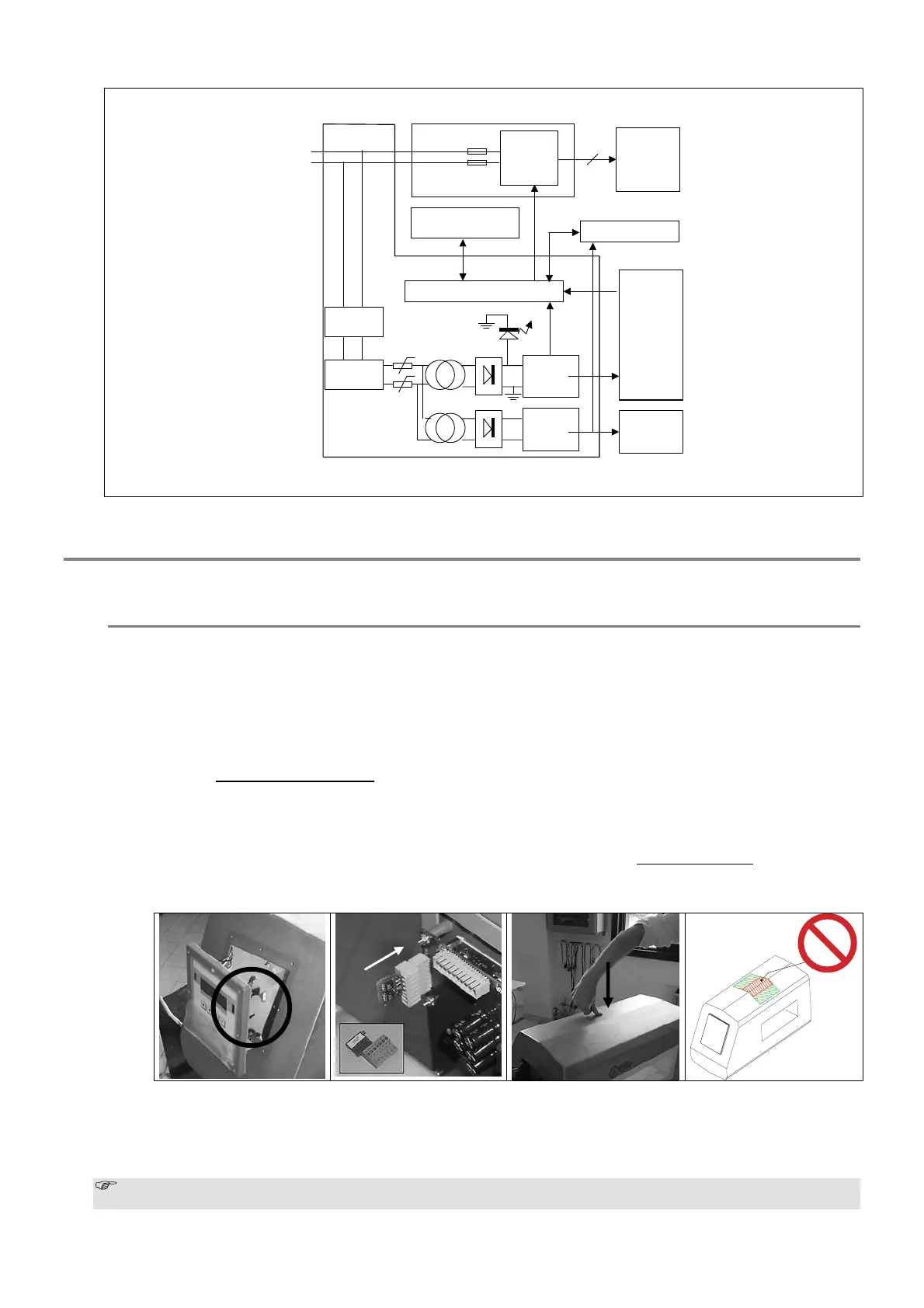
MDL card
Variable
frequency
3-phases
generator
motor
4
L0
L1
Switch I2
F1
F2
ALM card
Voltage
regulators
Voltage
regulators
Controller
Metal
Detector
SCD card
Emergency
switch
Sensors/Actuators
L2
Switch I1
115/230V
STC card
Keyboard and signals
Fig. V-8c block diagram of the THS system with MDL card
Replacing Card SCD
If the control card has to be replaced, the serial number of the device must be quoted in the order; the card will only be
able to be used with that same detector.
Procedure
• Switch off the device
• The card is attached to the detector control panel. Remove the control panel by unscrewing the fixing screws, taking
care not to pull on the internal connecting wires.
• Disconnect the card and connect the internal wires to the replacement card.
• Plug the SPM memory card from the old control card into the new one. N.B.: the memory card contains all the
device’s stored programming, product and event data.
• Reassemble the control panel.
• Switch on the detector and reset the programming.
• Carry out the TL Autolearn procedure
:
• The procedure must be carried out in an interference-free environment: deactivate the THS conveyor belt and any
other power devices in the area.
• Set the parameter TL Autolearn = ON and exit from programming.
• The message “Pass” will appear on the display: press forcibly for at least a second on the probe (see figs. below –
press in the middle of the belt width at either the entrance or the exit, but NOT in the centre
). In the case of
models THS/PH and THS/G, make the probe vibrate. Repeat TL autolearn for each band (BA) and for each
channel (CH).
• N.B.: in the case that the procedure is not carried out, or is carried out improperly, compensation for the products
may not be correct. As a check, select the “default” product and make some tests with the sample indicated in the
test card enclosed with this manual.
• Check that the system operates properly with all the products stored in memory.
The SCD card stores the values of all the operating parameters, including those of the power-supply and control
unit. If the power supply unit is replaced, therefore, it is not necessary to reprogram the system..



 To Next Page