THS – FI022GB2K8v3 --- V - MAINTENANCE
59
Sensitivity check with reference sample
It is important to check proper operation (sensitivity and ejection of material) of the metal detector periodically by carrying
out a sensitivity test with a reference sample.
Test using a sample defined by the customer
The reference sample is identified at the end of the installation phase based on the customer’s specifications; the
sensitivity, trajectory and orientation of the sample must be noted if it is not spherical.
This sample should be kept under constant conditions, and is used periodically for the test, which should be carried
out under the same conditions as the end-of-installation test.
Test using a CEIA sample
The reference sample is one of the CEIA spherical samples available in various sizes and in three types of metal
(ferrous, non-ferrous and stainless steel)
Determine by experiment the sensitivity needed to detect the sample, or carry out the procedure for minimising the
product effect
Enter the diameter of the sample in the FD parameter (or SD, or ND, depending on the type of metal used)
Set the intervals and the waiting period for carrying out the test, and whether or not the malfunction relay is activated
if the test is not performed (see QA Configuration menu)
Periodic test management
At the end of the period Test interv. (from when the metal detector is switched on),
a message requesting a test is displayed:. ( this can also be signalled via an
optional lamp).
The check can be carried out either by the Quality-control Operator or the Head of
Quality Control.
N.B.: to exclude the reminder to carry out the test periodically, set parameter Test
int.= 0.
** TEST **
Product productname
| |
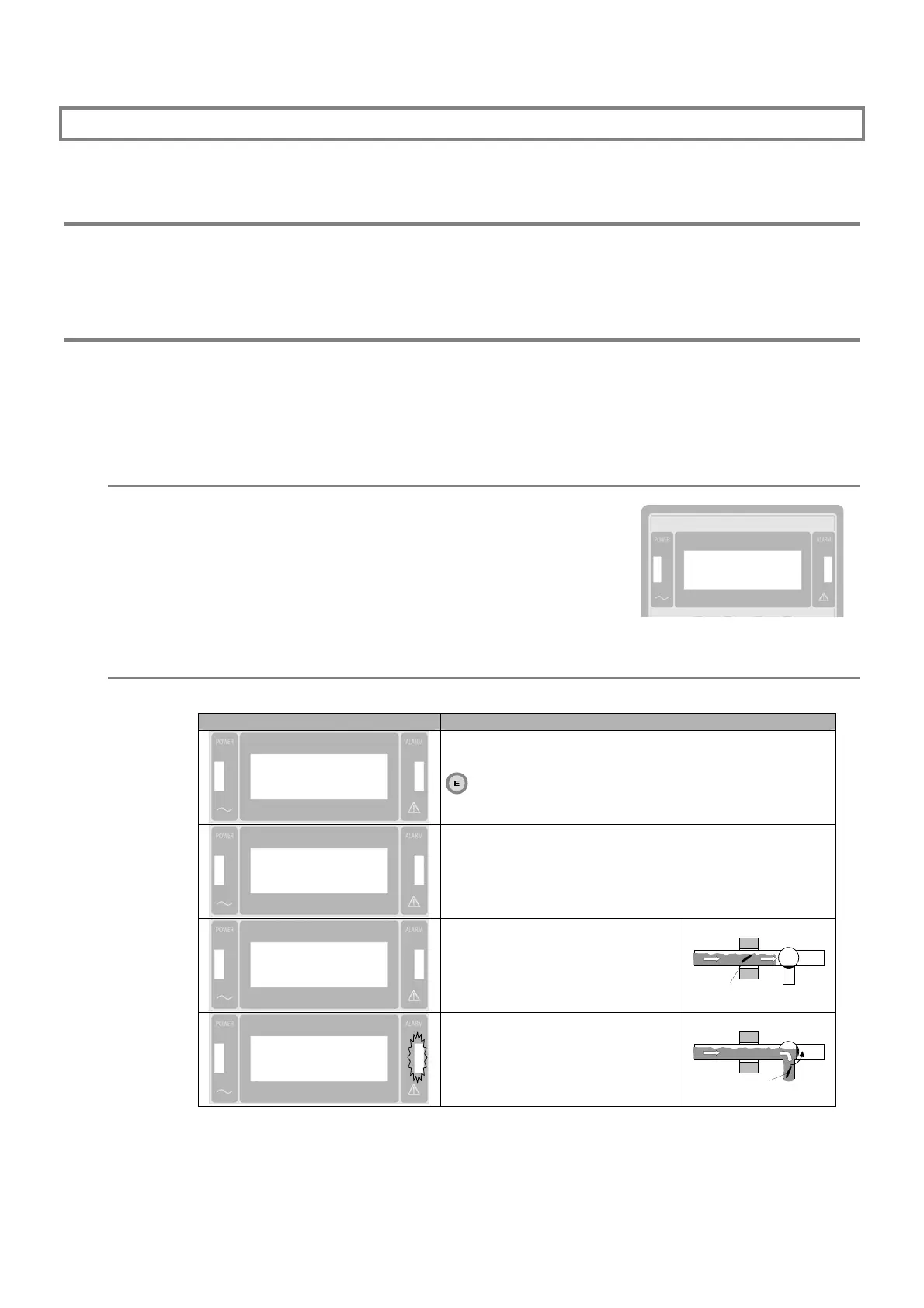
Test procedure
The procedure described below refers to the FE test; the other two tests follow the same procedure.
Display Comment
Test FE <
Test SS
Test Non-FE
Enter programming phase, select Test FE function and press
key.
Test FE WAIT <
Test SS
Test Non-FE
Wait
Test FE PASS <
Test SS
Test Non-FE
Pass a sample through the probe
within 20 seconds.
TEST SAMPLE
Test FE OK <
Test SS
Test Non-FE
The positive outcome is recorded in
memory.
TEST SAMPLE



 To Next Page