M-Series Operator’s Manual 4/9/15
10-80
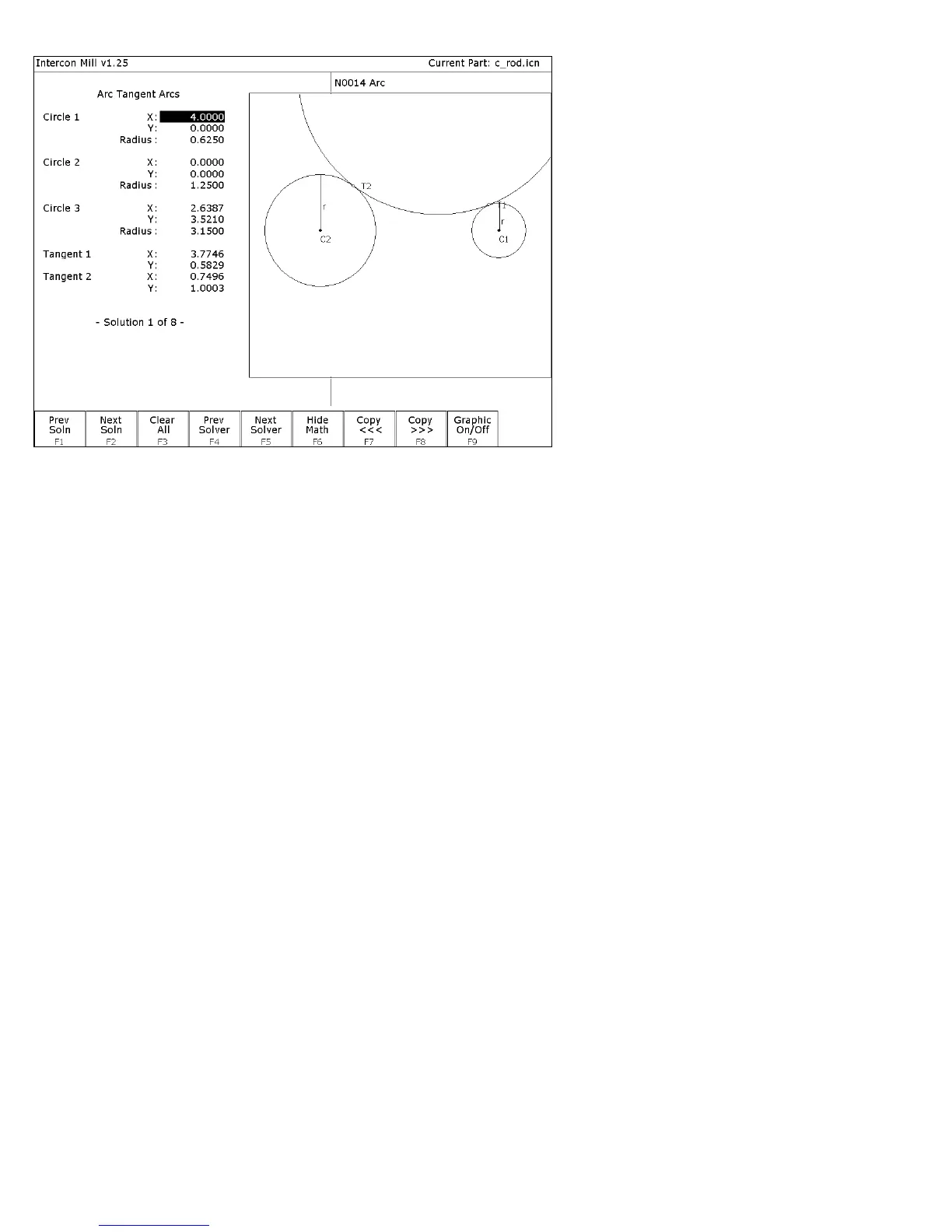
FIG. 7 - Math Help solution for arcs 3 and 4.
↑
↑↑
↑↓
↓↓
↓( ARROWS) Press to highlight the needed tangent point X coordinate in Math
Help. Tangent point T2 is the one you want this time.
→
→→
→ (ARROW) Press to remove the graphic display and move the cursor to the
arc operation. (This shortcut saves you from pressing F9 –-
Graphic on/off to hide the graphics each time.) The solid block
cursor on the left side of the screen will be replaced by an
outlined rectangle and the solid block will appear in the arc
operation on the right.
↑
↑↑
↑↓
↓↓
↓( ARROWS) Move the block cursor to the End X field of the arc operation.
F8 - Copy >>> Transfer the tangent point T2 value for X into the end point X
coordinate. The active fields on both sides of the screen advance
automatically.
F8 - Copy >>> Transfer the tangent point T2 value for Y into the end point Y
coordinate.
↑
↑↑
↑↓
↓↓
↓(ARROWS) Move down to the radius field and enter the radius of the arc
labeled ARC 3 in Figure 3. (This radius is 1.2500 inches). Also,
enter in No for the angle of this arc, since it is greater than 180°.



 To Next Page