M-Series Operator’s Manual 4/9/15
When the Z axis is commanded to move in the + direction, the Z axis will move up to its new position first, then the
other axes will move to their new position along a straight line.
When the Z axis is commanded to move in the - direction, all axes but the Z axis will move to their new position
along a straight line, then the Z axis will move down to its new position.
Example:
G0 X0.0 Y0.0 Z0.0 ; Rapid move to X0, Y0, Z0
CAUTION
The feedrate override knob has no effect on G0 moves unless rapid override is
turned ON
G01
-
Linear
Interpolation
G1 moves to the specified position at the programmed feedrate. The coordinates may be either
absolute positions (G90) or incremental positions (G91). The movement will be along a
straight line. G1 is modal and remains in effect until another positioning mode (G0, G2, G3
etc.) is commanded.
Example:
G01 X2 Y3 Z4 W5 F10 ; Linear move to X2, Y3, Z4, W5 at a 10in/min
G91 X6 Y7 ; Linear move to X8, Y10
Z3 W4 F20 ; Linear move to Z7, W9 at 20in/min (G91 is modal)
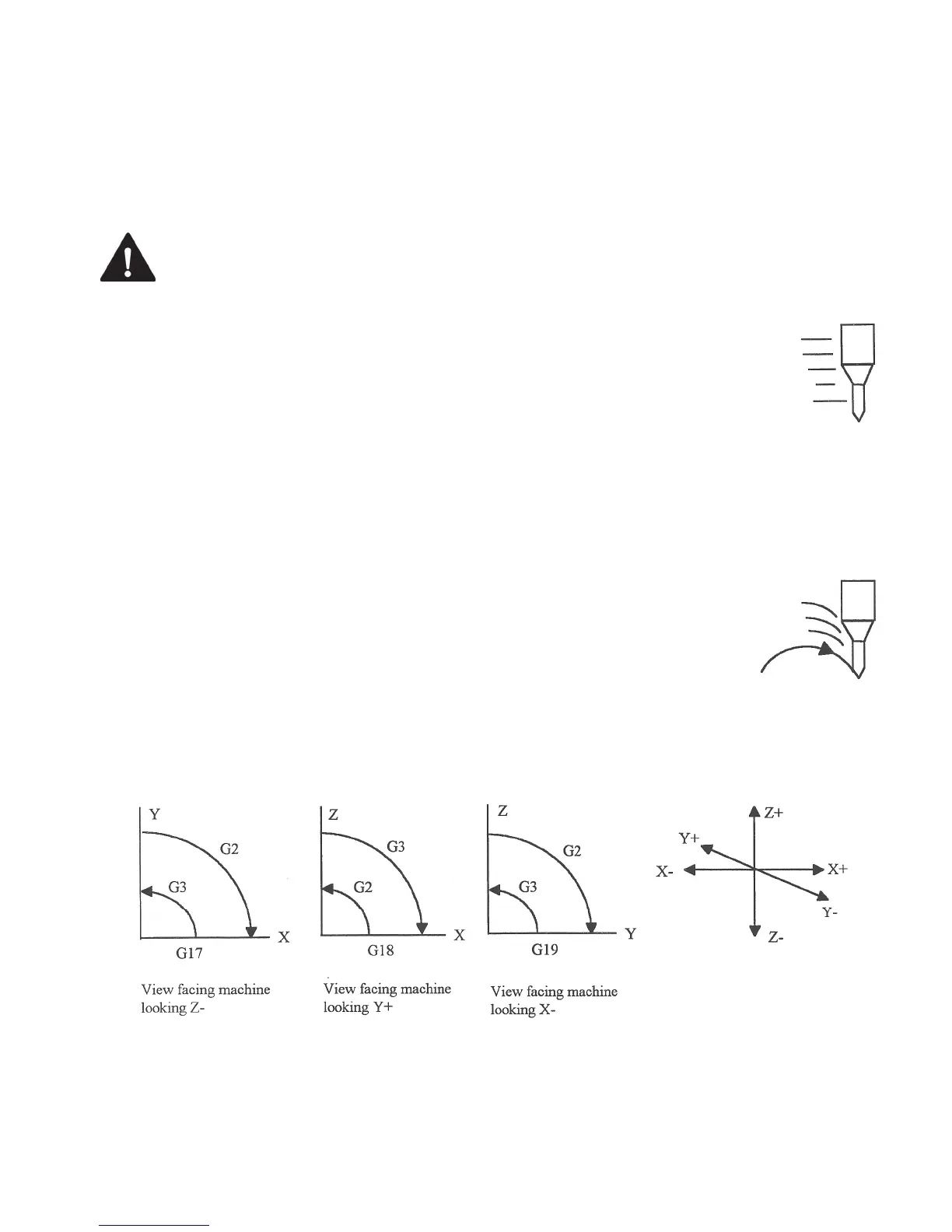
G02 & G03 - Circular or Helical Interpolation
G2 moves in a clockwise circular motion, and G3 moves in a counterclockwise circular motion. This clockwise and
counterclockwise motion is relative to your point of view, however. See the diagram below. The X, Y or Z
position specified in the G2 or G3 command is the end position of the arc, and may be an absolute position (G90) or
an incremental position (G91). G2 and G3 are modal and remain in effect until another positioning mode (G0, G1,
etc.) is commanded.
* NOTE: When using G18, the G2 command moves in a counterclockwise direction in the XZ plane.
The axes included in the currently selected circular plane (G17, G18, or G19) will move in a circular motion. Any
other axes specified will move along a straight line (helical movement). The programmed feedrate is used for the
interpolated motion along the movement of all axes.



 To Next Page