M-Series Operator’s Manual 4/9/15
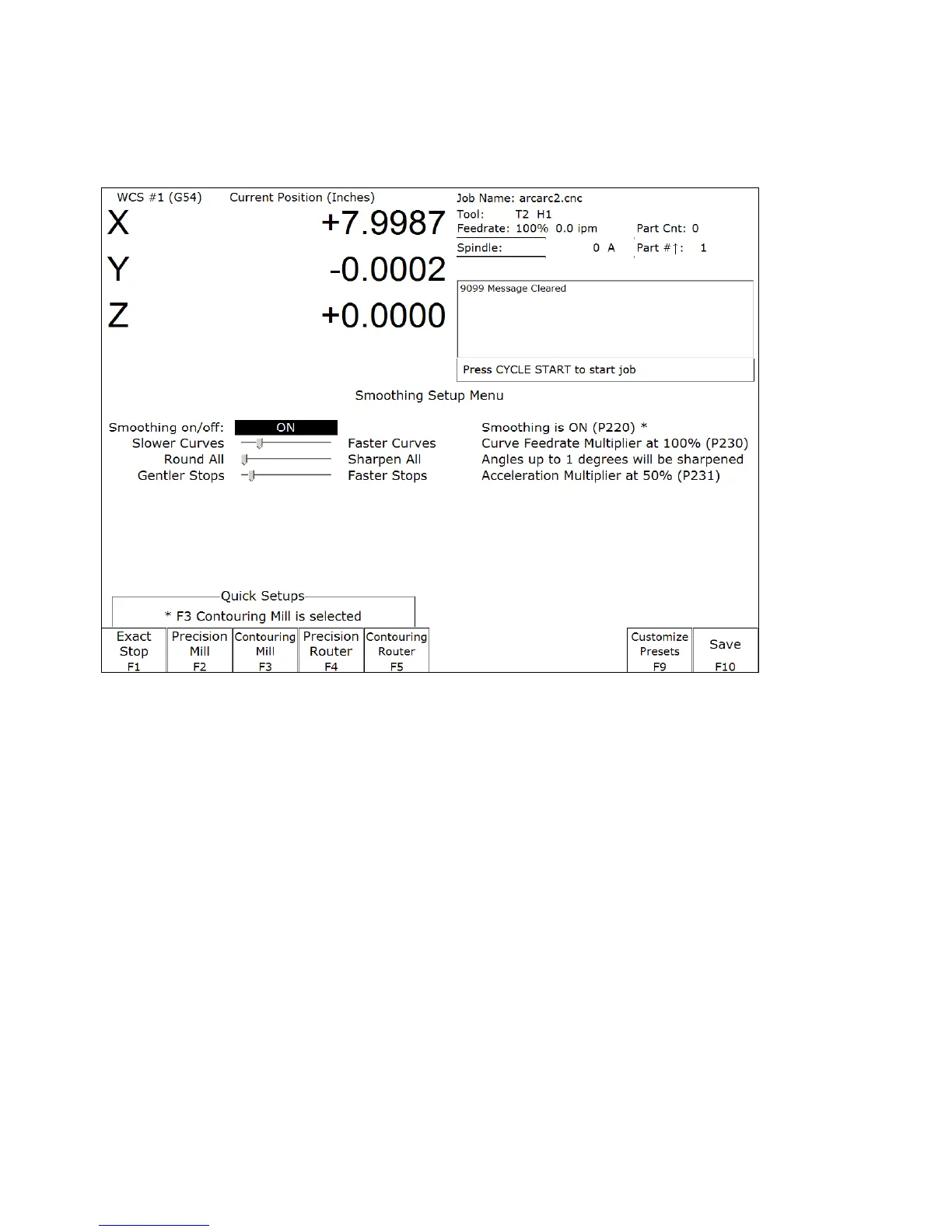
Smoothing Setup Menu
Pressing F8 – Smoothing Setup from the Setup menu will bring up the Smoothing Setup Menu. The Smoothing Setup
Menu provides a simplified way of choosing parameters for the Smoothing module. Smoothing is especially useful in
controlling and minimizing the amount of banging a machine experiences as it proceeds along the toolpath. Smoothing
is also able to (optionally) round part geometry, allowing for faster feedrates around corners.
F1 will turn off Smoothing. The other quick setup keys F2-F8 (if displayed) will turn on Smoothing and activate a
smoothing preset profile by setting Parameter 220 to 1 and copying preset values from the selected preset into
parameters 221-231.
By default the following 4 presets are provided:
F2 – Precision Mill chooses Smoothing with settings for high precision work on a Mill.
F3 – Contouring Mill chooses Smoothing with settings for a Mill, with looser tolerances for rounded geometry.
F4 – Precision Router chooses Smoothing with settings for precision work on a Router.
F5 – Contouring Router chooses Smoothing with settings for a Router, with looser tolerances for smooth geometry.
Presets can be modified, added, or removed by pressing F9 – Customize Presets which will give you access to the
menu described in the next section.



 To Next Page